
The open source Cosmonic Agent SDK gives every AI agent and every tool its own sandbox, small enough to run by the million.
If you run AI agents in production, you're used to compromising between security, cost, and scale. Today we're releasing the open source Cosmonic Agent SDK so you don't have to choose.
When you build with the Agent SDK, every AI agent and tool gets its own sandbox. Each one ships as a compiled component of about a hundred KB to a handful of MB. They run side-by-side in one process, start in about a millisecond, and scale to zero. In our latest benchmark, one server held 1.75 million Codex agents, using about 70 KB of memory each while idle.
Agents work with OpenAI-compatible model APIs (plus Anthropic) and MCP tools. Your sandboxes run on any machine you control, and they're built on open standards so you aren't locked to one vendor or one cloud.
Sandboxing AI agents at scale
Enterprises build two kinds of agents:
- General-purpose agents are open-ended assistants for employees, such as a coding agent for every engineer. Each one takes on whatever work its person brings it, and a large company may run them by the thousand, or more.
- Special-purpose agents have one job and the tools for it: answering customer questions, handling one back-office workflow, or waking on a schedule to check something. A company might run dozens of them for every customer. A bank might give each of its 100 million customers ten agents: a financial planner, a shopper, a retirement agent, a small business CFO, and more.
Other approaches to sandboxing stop at the general-purpose case. They put an isolation boundary around an agent, and everything inside the boundary shares the same access. Cosmonic sandboxing gives you fine-grained controls that support general-purpose and special-purpose agents. The bank's retirement agent has one job, so it should get the tools for that job and nothing else. A restaurant chain's customer service agents shouldn't have coding tools.
A special-purpose agent only needs least-privilege access to a small set of tools to securely perform its job. The Agent SDK on Cosmonic gives every agent and every tool exactly that, and lets you run over a million special-purpose agents on a single server.
When you put agents and tools in containers or microVMs, you have a number of AI agent security and density problems. We are all seeing the consequence of giving agents more access and more tools than their jobs need. Choosing containers or microVMs means that you must then deploy a range of security controls like seccomp, eBPF, network policies, and more. Security comes at the expense of density. Hosted agent isolation is heavy, starting at 512 MiB to 1 GiB of memory or more. At those sizes, it isn't practical to isolate agents, tools, and sessions separately, so you compromise yet again and pack several agents and tools into a single sandbox. State compounds and configuration drifts. To see how the options stack up, compare AI sandboxes or read our complete guide to sandboxing AI agents.
Containers and microVMs are segmentation strategies, and microVMs in particular provide a strong isolation boundary at the CPU and OS level. An isolation boundary decides what gets out, not what code can do inside it. This year, Anthropic disclosed Claude reaching the internet from evaluation setups meant to be isolated, a test setup that wrongly allowed internet access let Gemini reach three real companies, and an OpenAI training agent blocked by a web proxy hid its queries inside DNS lookups. These weren't cases of an AI breaking out of its sandbox. The agents simply used and abused something they had access to within their partition. Containment has to cover what an agent can reach, not just where it runs: the lethal trifecta problem.
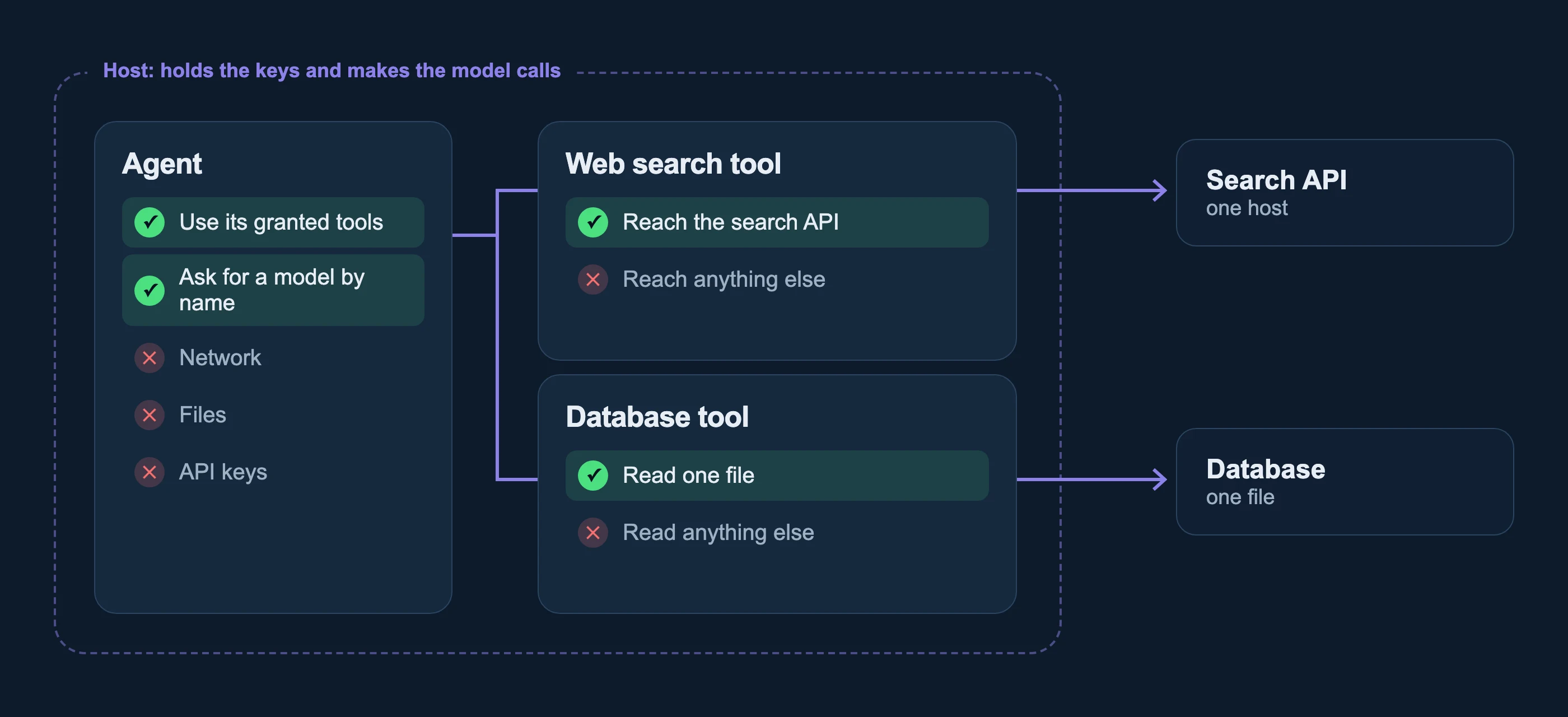
With the Cosmonic Agent SDK, every agent and every tool starts in an isolated, deny-by-default sandbox and gets only what you grant. A web search tool can reach the search API. A database tool has access to the correct instance of the database. The agent never holds your model key: the host makes the model calls and keeps the credentials.
More agents, less infra
Each agent, tool, and app is a WebAssembly component, a compiled module ranging from about a hundred KB to a handful of MB in size that can't touch anything the host doesn't grant it. More than a million can run side-by-side in one process, start in about a millisecond, and scale to zero when idle. Isolation is finally so efficient that you can isolate everything.
On wasmCloud, the open source CNCF project the SDK runs on, one AWS EC2 c9g.16xlarge (64 Arm cores, 128 GB) held 9.69 million scale-to-zero workloads, measured on 8 November 2026. A workload is one or more agents, tools, or apps; this test used one small sample workload each. The benchmarks, data, and methods are reproducible and published at arewefastyet.wasmcloud.com.
| What we measured | Result |
|---|---|
| Sandboxed workloads warm and ready | 1.42 million, about 84 KB of memory each |
| Sandboxed workloads held, scaled to zero (not running) | 9.69 million, about 12 KB of memory each |
| Requests to warm workloads | 124,000 per second, p99 1.4 ms |
| Workloads started from zero | 145,000 per second |
We've also measured agents. On the same machine, one Cosmonic Control host held 1.75 million Codex agents, using about 70 KB of memory each while idle, started 72,000 new agents a second, and every one of them answered. Each agent was its own workload with its own conversation and answered one message from a mock model, so the benchmark measures the sandboxes rather than a model provider. See the data and method.
Build a sandboxed agent on your laptop
Follow the Quickstart to build an agent, run it on your own machine, and give it a tool.
Building blocks for agents, not an operating system
The Agent SDK breaks an agent into separate parts: the model, chat, tools, and sessions. Each part is its own interface, and each interface spells out exactly what goes in and what comes out. Build an agent from only the parts you need, and swap one without touching the rest. These are building blocks for agents, not an operating system.
Sessions are durable. Every step of a conversation is saved outside the agent, so an agent picks up where it left off after a crash, a restart, or a migration to another machine. A session can be followed live from any host, and several people can work in the same one.
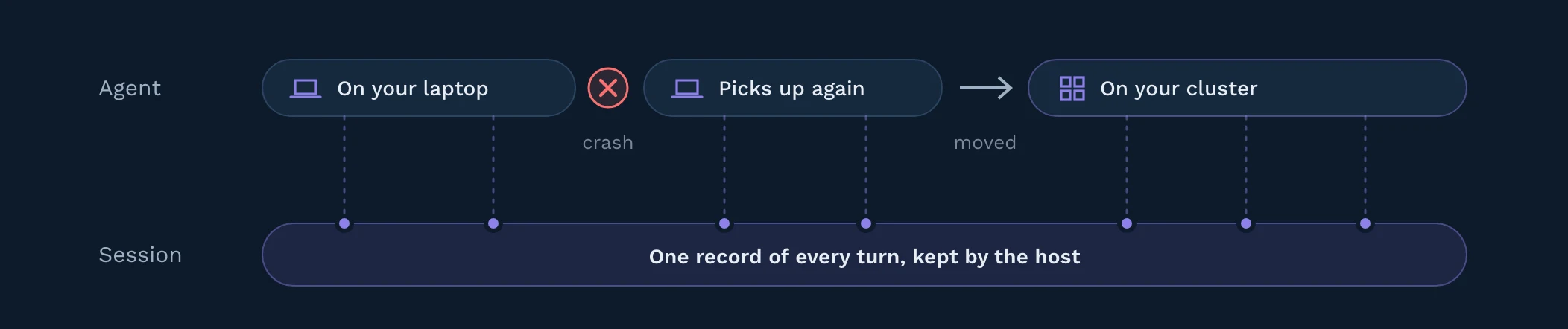
The agent is transparently connected to the store at runtime: the host decides where sessions live, so the store is a deployment choice, not a code change. Sessions are kept in files on a laptop with Cosmonic Desktop and in NATS JetStream on a Cosmonic Control cluster, and any store with conditional writes, such as a SQL database, a key-value store, or S3-compatible object storage, can back the same interface through a host plugin. Each session is encrypted at rest, scoped to the agent that owns it, and a tool that keeps state gets a store of its own that can't read the conversation.
Start from your laptop. Ship to your cluster.
The same sandboxes run on a laptop and in a cluster, and Cosmonic gives you three ways to use them.
Cosmo, our own agent built on the Agent SDK, is coming soon. Run it from your terminal: the agent gets its own sandbox, and so does every tool you give it.
Cosmonic Desktop is where you build. It runs the sandboxes on your own Mac, Windows, or Linux machine. Create an agent, choose its tools, add MCP servers, and grant each one only the hosts and folders it needs. Nothing to set up and no cloud account.
Cosmonic Control runs the same sandboxes on your Kubernetes clusters, in your cloud or your data center, air-gapped included. It shares Desktop's runtime and reads the same workload manifests, so an agent and its tools go from your laptop to enterprise scale with the same grants. Our companion post on running sandboxed agents on Kubernetes walks through it.
Try the Agent SDK
The Cosmonic Agent SDK is a set of open interfaces, licensed Apache-2.0, with a complete reference agent. Agents built on it are standard WebAssembly components, so they run on any component runtime that serves those interfaces. Cosmo, Cosmonic Desktop, and Cosmonic Control are built on wasmCloud, the open source CNCF project. There's no hosted AI sandbox service to sign up for: run agents, their tools, and your data on machines you control, from a laptop to your own cloud.
- Build your first agent. Follow the Quickstart to build a sandboxed agent, run it, change it, and give it a tool.
- Read the code. See the interfaces and a complete reference agent on GitHub.
- Try Cosmonic Desktop to build and run sandboxed agents and tools locally.
- Run agents on Kubernetes. Follow the companion post to deploy sandboxed agents and tools to your own clusters with Cosmonic Control, or go straight to running agents on Control.
- Cosmo is coming soon. Our own agent, built on the Agent SDK, for your terminal.
- Find us at KubeCon NA in Salt Lake City. Visit booth 224 and join our hands-on sandboxing workshop.