
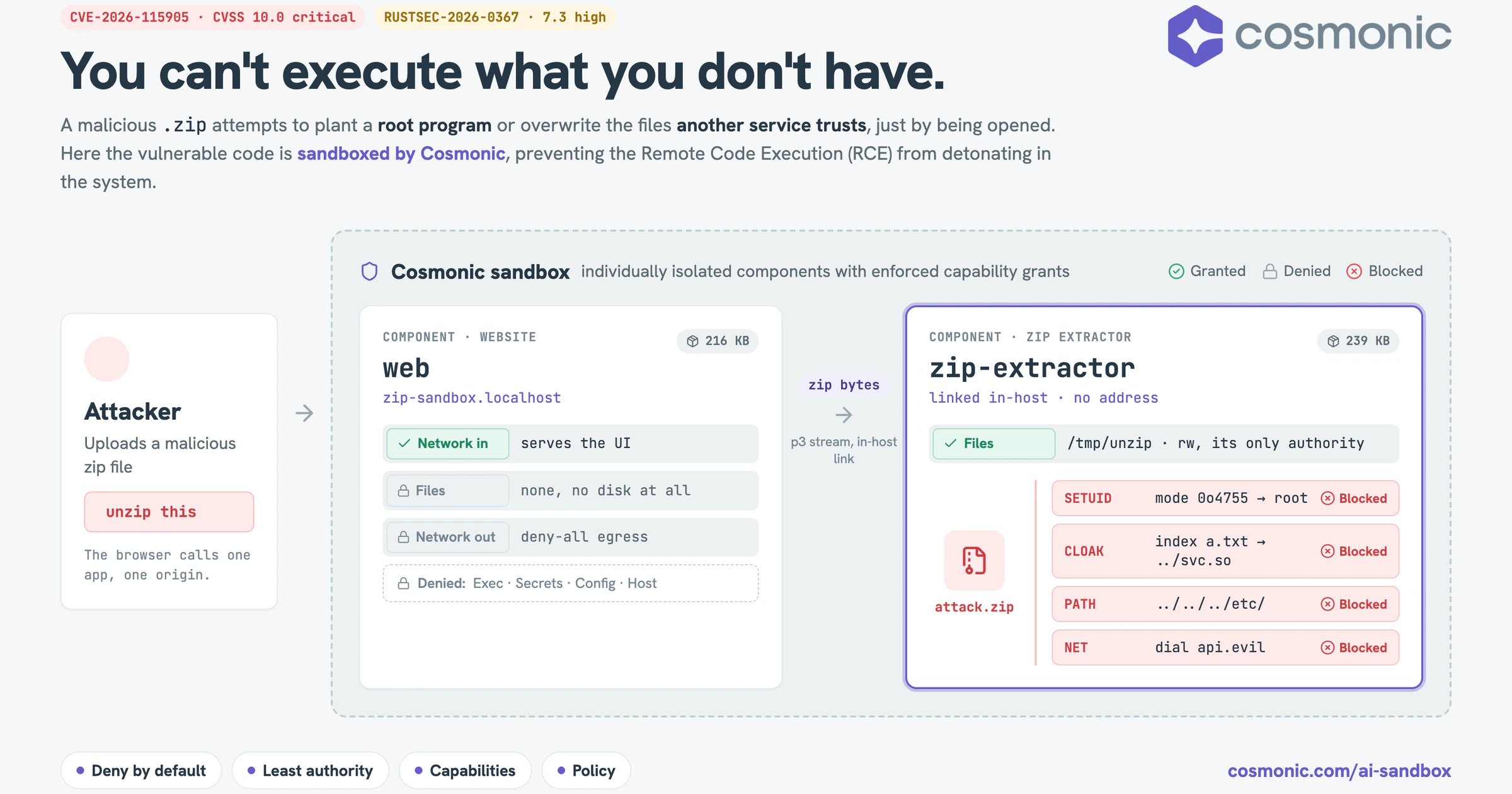
Your upload service, running as root, unzips a malicious file someone uploaded. A minute later there's a new program on your machine that runs as root, too, and you don't even know it's there. One crafted upload, and an attacker is a step away from remote code execution (RCE).
You can contain the vulnerabilities in the code you depend on with a secure, deny-by-default sandbox.
Memory-safe languages like Rust help, but they aren't enough on their own. RUSTSEC-2026-0367, a published flaw in the Rust zip crate, shipped despite the best efforts of its developers.
zip is one of the most widely used libraries for opening .zip files in Rust, which makes it a great case study for platform engineering teams trying to survive the #vulnpocalypse.
And it's not just open source. In many organizations, critical bugs like this one are being found so fast that CI pipelines fail constantly.
The good news: the fix is out, and you should upgrade to zip 9.0.5 today. But this is one bug, in one library, this week.
What about the tidal wave of other bugs in your dependency tree, your legacy codebase, or the AI platform you need to launch ASAP to replace it?
As it happens, you didn't have to wait long: the same crate disclosed a second, worse vulnerability, CVE-2026-115905, with an RCE and CVSS of 10.0 nine days later. (More on that below.)
Prevention is important, and you should still invest deeply in ways to stop vulnerabilities from being deployed, but the fact is that you can't simply scan your way out of this problem. The right strategy is to assume that code is vulnerable and to build systems that:
- Survive a compromise
- Limit the blast radius
- Actively counter attacker tactics (RCE, lateral movement, living off the land, etc.)
AI can help you fix problems as fast as they're found, but smart platform engineers are asking a different question: how do we treat all code as untrusted, and engineer architectural security around our applications?
We cannot know in advance what an arbitrary program will do with arbitrary input (Rice's theorem), and default seccomp profiles don't try: Docker's blocks only around 44 of more than 300 system calls, so that any image can run.
Instead of predicting what vulnerable code might do, let's use first-principles thinking to build architectural security around all of your code.
You can't execute what you don't have.
Below, I'll walk through what the bugs do, why patching alone won't keep you safe, and how deny-by-default sandboxing on Cosmonic contains unpatched code so an RCE has nothing to work with.
What is remote code execution (RCE)?
Remote code execution (RCE) is a form of arbitrary code execution: an attacker gets a system to run code of their choosing without ever having legitimate access to it, usually by feeding an application crafted input such as a request, a file, or a payload. That input triggers a bug in whatever parses it.
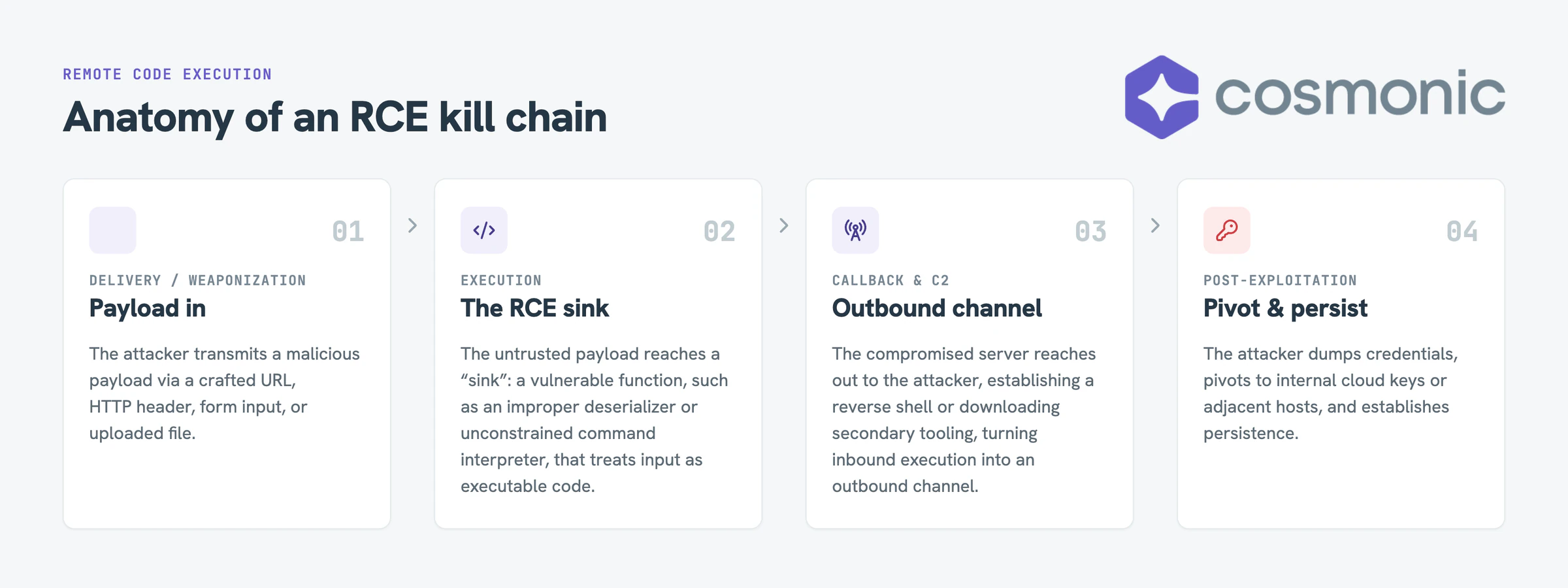
Triggering the bug is only the first step in an RCE attack. From there, the attacker needs the environment's help to escalate privileges, move laterally, establish command and control (C2), gain persistence and exfiltrate data. We'll show how a deny-by-default, capability-driven sandbox on Cosmonic takes that help away.
Zip-ity-do-what?? A privilege escalation hiding in a zip file
RUSTSEC-2026-0367 (GHSA-vv5m-jxxh-4627, CWE-732) scores 7.3 out of 10, a high-severity bug. It affects the zip crate at versions up to 9.0.0-pre3 and is fixed in 9.0.0. (The crate's later 9.0.5 fixes both this and the CVSS 10.0 cloaking bug covered below, so 9.0.5 is the version to pin.)
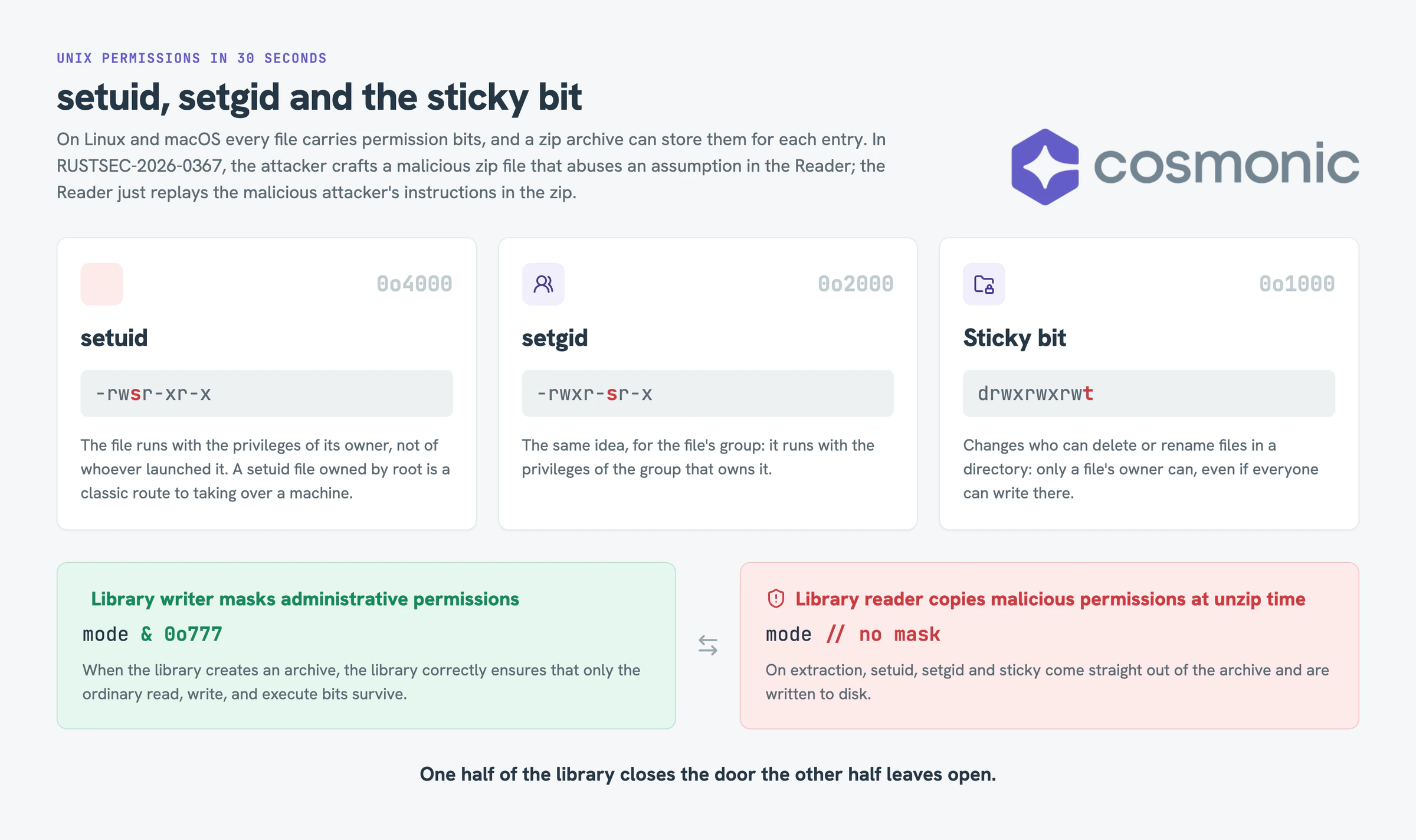
setuid, setgid and the sticky bit in 30 seconds
On Linux and macOS every file carries permission bits, and a zip archive can store them for each entry. Three of those bits are special:
- setuid: the file runs with the privileges of its owner, not of whoever launched it. A setuid file owned by root is a classic route to taking over a machine.
- setgid: the same idea, for the file's group.
- sticky bit: changes who can delete or rename files in a directory.
When the vulnerable zip reader extracts a file, it copies those bits straight out of the archive instead of masking them off.
The library's writer does mask them, with & 0o777. The library's reader doesn't, so one half of the library closes the door the other half leaves open.
Who's exposed
An attacker crafts an archive, sets the setuid bit on one entry, and waits for a privileged process to unpack it: a form uploader on your website, an installer, a CI/CD job, a container build running as root. The result is a setuid-root file planted by an attacker.
Everything in the demo is non-weaponized. The crafted archives contain only inert text files. We set the hostile permission bits and hostile entry names, then observe what the runtime does with them, but we don't ship an executable or do any real privilege escalation.
Deflate-gate: a CVSS 10.0/10.0 Remote Code Execution (RCE) in the same crate
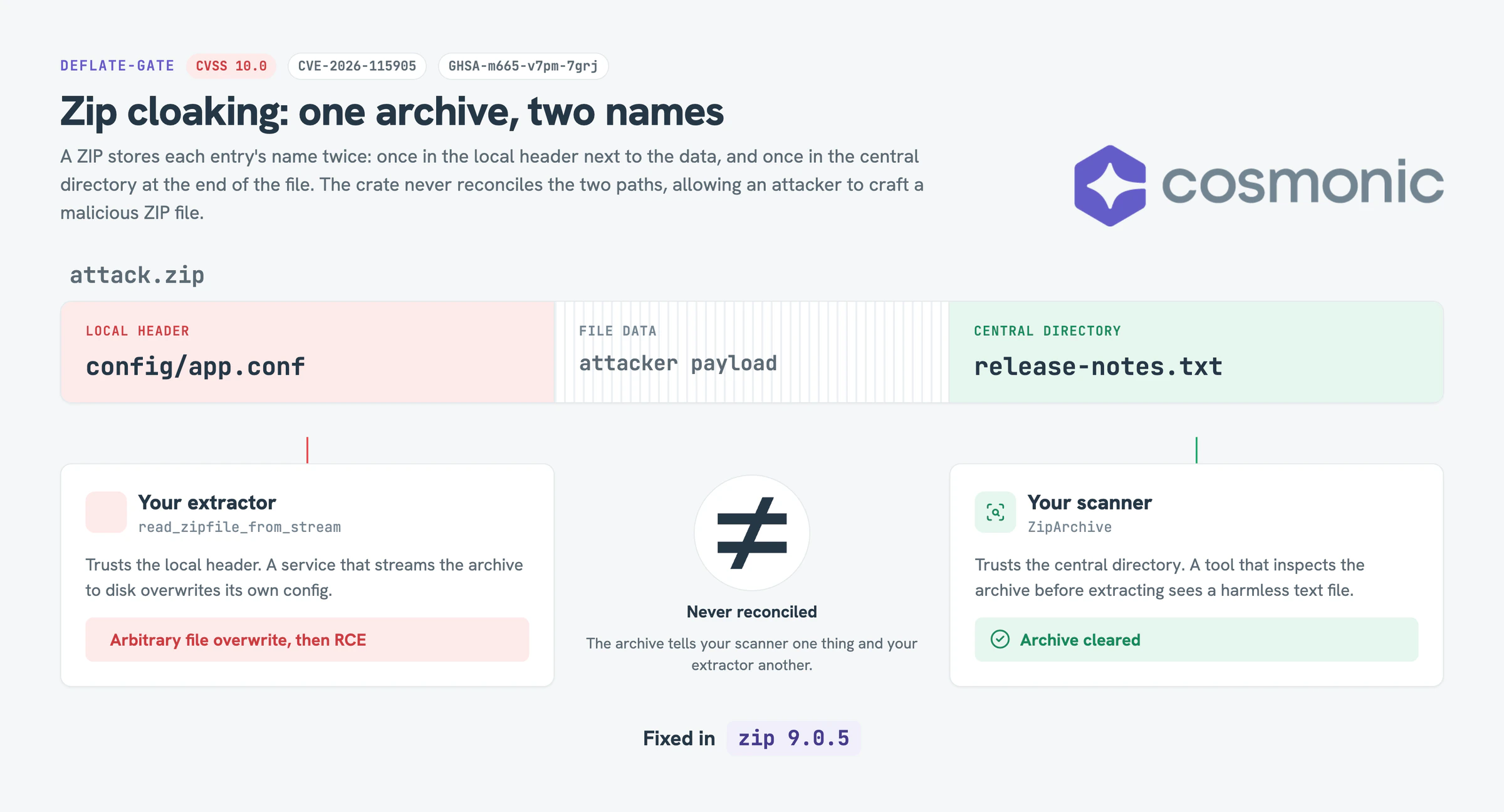
Nine days later the same crate disclosed CVE-2026-115905 (GHSA-m665-v7pm-7grj), a CVSS 10.0 "zip cloaking" flaw. A ZIP stores each entry's name twice: once in the central directory at the end of the file, and once in the local header next to the data. ZipArchive trusts the central directory; a streaming reader (read_zipfile_from_stream) trusts the local header. The crate never reconciles the two.
So an archive can tell your scanner one thing and your extractor another. The central directory says release-notes.txt; the local header says config/app.conf. A tool that inspects the archive before extracting clears it. A service that streams it to disk overwrites its own config. That's an arbitrary file overwrite. Point it at a system service, a startup script, or anything else the host runs, and it becomes remote code execution, which is why it scored a 10.0 and was tagged as an RCE. It's fixed in zip 9.0.5.
Two serious bugs, one HIGH and one CRITICAL, in the same library, nine days apart: if this isn't peak 2026, I don't know what is. The bugs are unrelated, and that's the point: new ones will keep coming, and a sandbox designed from first principles contains them all the same.
Why patching isn't enough: the #vulnpocalypse
The standard advice is to upgrade the library, and you should. Patch it today. But patching only closes the holes you know about.
How do we build architecturally secure and resilient platforms that mitigate RCEs?
When we are designing platforms to be secure we think about a variety of principles of secure agent platforms, like isolation: of process, resources, and re-use. Like deny-by-default, least authority, policy enforcement points, controlling information flow, and composition.
So the durable question is: how do we operate our platforms in a way to minimize the impact of bugs, limit blast radius, ensure correctness, and deliver value to our enterprises faster?
What are capabilities and where are they used?
We keep using the word "capabilities." What do we mean by that?
A capability is a reference to a resource (a file, a folder, a network connection) that also carries the right to use it, and that nobody can forge. Holding it is the permission. If you have it, you can use the resource. If you don't, you can't reach it at all, even if you know its name, where it lives, or how to call it.
Think of a valet key. It starts your car but won't open the trunk, and the valet can't cut a better one.
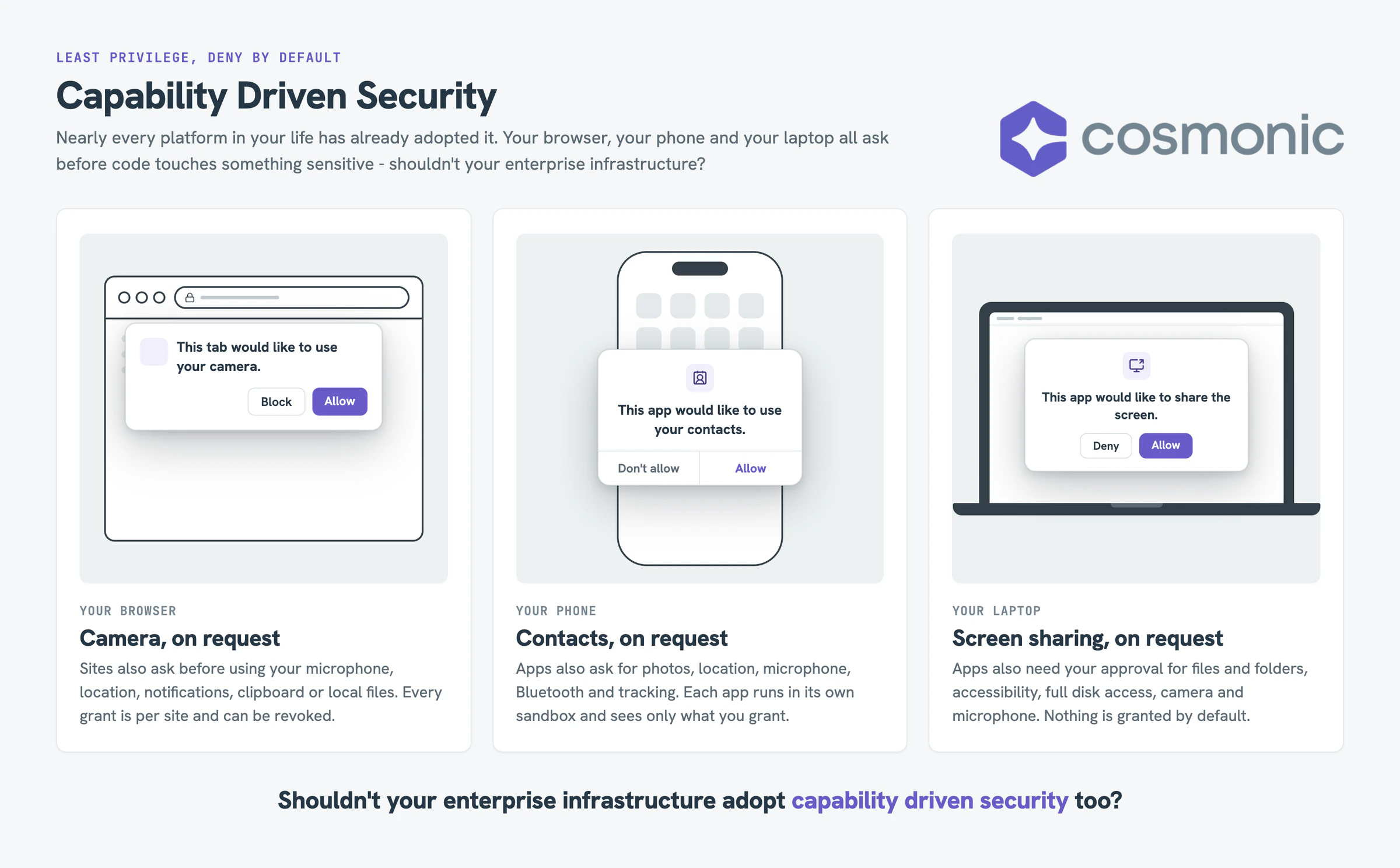
Jack Dennis and Earl Van Horn described the idea of capabilities in 1966 in "Programming Semantics for Multiprogrammed Computations" (Communications of the ACM). Each capability, they wrote, "locates by means of a pointer some computing object, and indicates the actions that the computation may perform with respect to that object."
Two properties separate a capability from an ordinary permission:
- The name and the permission travel together. The thing that points at the file is the thing that lets you use it. Nobody checks you against a list.
- You can't forge one. A program can only use the capabilities it was handed, or ones for things it created itself.
Here's what that looks like for an AI agent. A tool that summarizes a repository might get exactly one capability: read access to /workspace/my-repo. If it types /home/you/.ssh, it gets nothing, because a path is just text, not a key. That's the same reason the zip extractor in this demo can't write to /etc: it was only ever handed /tmp/unzip.
Deny by default
Every capability is off until you turn it on: files, network, process execution, secrets, configuration, host access. Saltzer and Schroeder called this "fail-safe defaults" in The Protection of Information in Computer Systems (1975). See deny by default.
Least authority
Grant the narrowest capability that does the job, scoped to the exact path or host. Not "the network," but this one host. Not "the disk," but this one directory. Least authority goes further than least privilege: it limits not just what the code can do directly, but what it can cause to happen. See least authority.
If the vulnerable code was never handed the ability to set a setuid bit, reach the network, or write outside one folder, then a bug that tries to do those things has nothing to work with. The exploit isn't detected and blocked. It's irrelevant.
This section is adapted from our longer explainer; for the full treatment, see Capabilities over ambient authority.
Demo: lossless compression? More like loss of control
Loss of control, am I right?? Sorry, we're all slap-happy in 2026. To make this concrete, we built the attack as a live demo on Cosmonic Desktop, which runs code as sandboxed WebAssembly components. We left the vulnerable zip crate unpatched, compiled it to WebAssembly, and split the work into two components in one workload. Each runs in its own sandbox with its own set of capabilities.
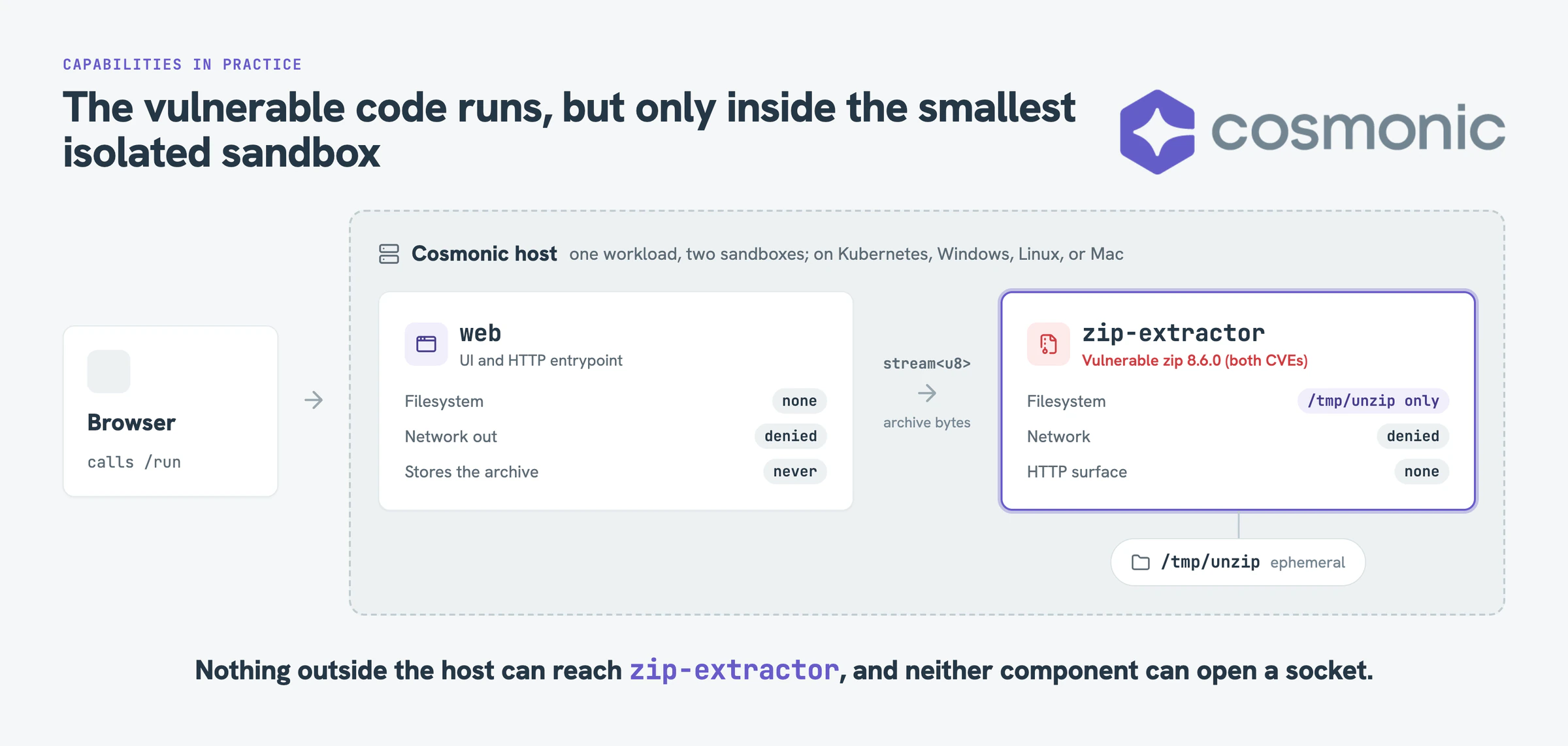
web serves the page and receives the upload. It has no filesystem and no outbound network. It listens over HTTP and hands the archive to zip-extractor as a live stream inside the host, so the untrusted bytes never land on its disk, because it doesn't have one.
zip-extractor does the unzip with the vulnerable library. Its only capability is one scratch directory, /tmp/unzip. It has no network and no HTTP endpoint; it can't phone home and nothing outside the host can reach it. And most importantly, if the bug became a direct RCE and tried to launch a shell, run python, or make a raw system call: IT. DOES. NOT. EXIST.
You can't execute what you don't have.
Here's the verdict when you run one archive carrying every attack through it:
MITIGATED: 3 privileged (setuid/setgid/sticky) entries in the archive, 0 applied;
3 zip-slip symlinks neutralized; 1 cloaked entry (CVE-2026-115905) honored but confined.
Everything stayed inside /tmp/unzip.
The archive still carries the setuid bits, and the report shows them exactly as the vulnerable reader read them. Nothing on the other side can apply them. The cloaked write still happens, because that bug lives in the crate, but it lands in a throwaway folder. Nothing was patched. The bugs are fully loaded; they just have nothing to fire.
Walkthrough: sandboxing RCE on Cosmonic Desktop
To get started, everything is in one GitHub repo. Install Cosmonic Desktop, deploy the workload from the included manifest, and you're running the vulnerable zip 8.6.0 code, unpatched, inside two isolated sandboxes.
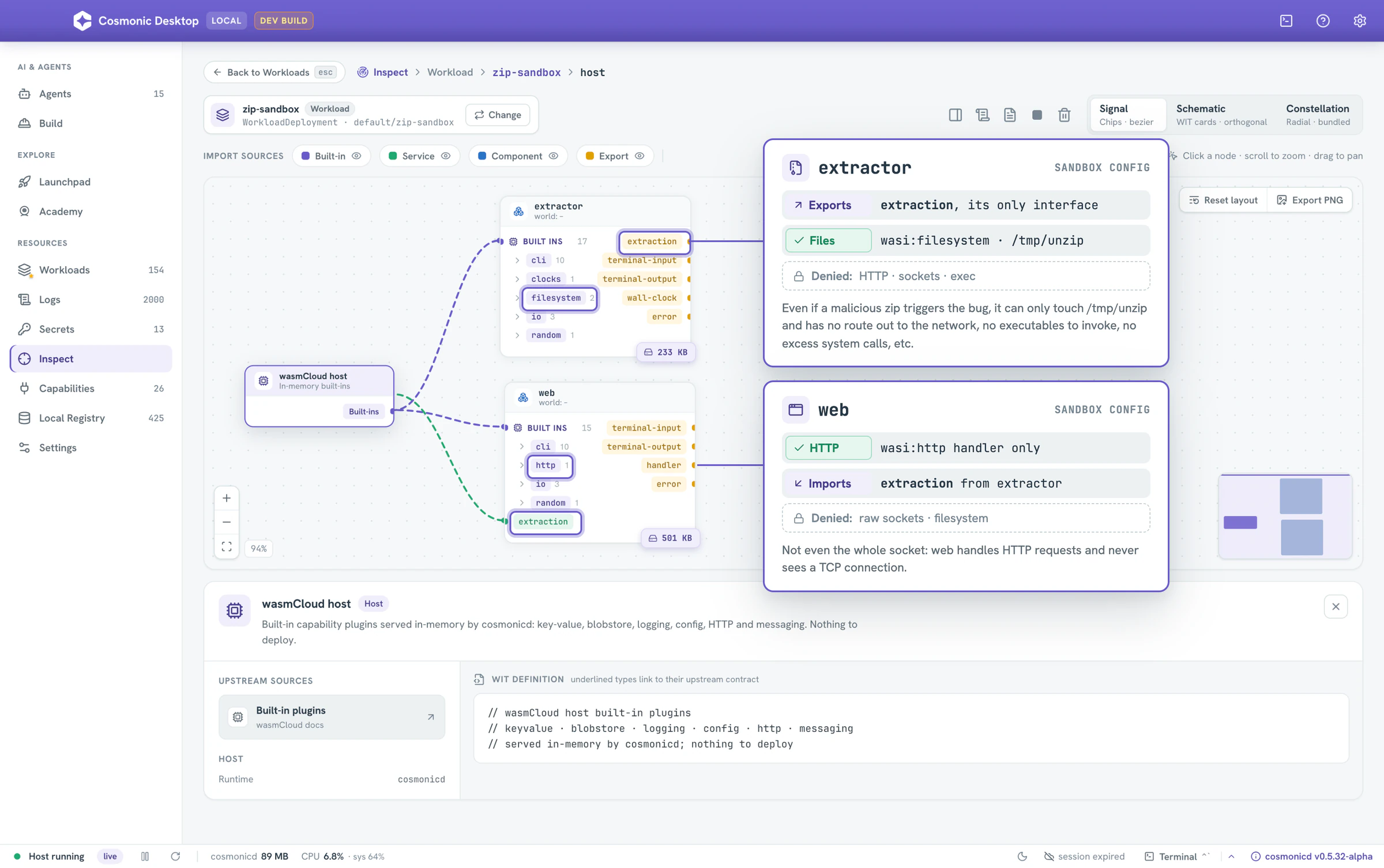
Start in Inspect. Desktop draws the workload as a graph: each component, the host, and every import and export between them. You can see exactly which capabilities each sandbox holds and click into any of them for detail. If a capability isn't on the graph, the component doesn't have it. The extractor exports one interface and imports the filesystem; the manifest scopes that to one directory, /tmp/unzip. The web component handles incoming HTTP and nothing else: it never sees a raw socket, and it has no egress.
The manifest tells the same story in YAML. If you can read a Kubernetes spec, you can read this one: the grants are written down per component and reviewable in a pull request. The web component has no volume mounts and an empty allowedHosts. The extractor gets exactly one volume, and it's ephemeral: it lives only as long as the workload, and the extractor wipes it on every request. The same workload runs on Desktop and on Cosmonic Control in your Kubernetes clusters.
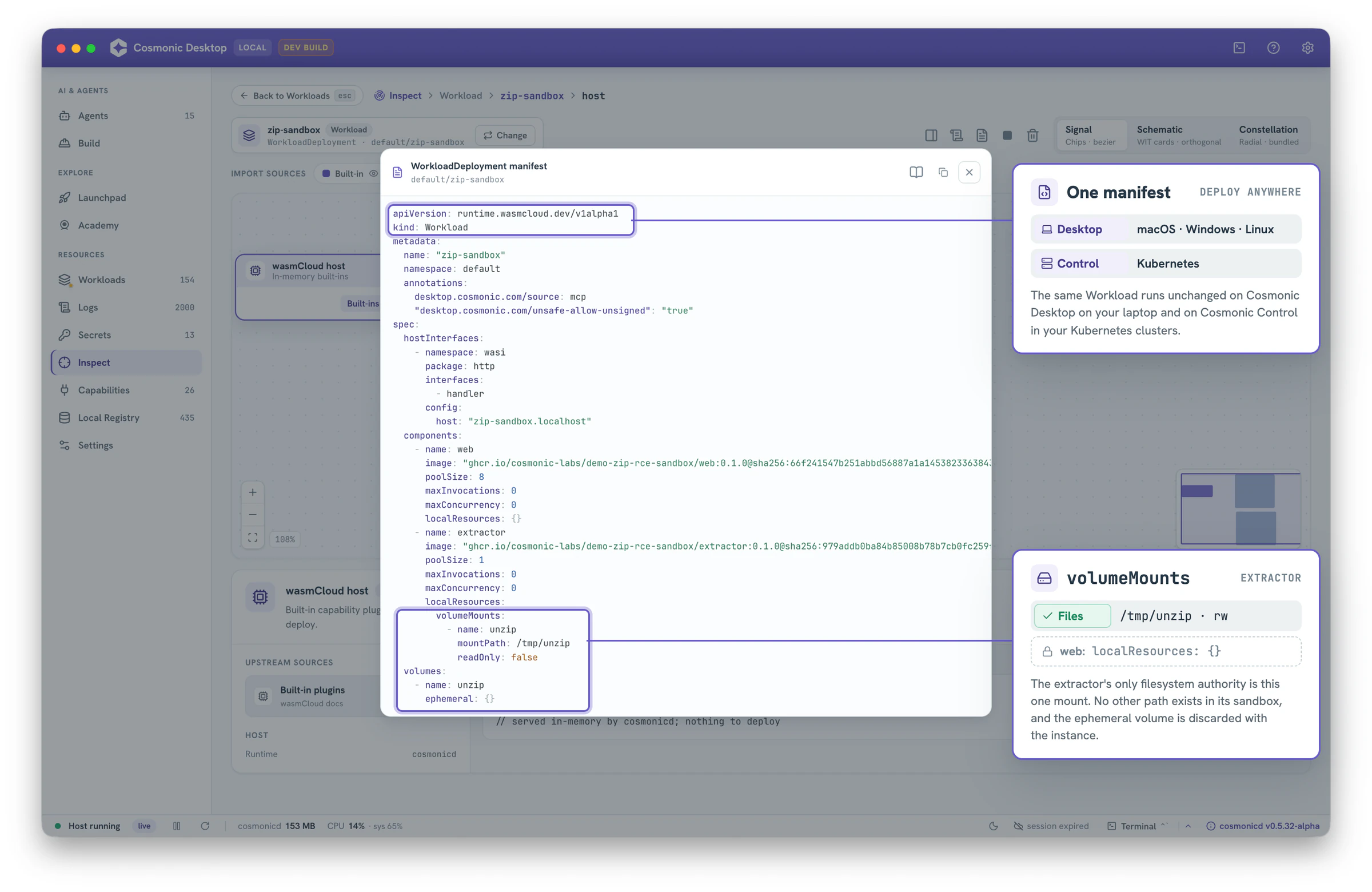
Because the grants are plain data, you can audit them, or enforce policy on them with Kubernetes admission controls before anything deploys. (More on that below.)
Now the fun part. Open the demo page and fire the attacks. Each button streams a real crafted archive into the sandbox:
- Setuid bits. Entries carry setuid, setgid and sticky modes. On a Unix extractor running as root, they'd hand a dropped file root-level powers. Here: three in the archive, zero applied.
- Zip slip. Three entries are symlinks aimed at known paths:
/etc/cron.d,/root/.ssh/authorized_keysand/tmp. The zip crate refuses../names, but on Linux and macOS it plants these links without checking where they point. Here each one lands as a plain file holding the target's name. - Zip cloaking. The central directory shows a benign name; the local header carries the real path. The cloaked write is honored, and it lands inside
/tmp/unzip, where it can't touch anything that matters. - Run all. One archive carrying every attack, contained together.
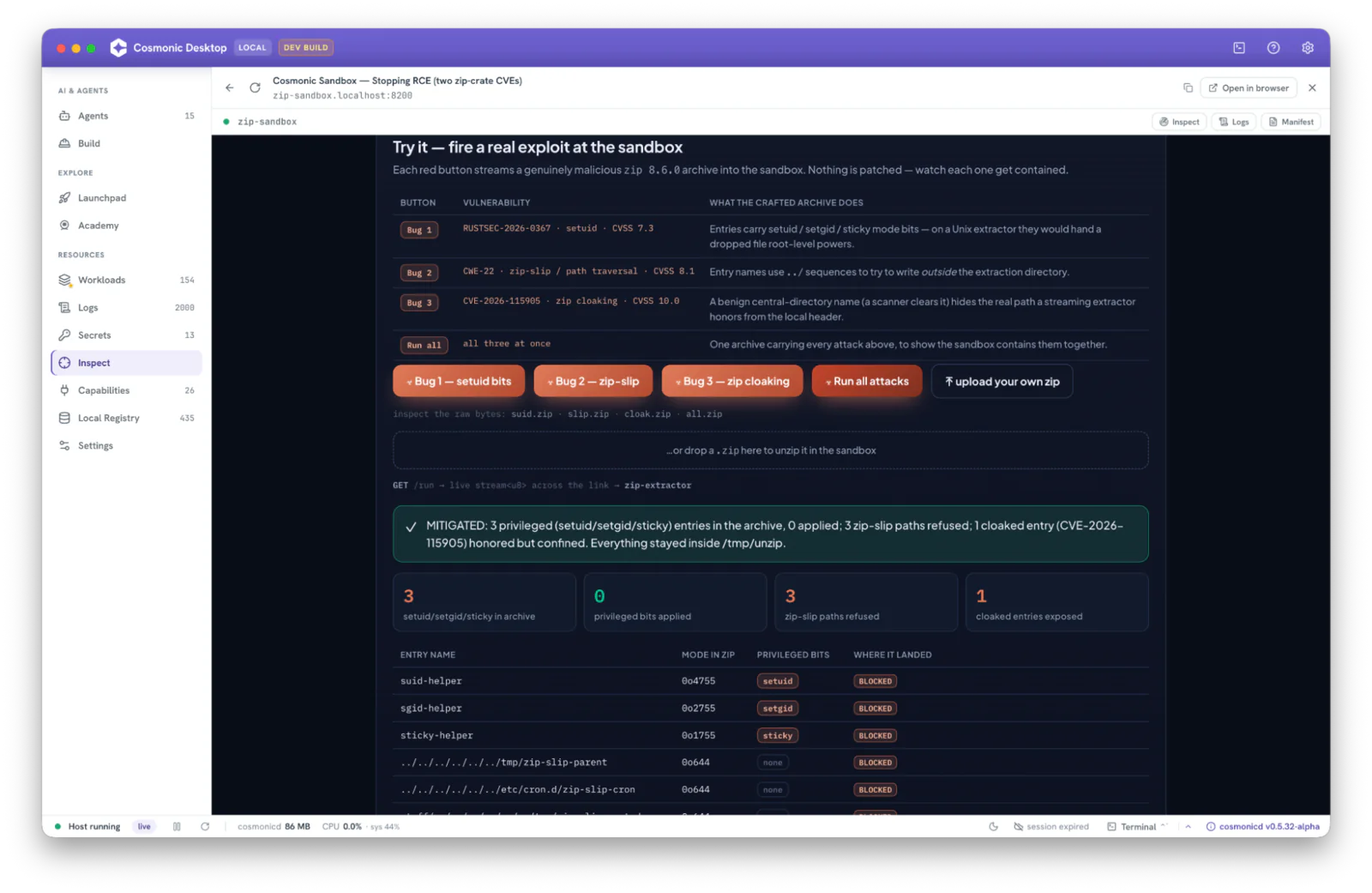
The attempted privilege escalation and remote code execution are all still attempted, and denied by the sandbox. They have no way of impacting the sandbox or the underlying host system: Kubernetes, Linux, Windows, or Mac.
Want to see it go wrong instead? The repo also ships a command-line tool that runs the same attacks natively on macOS and Linux, with no sandbox, so you can watch each one succeed. Same code, same archives.
Defense in depth: six ways the sandbox contains RCE
The interesting part isn't that the attack is blocked. It's that every move needs something from the host: a Unix permission model, a symlink, a path outside one folder, a socket, a root account. In the sandbox, none of those exist.
| What the attack tries | On the host | In the sandbox |
|---|---|---|
| Plant a setuid-root file | Bit applied verbatim: -rwsr-xr-x | The sandbox is not a Unix target, so the crate's #[cfg(unix)] permission code is compiled out. There is no setuid to set. |
Write outside the target folder (/etc, $HOME) | Anywhere the process can reach | The only path that exists is /tmp/unzip. Nothing else is there to write to. |
Zip slip: a symlink to /etc/cron.d | extract() plants a real link out of the folder, so a later write lands in /etc/cron.d | The crate's symlink code is compiled out of the Wasm build, so the link lands as a plain file, and nothing outside /tmp/unzip exists to point at |
| Phone home over the network | Open | The sandbox enforces deny-all egress (allowedHosts: []). The component can't open a socket. |
| Privilege escalation to root | Root, if the process runs as root | An unprivileged Wasm guest. There is no root to become. |
| Zip cloaking: central-dir name hides the real path (CVE-2026-115905) | Streaming extractor writes to a different path than declared in the header, potentially overwriting files in its extraction directory; RCE if one of them runs | The differential still exists (it's a crate bug), but the only writable path is /tmp/unzip, so a cloaked write lands on a throwaway file, never on anything the host relies on |
None of this depends on scanning the payload. The capabilities each attack needs simply aren't in the sandbox.
You can check both columns yourself. The repo's native-demo CLI runs all three attacks directly on macOS or Linux, and all three succeed: the setuid bit survives, the symlinks point out of the folder, and the hidden path gets written. Send the same kinds of archives through the sandboxed demo, which runs on Wasmtime (the Wasm runtime under the hood of CNCF wasmCloud), and the report shows no bits applied, every symlink landing as a plain file, and the cloaked write confined to /tmp/unzip.
How a sandbox stops privilege escalation and lateral movement
An RCE exploit is rarely the end goal. It's a foothold. What the attacker does next usually comes down to two moves, both catalogued in MITRE ATT&CK: privilege escalation (TA0004) and lateral movement (TA0008). Both live off the land, relying on the tools, permissions and network paths the compromised host already has. In a deny-by-default sandbox, those tools aren't there.
Privilege escalation: there's no root to become
Privilege escalation is when an attacker turns a foothold with limited rights into higher ones. Vertical privilege escalation climbs from a regular user to root or admin; horizontal privilege escalation takes over another account at the same level. On Linux, the classic privilege escalation attack paths are well known, and each one depends on something the sandbox never hands out:
| Linux privilege escalation path | In the sandbox |
|---|---|
| Run a setuid-root binary, planted or misconfigured | No Unix permission model, so there's no setuid bit to set or abuse |
| Overwrite a system service, cron job or startup script | The only writable path is /tmp/unzip; /etc/systemd and /etc/cron.d don't exist |
Spawn sudo, su or a shell | No process execution capability, and no binaries to launch |
| Exploit the kernel through a system call | No raw system calls; the guest can only call the typed interfaces it was granted |
| Read credentials from environment variables or files | Secrets and configuration are off until granted |
Privilege escalation prevention on a normal host means hardening: auditing setuid binaries, patching the kernel, tightening sudo rules. Keep doing that on your hosts. Inside the sandbox, you start from that end state by default.
Lateral movement: there's nowhere to go
Lateral movement is how an attacker spreads from the first compromised system to others: scanning the network for neighbors, reusing stolen credentials, and pivoting over SSH, RDP or internal APIs. The usual answer to how to prevent lateral movement is network segmentation, zero trust and detection. A capability sandbox applies that segmentation to every component, not just every subnet:
- No network unless granted. zip-extractor has no network at all. web accepts incoming HTTP and has
allowedHosts: [], so there's no socket to scan from and no channel for a C2 callback. - No credentials to steal. There's no
~/.ssh, no kubeconfig, no cloud credentials file and no environment full of tokens, unless you grant one. - No paths you didn't wire. web can call the one interface zip-extractor exports, and nothing else. zip-extractor can't call back into web or reach any other component on the host.
- Every connection is reviewable. Grants are fields in the manifest, so you can enforce them with admission policy before anything deploys (more on that below).
An attacker who compromises one component gets exactly that component's grants, nothing more. That's what limiting the blast radius looks like in practice.
Is WebAssembly right for your workload?
WebAssembly isn't the answer to every workload. Not every application can be compiled to Wasm today: Rust, C and C++ pretty much just work, Go and Python are improving, and support in other language toolchains is generally early or emerging.
But languages aren't the silos that they used to be. An agentic workflow that needs an LLM, an agent, and a few capabilities like Kafka, NATS, Postgres, HTTP, a filesystem, and so forth absolutely belongs in a real, capability-driven sandbox like Cosmonic Desktop on Windows, Linux, and Mac or on Cosmonic Control on Kubernetes.
The rules I use are simple:
- Can you count the capabilities? It's likely a good candidate.
- Is an LLM going to write this for you? Tell it to use Rust and it's a good candidate.
AI agent security uses the same pattern
A zip extractor is easy to picture, but the same model answers a bigger question: how do you safely run code you can't fully trust? That's the core problem of AI agent security. An agent that writes and runs its own code, calls tools, and acts on content it was told to trust is, from a security standpoint, the privileged process unpacking a stranger's archive. Its input is non-deterministic, sometimes wrong, and sometimes prompt-injected.
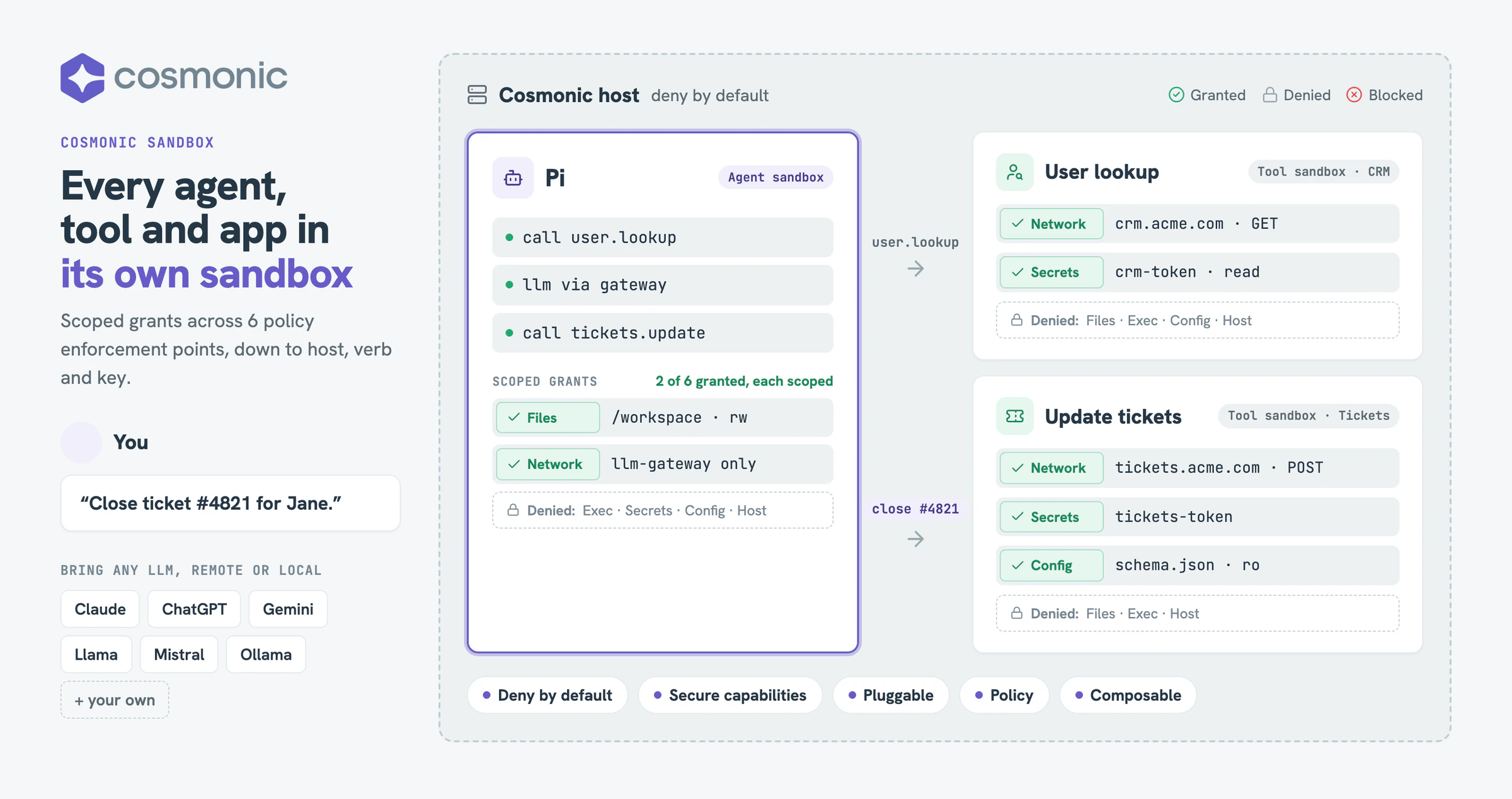
Your phone asks before an app opens the camera. Server-side code rarely gets asked anything. The capability model brings that discipline to agents:
- An AI coding agent gets a workspace directory and the one or two hosts it needs, not your whole filesystem and the open internet.
- An MCP server or tool gets the single API it wraps, not ambient access to every credential on the machine.
- A data pipeline parsing untrusted input runs where a parser bug can't pivot to the network.
Deny by default, least authority, per-component grants. Whether the risky code is a zip library, a model's tool call, or a dependency nobody has audited, the move is the same. For the full framework, see the principles of secure agent platforms.
Sandbox Remote Code Execution on Kubernetes
Nothing in this demo is Desktop-specific. The same WorkloadDeployment runs on Kubernetes with Cosmonic Control. It's a Kubernetes custom resource, so it works with the tools you already have: kubectl, GitOps, RBAC, audit logs.
Cosmonic Control and the operator are built to run a lot of these. Components are small and start fast, so they pack densely: in our benchmark, 2 GB of memory held 175,000 scale-to-zero workloads, or nearly 10,000 warm ones. Give it more hardware and it goes further. That's tens of thousands of sandboxed workloads, even on a memory-constrained node.
The bigger win is policy. Every grant is a field in the manifest, so the cluster can check it before anything runs. Each policy enforcement point (network egress, filesystem volumes, host interfaces, image registry and digest) maps to fields you can enforce with a ValidatingAdmissionPolicy, built into Kubernetes 1.30 and later, or with Kyverno. Securing a cluster in our docs has the details.
Here's a simplified example for the extractor's case: every volume must be ephemeral. Once the binding is set to Deny, no tenant can mount a host path, whatever their RBAC allows.
apiVersion: admissionregistration.k8s.io/v1
kind: ValidatingAdmissionPolicy
metadata:
  name: ephemeral-volumes-only
spec:
  failurePolicy: Fail
  matchConstraints:
    resourceRules:
      - apiGroups: ['runtime.wasmcloud.dev']
        apiVersions: ['v1alpha1']
        operations: ['CREATE', 'UPDATE']
        # check all three kinds, or a tenant can bypass the policy
        resources: ['workloads', 'workloadreplicasets', 'workloaddeployments']
  variables:
    # finds the workload spec in all three kinds
    - name: ws
      expression: 'object.spec.?template.?spec.orValue(object.spec)'
    - name: notEphemeral
      expression: "variables.ws.?volumes.orValue([]).filter(v, !has(v.ephemeral))"
  validations:
    - expression: 'size(variables.notEphemeral) == 0'
      messageExpression: >-
        object.kind + '/' + object.metadata.name + ': volumes must be ephemeral: ' +
        variables.notEphemeral.map(v, v.name).join(', ')
      reason: Forbidden
---
apiVersion: admissionregistration.k8s.io/v1
kind: ValidatingAdmissionPolicyBinding
metadata:
  name: ephemeral-volumes-only
spec:
  policyName: ephemeral-volumes-only
  validationActions: ['Warn', 'Audit'] # switch to ['Deny'] once clean
Start the binding in Warn and Audit to find existing violations, then switch it to Deny. From then on, a manifest that asks for more than the sandbox should have never gets admitted.
Try it yourself
Everything is in one repo: the two sandboxed components, the four attack scenarios, and a command-line tool that runs the same attacks with no sandbox. Deploy it on Cosmonic Desktop in a few minutes, press the red buttons, then upload your own zip and see how far it gets.
- Code: cosmonic-labs/demo-zip-rce-sandbox on GitHub
- Step by step: the sandboxed zip extractor walkthrough, from deploy to reading the verdict
- No sandbox: the repo's native-demo CLI, to watch the same bugs succeed on macOS or Linux
When you're ready to run the same sandboxes in production, on any cloud or Kubernetes cluster, that's Cosmonic Control. The manifest doesn't change.
FAQ
What is remote code execution?
Remote code execution (RCE) is when an attacker gets a system to run code of their choosing, usually by sending crafted input that a vulnerable parser or service mishandles. The damage it does depends on what that code is allowed to access.
Does a sandbox stop RCE?
A sandbox doesn't stop a bug from existing, but it removes what the exploit needs to do damage. In this demo the vulnerable code still runs and still reads the malicious setuid bit, but it was never granted the capability to apply it, so nothing happens.
How do you prevent remote code execution?
Layer your defenses. Patch and scan dependencies, validate untrusted input, and avoid running services as root. Then run anything that parses untrusted input in a deny-by-default sandbox, so that if an RCE does land, the code has no network, no filesystem beyond one folder, and no host access to work with.
How do you prevent privilege escalation?
Remove what an attacker would escalate with: setuid binaries, writable system services, broad sudo rules and unpatched kernels. A deny-by-default WebAssembly sandbox goes further. The code inside has no root account, no Unix permission bits, no process execution and no raw system calls, so there's nothing to escalate to.
How do you prevent lateral movement?
Cut off every path an attacker could pivot through. On networks that means segmentation, zero trust and detection. For workloads, run each component in a deny-by-default sandbox with no network access and no credentials unless granted, so a compromised component has no route to the next system.
What is a zip slip vulnerability?
Zip slip is a path traversal flaw where an archive entry is named something like ../../etc/passwd, or is a symlink pointing at a path like /etc/cron.d, so extracting it writes, or lets a later write land, outside the intended folder. In a capability sandbox with a single preopened directory, paths outside that directory don't exist.
Why is the setuid bit dangerous?
A file with the setuid bit runs with its owner's privileges instead of the caller's. If an attacker can plant a setuid file owned by root, any user who runs it gets root.
Is a Docker container a sandbox?
No. A container provides isolation, but it shares the host kernel and starts with broad default access: it runs as root unless you say otherwise, can make hundreds of system calls, gets a writable root filesystem and the network, and reaches host files through whatever you mount into it. One runtime bug can widen that further: Leaky Vessels (CVE-2024-21626) let a container process reach the host's filesystem. You can lock a container down (non-root, read-only root filesystem, no network, all capabilities dropped, no-new-privileges), but each of those is a flag someone has to set on every container. gVisor and Firecracker put a stronger wall around the kernel, but the code inside still starts with a full Linux environment. A WebAssembly component starts with nothing until you grant it.
How is sandboxing different from patching?
Patching fixes the one bug you know about. Sandboxing contains any bug, known or not yet discovered, by limiting what the vulnerable code is allowed to do. You want both.
What is zip cloaking (CVE-2026-115905)?
A ZIP stores each entry's name twice: in the central directory and in the local file header. A scanner (and ZipArchive) reads the central directory; a streaming extractor reads the local header. When they disagree and the library doesn't reconcile them, an archive can look benign to the scanner while the extractor writes an attacker-chosen path, an arbitrary file overwrite. It scored CVSS 10.0 and is fixed in zip 9.0.5.
The takeaway
You want two layers:
- Patch the dependency. Upgrade to zip 9.0.5, which masks the privileged bits (bug 1) and reconciles the dual headers (bug 2), and close the holes you know about.
- Sandbox anything that extracts, parses or executes untrusted input, so a vulnerable dependency, known or not, can't apply a malicious bit, escape its directory, overwrite a file you rely on, or reach anything you didn't grant.
Patch the bug you know about. Assume all code is vulnerable and, when possible, sandbox it.
Security isn't always about being smarter than the attacker; it's about building resilient, architecturally secure platforms.
Questions, or a case where this approach breaks down? I'd like to hear it. Find us in the wasmCloud Slack.
Keep reading: Choosing an agent sandbox · Principles of secure agent platforms · Deny by default · Least authority · Capabilities over ambient authority