Tools
A tool is like a library your agent can call. You write functions, types, and doc comments, the same as you would for a package on npm or crates.io, and the host turns them into something a model can use. The difference is that each tool runs in its own sandbox with only the access you grant it.
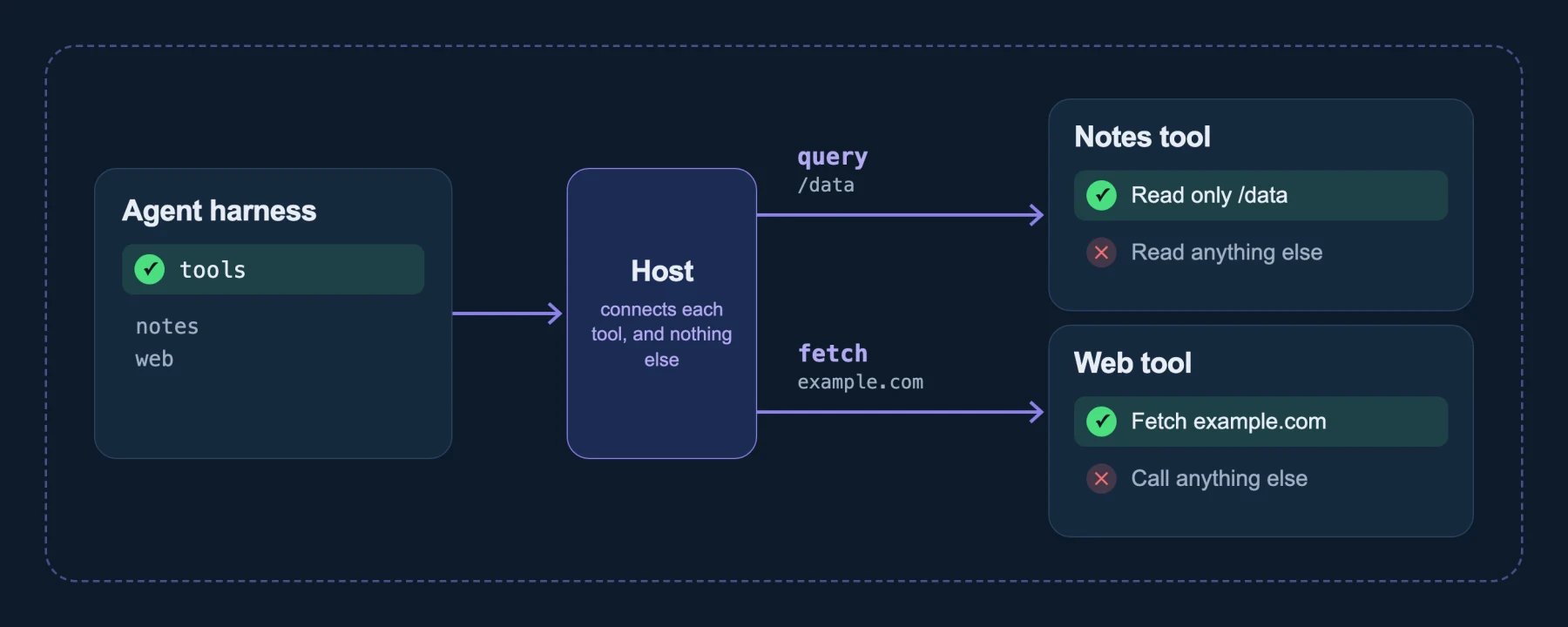
Each tool exports a typed interface, and the host connects it to the harness and nothing else. This page explains how a component becomes a tool a model can call, how much one tool should do, and how MCP servers fit in.
Typed tools
A model calls a tool by writing JSON that matches a tool definition. With a typed tool, you never write that definition or parse that JSON. You write an ordinary interface, and the host does the translation.
A tool is a component with an ordinary interface
A typed tool is a component that exports an ordinary interface: functions with real parameter and return types, documented with comments. A GitHub tool might export list-issues and get-pull. Nothing in that interface mentions agents, models or JSON.
Because the interface is ordinary, the same component can serve two kinds of caller:
- A model, through the host, which turns the interface into tools the model can choose.
- Other code, which imports the component directly and calls it with the real types, with no model and no JSON involved.
A component is not marked as a tool anywhere. Which components a session offers as tools is the host's decision, from its catalog.
The host translates both ways
Models expect a tool as a name, a description and a JSON Schema for its arguments. The host builds all three from the component's interface. Here is part of a GitHub tool's interface, in WIT:
enum issue-state { open, closed }

/// Arguments for `list-issues`.
record list-issues-args {
  /// The repository, as owner/name.
  repo: string,
  /// Which issues to list.
  state: issue-state,
}

/// List the issues in a repository.
list-issues: async func(args: list-issues-args) -> result<list<issue>, error>;
And here is the tool definition the host builds from it for the model:
{
  "name": "list_issues",
  "description": "List the issues in a repository.",
  "input": {
    "type": "object",
    "properties": {
      "repo": {"type": "string", "description": "The repository, as owner/name."},
      "state": {
        "type": "string",
        "enum": ["open", "closed"],
        "description": "Which issues to list."
      }
    },
    "required": ["repo", "state"],
    "additionalProperties": false
  }
}
The same translation runs in both directions:
- The name comes from the function name.
- The description comes from the function's doc comment, and each argument's description comes from the comment on that field.
- The schema comes from the parameter types. Optional fields may be left out, and enums and variants become the choices a model can pick from.
- The result goes back to the model as text, with structured data alongside when there is any. An error the tool returns is something the model reads and reacts to, not a crash.
On the way in, the host checks the model's JSON against the schema before the tool runs. A malformed call is turned away without reaching the tool.
The upshot is that your doc comments are the documentation the model reads. Writing a clear comment is how you teach a model to use your tool well.
Not every tool has to be typed. A component can also list its own tool definitions and handle the JSON itself. Desktop's MCP bridge, the tool that talks to an MCP server for you, works this way.
The grant is one line in the manifest
A tool's reach isn't in its code. It's in the workload manifest, set per component:
components:
  - name: github
    image: ghcr.io/example/tools/github@sha256:… # your tool's image
    localResources:
      allowedHosts:
        - api.github.com
A tool can also only ever call what it imports, and a component lists everything it imports, so you can check with wash inspect. What isn't imported can't be called.
How big should a tool be?
When you give an agent tools, you decide how much each tool does. That choice is tool granularity: a tool can do one narrow job, such as searching a folder, or it can be as broad as a shell that runs any command.
What granularity changes
The size of a tool decides four things about it:
- What an approval means. Approving a search tool approves a search. Approving a shell approves anything the shell can run.
- What the tool can reach. Every grant on a tool is shared by everything the tool does. A tool that reads and writes a folder needs the folder writable, even for its reads.
- How many tokens a task costs. One meaningful call returns just the answer. A chain of shell commands sends each command's output back into the conversation. Fewer calls, fewer tokens walks through an example.
- How easily a model picks the right action. A few well-named tools with clear descriptions are easy to choose between. A general tool leaves the model to work out the right commands and flags each time.
Fewer calls, fewer tokens
A tool that does one meaningful thing tends to spend fewer tokens than the shell commands it replaces.
Consider asking an agent which issues are open in a repository. With only a shell, the model might check for a CLI, read its help, try a command, fix the flags, page through the output and trim it, around ten calls, each one adding command output to the conversation. With a typed list_issues tool, it is one call that returns just the issues.
Each call costs tokens twice: once for the model to write it and again when its output joins the context for every later step. Fewer, more meaningful calls keep the context small, cost less and leave less room for the model to wander. Anthropic's engineering team makes the same case in Writing effective tools for agents (2025): tools built around meaningful tasks, returning only the information that matters, work better than thin wrappers over low-level operations.
A typed tool is also more predictable. Its arguments are checked against its interface, and a tool that makes no outside calls does the same thing every time it gets the same arguments, which a chain of shell commands with model-chosen flags does not guarantee.
The range of shapes
Tools sit on a range, from narrow to broad.
- A single-purpose tool does one job with one grant: a ripgrep-style search over one folder, or a fetcher that reaches two hosts.
- A toolbox groups related functions that always share the same reach, such as a GitHub reader that can list issues, read a pull request and read a file, all with read access to
api.github.com. It is one component, and the host offers each of its functions to the model as a tool. - A general environment gives the model a set of operations over one folder. Desktop's Workspace (read), Workspace (write) and git tools work this way: reading, searching, finding and changing files, and working with the repository. Every operation shares the folder grant, so the whole folder is open to all of them.
| Single-purpose tool | Toolbox | General environment | |
|---|---|---|---|
| Best for | Actions you want to approve one by one | A related set of actions with equal reach | Open-ended work in a folder, where the model chains operations |
| Approval | One decision per action | One decision for the set | One decision for everything the environment can do |
| Reach | The narrowest possible | Shared by the set | Shared by every command |
| Token cost | Low: one meaningful call per action | Low | Higher: each result flows back into the conversation |
None of these is the right answer everywhere. One session can mix them: typed tools for the actions you want to approve individually, and a general environment for scratch work in a folder of its own.
Draw the boundary around the grant
The useful rule is to give a tool the edges of its grant.
- Split when reach differs. Reading a folder and changing it need different grants, so they belong in different tools. The same goes for two APIs on different hosts, or a public read and a write that needs a credential.
- Group when reach is the same. Functions that touch exactly the same things, and that you would always approve together, can share one component. Splitting them further adds approvals without adding safety.
- Keep the actions you care about apart. If you want to see and approve a particular kind of step, such as sending a message or deleting a file, make it its own tool, so the approval means exactly that.
- Go broad only inside a small grant. A general environment is reasonable when its whole grant is something you would hand over at once, such as a scratch folder and no network.
That is why reading and writing are separate components. Approving a tool that reads a folder never approves a tool that changes it. Each one holds its own grant: the reader gets the folder read only, the writer gets it writable. The same goes for the network: a tool that reads public GitHub can reach api.github.com and holds no credential to post anything. A single "filesystem" tool with both read and write calls would force an all-or-nothing choice.
A shell is a set of tools
Models are good at using a shell, and you can give them what makes one useful without a shell's reach. Each utility becomes its own component with its own grant.
Because the boundary is what each tool can reach, you don't have to predict which commands a model will run. An operation you did not anticipate reaches its tool's grant and nothing else. (See Capabilities.) With discovery, an agent can also find a narrow tool it needs at run time, from a catalog that can keep growing. Anatomy of an agent shows that loop.
Agents need a small set of commands most of the time: searching, reading, editing, comparing files and fetching a URL cover a large share of real work. Each tool is built once, published to a registry and reused by every session on every host, much as one container image serves every deployment.
A component cannot start native processes, so a tool whose whole job is to run other programs, or one that depends on native extensions, does not port as is.
MCP servers: one grant per hop
The Model Context Protocol (MCP) is a common way to offer tools to agents. An MCP server is usually an HTTP service in front of an API you already have, and that is how it runs here too: as its own sandboxed workload, granted only the hosts it needs, such as the one service it fronts.
The agent reaches an MCP server through a tool, and that tool is granted only the server's address. So each hop is limited separately: the agent can only ask the tool, the tool can only reach the MCP server, and the MCP server can only reach what it fronts. None of them gets the others' reach. This is secure composition: one sandbox per tool, connected only where you say.
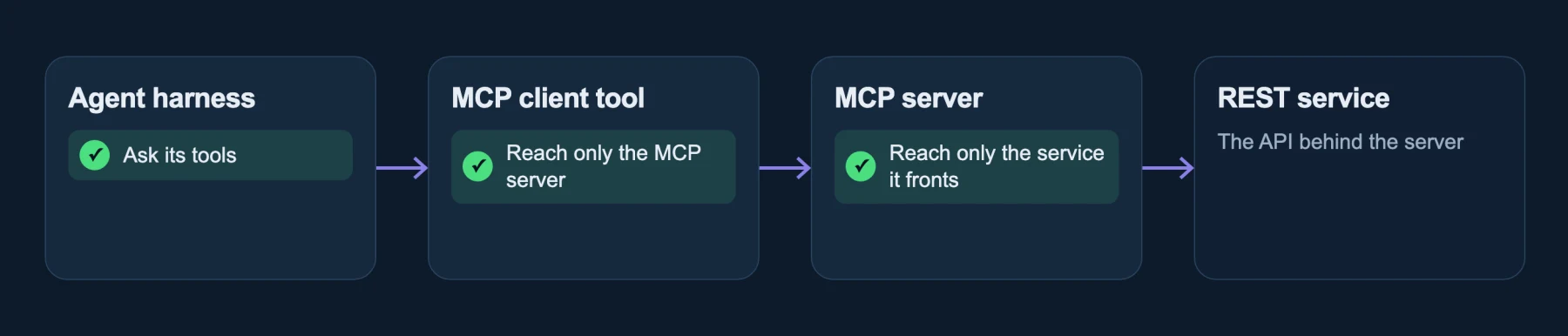
In Desktop, you add an MCP server to the tool catalog as a component or as a remote server, and Desktop provides the tool that talks to it. The tools a server offers are approved the first time and again whenever a tool's definition changes. See Sandbox MCP servers.