Remote Code Execution Example: Sandbox Rust Zip RCE
This remote code execution (RCE) example runs a vulnerable zip extractor on Cosmonic Desktop (Windows, Linux, Mac) or Cosmonic Control (Kubernetes) and attacks it with real malicious zip files, to show how a capability-driven sandbox contains RCE even when the code is unpatched. The extractor uses the Rust zip crate at 8.6.0, which carries two published advisories:
- RUSTSEC-2026-0367 (CVSS 7.3). Extraction keeps the setuid, setgid and sticky bits from the archive, so a dropped file can run with root's privileges.
- CVE-2026-115905 (CVSS 10.0), known as zip cloaking. The central directory and the local file header name different files, so a scanner approves one file while a streaming extractor writes another.
The sandbox stops the attacks because the extractor holds only the capabilities you grant it: one streaming import to receive the zip file and one scratch folder. No network, no process execution, no shell, no configuration, nothing else. For why that works, read Stop Remote Code Execution with a Sandbox.
This page is hands-on:
- Deploy the workload.
- Check its grants.
- Run four attack scenarios.
- Read the verdict.
- Run the same attacks with no sandbox.
The crafted archives are non-weaponized. Their contents are inert text; only the permission bits and entry names are hostile, and no real privilege escalation is performed.
If you use zip in your own code, upgrade to zip 9.0.5, which fixes both advisories.
Prerequisites
-
The demo repo, cosmonic-labs/demo-zip-rce-sandbox:
git clone https://github.com/cosmonic-labs/demo-zip-rce-sandbox cd demo-zip-rce-sandbox -
Optional: a coding agent connected to Desktop's MCP server, to deploy by asking. See Connect coding agents.
-
Optional: a Rust toolchain on macOS or Linux, to run the attacks with no sandbox at the end.
How the workload is built
The workload has two WebAssembly components, and each one is its own sandbox with its own grants. The browser only ever talks to web. web streams the uploaded archive to extractor over a WASI p3 stream<u8> link inside the host, so the untrusted bytes never touch a disk on the way in.
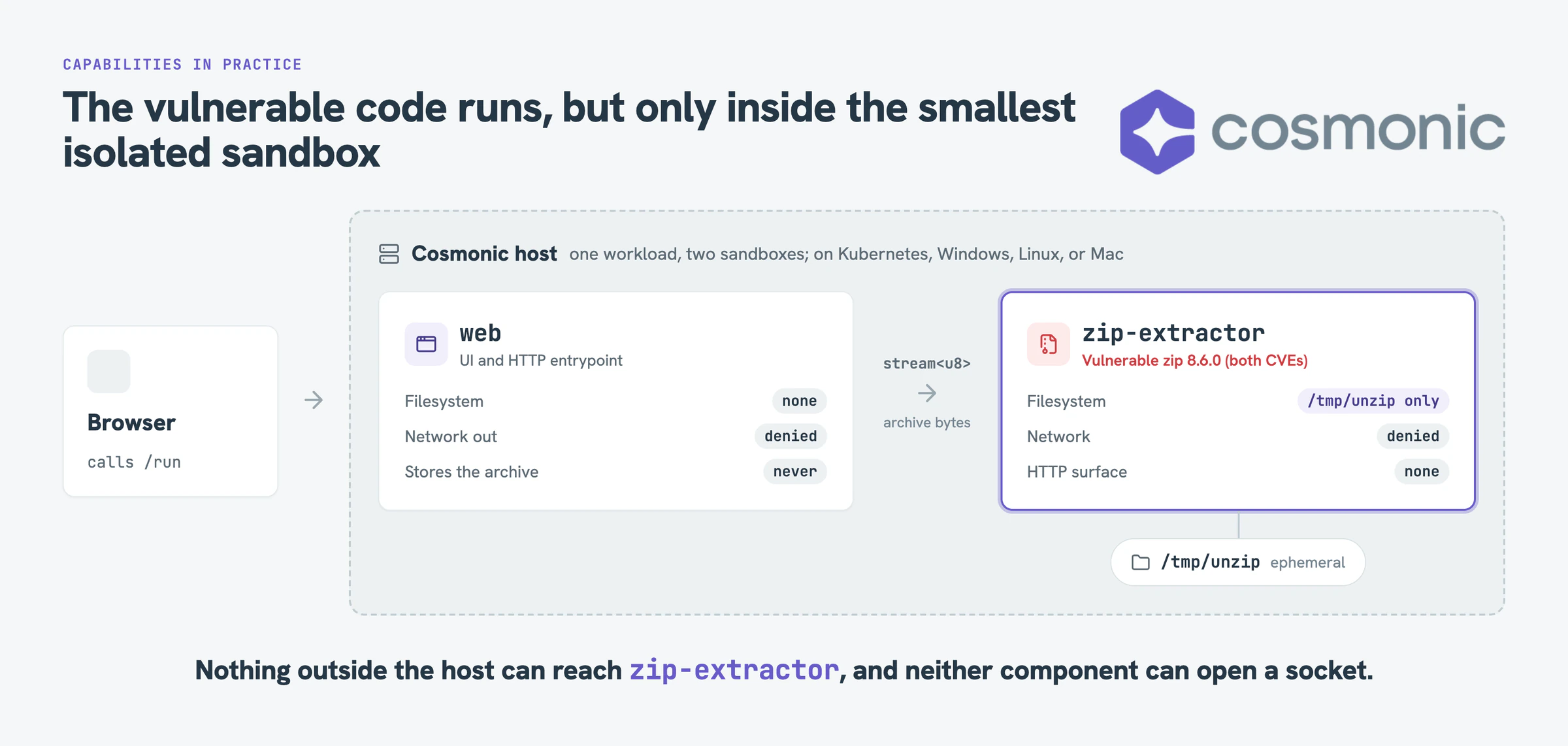
| Component | Filesystem | Network | HTTP | Job |
|---|---|---|---|---|
web | None | No egress | Serves wasi:http/handler | The page and the upload. Never stores the archive. |
extractor | /tmp/unzip only, ephemeral | No egress | None. Reachable only through the link from web. | The unzip, with the vulnerable crate. |
The grants live in deploy/zip-sandbox.workload.yaml. Here is the part that matters, with the image digests shortened:
spec:
  components:
    - name: web
      image: ghcr.io/cosmonic-labs/demo-zip-rce-sandbox/web:0.1.0@sha256:…
      localResources:
        allowedHosts: [] # deny-all egress; no volume means no filesystem
    - name: extractor
      image: ghcr.io/cosmonic-labs/demo-zip-rce-sandbox/extractor:0.1.0@sha256:…
      localResources:
        allowedHosts: [] # deny-all egress: it cannot phone home
        volumeMounts:
          - name: unzip
            mountPath: /tmp/unzip # the only writable path
            readOnly: false
  volumes:
    - name: unzip
      ephemeral: {} # starts empty, thrown away with the workload
That one volume is the main mitigation. Cosmonic doesn't scan for or filter "bad" filenames: the extractor can write to one throwaway folder and nothing else. To learn more about volumes, see Mount a volume.
Deploy the workload
The manifest pins both components by digest on GitHub Container Registry, so there is nothing to build. Apply it one of two ways.
Ask your coding agent. With Desktop's MCP server connected, prompt:
Apply
deploy/zip-sandbox.workload.yamlto Cosmonic Desktop, then show me its status.
The agent calls cosmonic_workload_apply and then cosmonic_workload_list. The workload's status should move to Running.
Or copy the file. Desktop keeps each workload as YAML in its state directory. Run cosmonicd paths to find it, then copy the manifest to workloads/default/zip-sandbox.yaml under that directory.
The extractor needs its /tmp/unzip volume. Desktop's quick-deploy paths (cosmonic dev, publishing a draft, or pasting an image link) build a spec from the image alone and drop the volumes section. The extractor then answers "sandbox unavailable".
The published demo images are unsigned, so the manifest carries the desktop.cosmonic.com/unsafe-allow-unsigned: "true" annotation to let Desktop run them. Keep it on your laptop only. Before you deploy anywhere else, sign the images and remove the annotation.
Inspect the grants
Open the workload in Inspect (see Application views). Desktop draws each component, the host, and every import and export between them. If a capability isn't on the graph, the component doesn't have it.
Check two things:
extractorexports one interface and holds one filesystem grant,/tmp/unzip. It has no HTTP export and no outbound network.webhandles incoming HTTP and nothing else. It has no filesystem and no egress.
The workload's manifest view shows the same grants as YAML. The web component's localResources has no volume mounts, and the extractor's single volume is ephemeral.
Run the attacks
Desktop serves workloads on 127.0.0.1:8200.
Open zip-sandbox.localhost:8200. The page has one red button per scenario. Each button streams a real crafted archive into the extractor. You can also upload your own zip.
| Button | Vulnerability | What the crafted archive does | Expected result |
|---|---|---|---|
| Bug 1: setuid bits | RUSTSEC-2026-0367, CVSS 7.3 | Three entries carry setuid, setgid and sticky bits. On a Unix extractor, a dropped file would keep them. | All three bits show in the report. None are applied. |
| Bug 2: zip slip | CWE-22 / CWE-59 | Three symlink entries aimed at known paths outside the folder: /etc/cron.d, /root/.ssh/authorized_keys and /tmp. | All three land as plain files. No link exists. |
| Bug 3: zip cloaking | CVE-2026-115905, CVSS 10.0 | The central directory shows release-notes.txt. The local header tells a streaming extractor to write config/app.conf. | The cloaked write happens, but it lands inside /tmp/unzip. |
| Run all attacks | All three | One archive carrying every attack above. | All of the above, contained together. |
From the command line
Each scenario has an API mode and a downloadable archive, so you can script the run or inspect the raw bytes.
| Scenario | Run it | Download the archive |
|---|---|---|
| Bug 1: setuid bits | /run?mode=suid (the default) | /suid.zip |
| Bug 2: zip slip | /run?mode=slip | /slip.zip |
| Bug 3: zip cloaking | /run?mode=cloak | /cloak.zip |
| Run all attacks | /run?mode=all | /all.zip |
B=http://127.0.0.1:8200
curl -s -H 'Host: zip-sandbox.localhost' "$B/run?mode=all" | python3 -m json.tool

# or upload your own zip
curl -s -H 'Host: zip-sandbox.localhost' -H 'content-type: application/zip' \
  --data-binary @your.zip "$B/run" | python3 -m json.tool
Read the verdict
Every run returns a JSON report from the extractor, with a verdict field for easy reading.
For example, a contained run of mode=all reports:
MITIGATED: 3 privileged (setuid/setgid/sticky) entries in the archive, 0 applied;
3 zip-slip symlinks neutralized; 1 cloaked entry (CVE-2026-115905) honored but confined.
Everything stayed inside /tmp/unzip.
Fine grained reasoning is also included in the report:
| Field | What it tells you |
|---|---|
target_is_unix, permission_code_active | Both false. The extractor is compiled to wasm32-wasip2, which isn't a Unix target. |
privileged_bits_in_archive, privileged_bits_applied | The bits the vulnerable reader found, and how many were applied. The second number is always 0. |
traversals_blocked | How many zip-slip entries were neutralized (symlinks that landed as plain files, or refused ../ paths). |
cloaked_entries, cloak_notes | Entries whose central-directory name differs from the name that was written. |
entries | One row per entry: its name, cloaked_as, its declared mode and bits, written_to, and traversal_blocked. |
escape_probes | The extractor also tries to write /tmp/zip-slip-escape and /etc/cron.d/zip-demo-escape directly. Each probe records allowed: false and the OS error. |
Each bug is contained for a different reason:
- Setuid bits have nowhere to land. The crate's permission code sits behind
#[cfg(unix)], so it is compiled out of a WebAssembly component. The bits arrive and the report shows them. Nothing can apply them. - Zip slip has nowhere to go. Zip slip is a path traversal attack (CWE-22): an entry tries to land outside the target folder. The crate's symlink code is compiled out of the Wasm build, so each link lands as a plain file. And
/tmp/unzipis the only directory the extractor was handed: a path outside it doesn't exist inside the sandbox. - Cloaking is contained, not fixed. The parser differential is a bug in the crate, and it still happens in WebAssembly.
ZipArchivereads the central directory, andread_zipfile_from_streamreads the local header. The sandbox doesn't stop the cloaked write. It makes sure the write can only land in a throwaway folder, never on a file the host relies on. - Nothing phones home. Both components ship with
allowedHosts: [], so neither can open an outbound connection.
If a privileged bit were ever applied, the verdict would start with VULNERABLE instead.
See it fail without a sandbox
To watch the attacks succeed, run the repo's native-demo, a small CLI that runs the same vulnerable crate directly on macOS or Linux, with no sandbox.
cd native-demo
cargo run              # Bug 1 (the setuid bit survives) and Bug 3 (the cloaked path is written)
cargo run -- cloak     # Bug 3 only
On most systems, Bug 1 will end with this verdict:
VULNERABLE: 1 file(s) kept a SUID/SGID/sticky bit after extraction.The run prints its temp directory. Check the extracted file with the OS, and look for the s in the owner's execute position:
ls -l <temp>/extracted/installer-helper # -rwsr-xr-xBug 3 shows the scanner reading release-notes.txt from the central directory while the streaming extractor writes config/app.conf. Same code, same kind of archive. The only difference is what the code was handed.
cargo run -- slip runs zip slip: the crate plants three symlinks that point out of the folder. The CLI only plants them and shows where they point; it never writes through them. The CLI also has cargo run -- craft attack.zip to write the crafted setuid archive, and cargo run -- extract attack.zip out/ to extract any archive and report its permission bits.
Next: run it on Kubernetes
The same manifest runs unchanged on Kubernetes with Cosmonic Control. The workload is a Kubernetes custom resource, so it works with kubectl, GitOps, RBAC and audit logs.
On a cluster, you can enforce the grants before anything runs. Network egress, filesystem volumes, host interfaces, and image registry and digest are all fields in the manifest, so a ValidatingAdmissionPolicy or Kyverno rule can reject a workload that asks for more. For example, a policy can require every volume to be ephemeral, so no tenant can mount a host path. See Securing a cluster for the policies, and the Kubernetes section of the blog post for a complete example.
Before you deploy to a cluster, sign the images and remove the unsafe-allow-unsigned annotation.
The vulnerable code ran, unpatched, and every attack fired. None of them did any harm, because the extractor was never handed the capabilities they needed: no setuid, no path outside /tmp/unzip, and no network. You can't execute what you don't have.
Related
- Stop Remote Code Execution with a Sandbox: the blog post behind this example
- Mount a volume: grant a component a scratch directory or a host folder
- Sandboxing AI: the same deny-by-default model for agents and tools
- Capabilities over ambient authority: why grants beat blocklists
- Securing a cluster: enforce grants with admission policies