Introduction to Cosmonic
Cosmonic secures the code your AI agents run, from your laptop to your cluster. It puts a capability-based sandbox around AI-generated apps, MCP servers, and other untrusted code. Build and run sandboxes on your own machine with Cosmonic Desktop, now in public beta. Run sandboxed code at scale on Kubernetes with Cosmonic Control.
What is Cosmonic Desktop?
Cosmonic Desktop is a sandbox for your agent's code. It's a free, cross-platform app for macOS, Windows, and Linux, now in public beta, that runs AI-generated code, MCP servers, and tools in tiny sandboxes entirely on your own machine, with no cloud required.
Grab a component or point a coding agent at your project, and Desktop shows you exactly what the code is allowed to reach before it runs. You review that boundary, then run it with nothing but the access you granted. Connect coding agents like Claude Code and OpenAI Codex through the built-in MCP server so they can build and deploy into your local sandbox, and when you're ready to ship, the same Workload manifest deploys unchanged to Cosmonic Control: the boundary you trusted on your laptop is the boundary that runs in production.
- Get started with Cosmonic Desktop and run your first sandboxed workload.
- Connect your coding agent so it can build and run code in the sandbox.
- Sandbox an MCP server and see what it can reach before it runs.
What is Cosmonic Control?
Cosmonic Control is a Kubernetes-native control plane for securely running microservices, agentic workflows, MCP servers, and other sensitive or untrusted code in sandboxed WebAssembly components. Ultra-dense workloads deploy on any cloud or edge, including your own on-premises and air-gapped environments, containing risks like prompt injection, lateral movement, and remote code execution.
Built on the Incubating CNCF project wasmCloud, Cosmonic Control helps platform engineering teams cut costs by scaling to zero and maximizing node density, while providing enterprise-grade security for agents, functions, and other code, and integrating with the cloud-native tooling you already run.
- To try it out, get started for free.
- If you're an operator, explore the Architecture and Operations documentation.
- If you're a developer building components, see the Template Catalog and the wasmCloud Developer Guide.
How does it work?
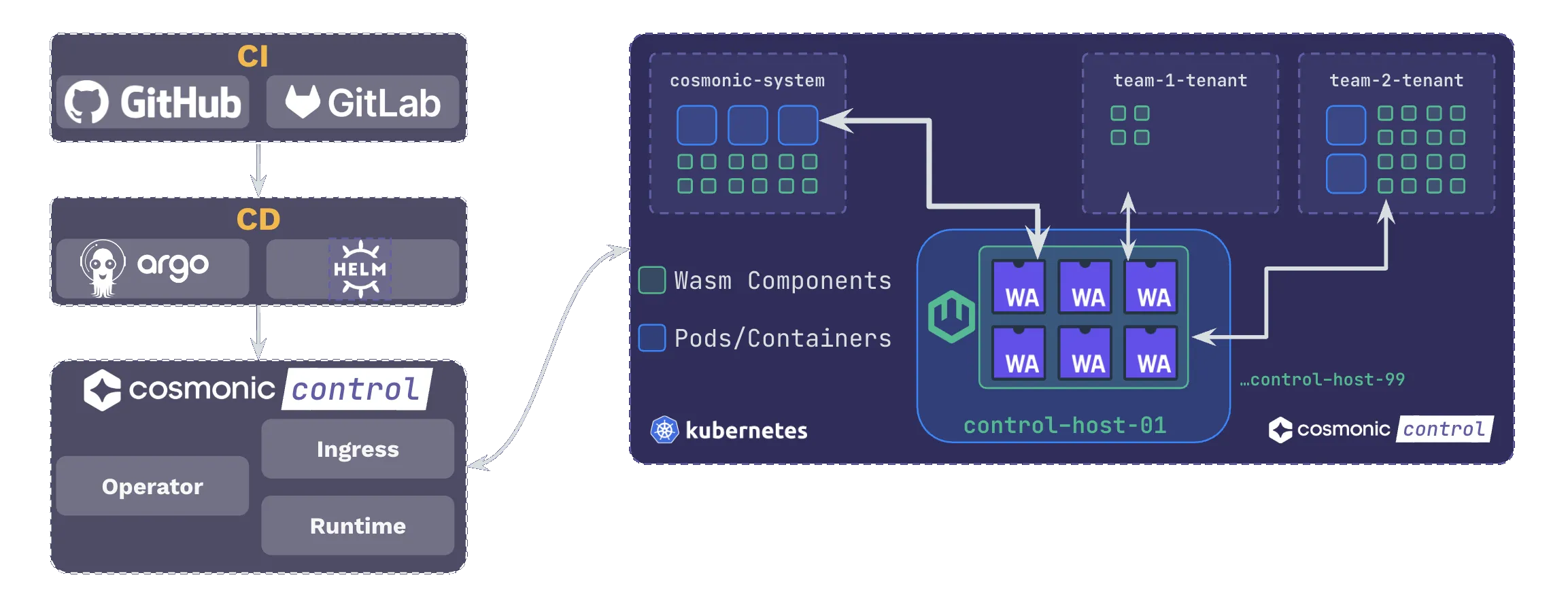
- Teams compile code to WebAssembly component sandboxes, using open source tooling and streamlined pipelines for builds, attestation, and publication.
- Workloads deploy declaratively with any GitOps.
- Sandboxed workloads run on Cosmonic Control hosts, with traffic routed through the built-in ingress proxy.
The same capability-bounded component runs in both products, so what you develop and sandbox on Cosmonic Desktop is what deploys to Cosmonic Control. For more, see the Architecture documentation and From Laptop to Cluster.
Join the community
We're proud members of the wasmCloud community. Join us on the wasmCloud Slack or in the weekly wasmCloud community meeting.