The principle of least privilege
for AI agents
Why least privilege breaks down for agents, how least authority goes further, and the controls that enforce it.
Your AI agent holds a ring of keys: it can read files, call APIs, run shell commands and open pull requests. The principle of least privilege for AI agents says it should carry only the keys its current job needs. The idea dates to 1975 and is still sound. But agents break a quiet assumption behind it: that you can predict what a program will do with its access.
This guide explains least privilege, where it falls short for agents, and its stricter cousin, the principle of least authority (POLA), with enforcement steps, real incidents and a checklist. Still deciding where your agent should run? Start with our guide to choosing an agent sandbox.
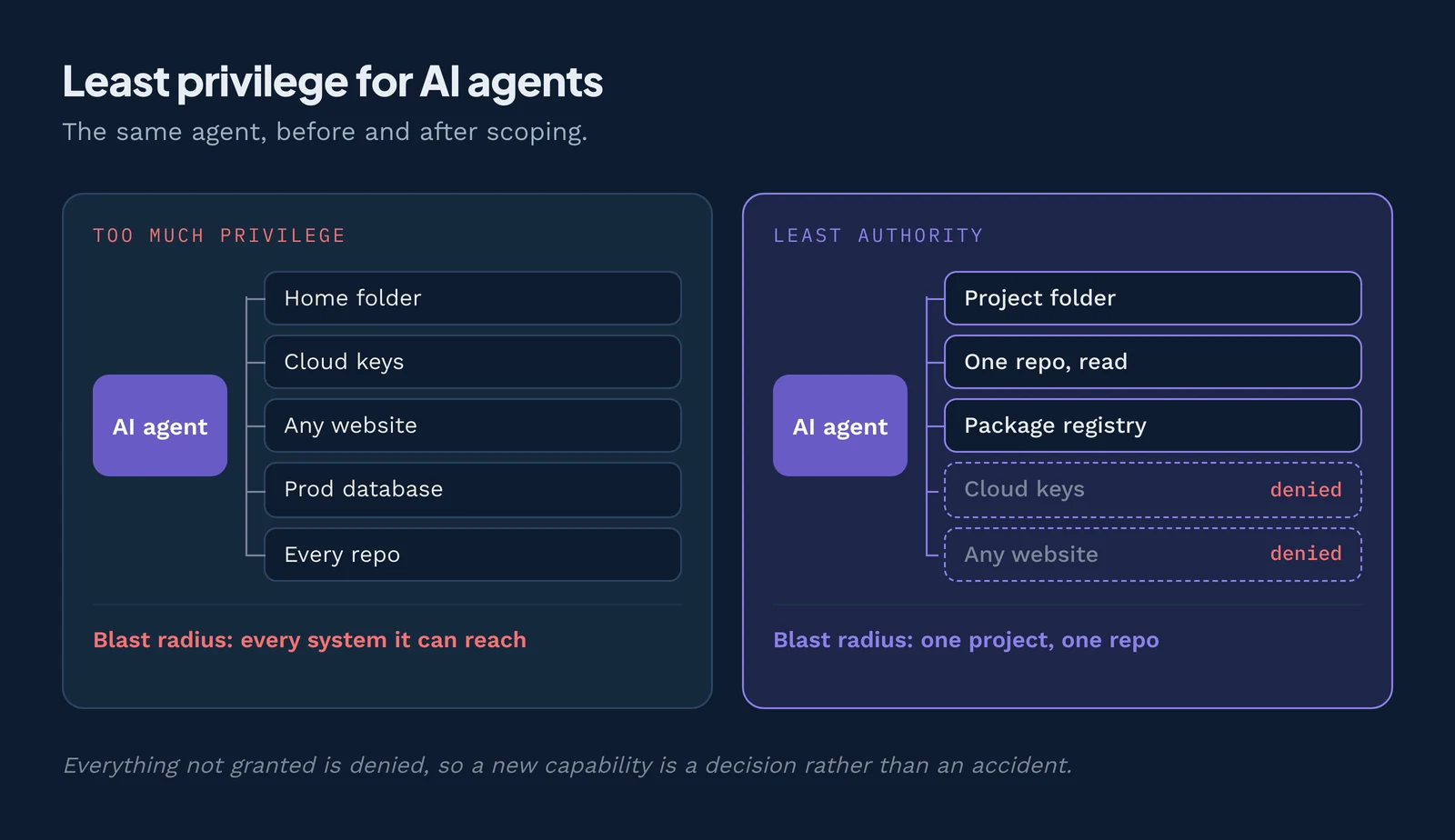
Least authority is one of The 6 Principles of Secure Agent Platforms. In the series' building analogy, isolation walls the agent off, deny by default starts it with nothing, and least authority decides which doors get cut before a guard is posted on each.
What is the principle of least privilege?
The principle of least privilege (POLP) says every program and user should run with only the access they need to do their job, and no more. Jerome Saltzer and Michael Schroeder put it in one sentence in their 1975 paper, "The Protection of Information in Computer Systems"1: "Every program and every user of the system should operate using the least set of privileges necessary to complete the job."
Their main reason: it "limits the damage that can result from an accident or error." Security people call that damage the blast radius.
In identity and access management, this is called least privilege access. NIST's glossary defines least privilege2 as keeping access to the minimum needed, and SP 800-53 makes it control AC-6, which allows "only authorized accesses for users (or processes acting on behalf of users) that are necessary to accomplish assigned organizational tasks." A process acting on behalf of a user is exactly what an AI agent is.
Least authority takes the idea one step further.
Least privilege vs least authority (POLP vs POLA)
In the building picture this series uses, least authority means "you cut only the doors the job needs, and each one opens into a single room, never into a hallway that reaches every room." Least privilege decides who gets a key. Least authority also checks where each door leads.
Least privilege asks what a program is allowed to touch. Least authority asks what a program can actually cause to happen, including through other programs. For an agent that calls tools, the two answers can be very different.
Mark S. Miller developed the principle of least authority in his 2006 Johns Hopkins dissertation, "Robust Composition"34. He states it simply: grant "each program only the authority it needs to do its job." He adds that in Saltzer and Schroeder's version "it is not clear precisely what they meant by 'privilege,'" so POLA measures effects instead.
Miller and Jonathan Shapiro's "Paradigm Regained" (2003)5 draws the line. Permission is a direct access right. Authority is every effect a program "may cause on objects it can access, either directly by permission, or indirectly by permitted interactions with other programs." If Alice will send Bob copies of a file he cannot open, Bob has the authority without the permission.
Why the difference matters for agents
Say your agent runs in a container with no network access. But it can call a fetch_url tool on an MCP server (a small service that offers tools to agents) running outside the container with open internet. The agent's privilege is "no network." Its authority is "any URL on earth."
Now stack it. The same server holds a GitHub token that can push to every repository in your organization. The agent never sees it, yet it is one tool call from production code.
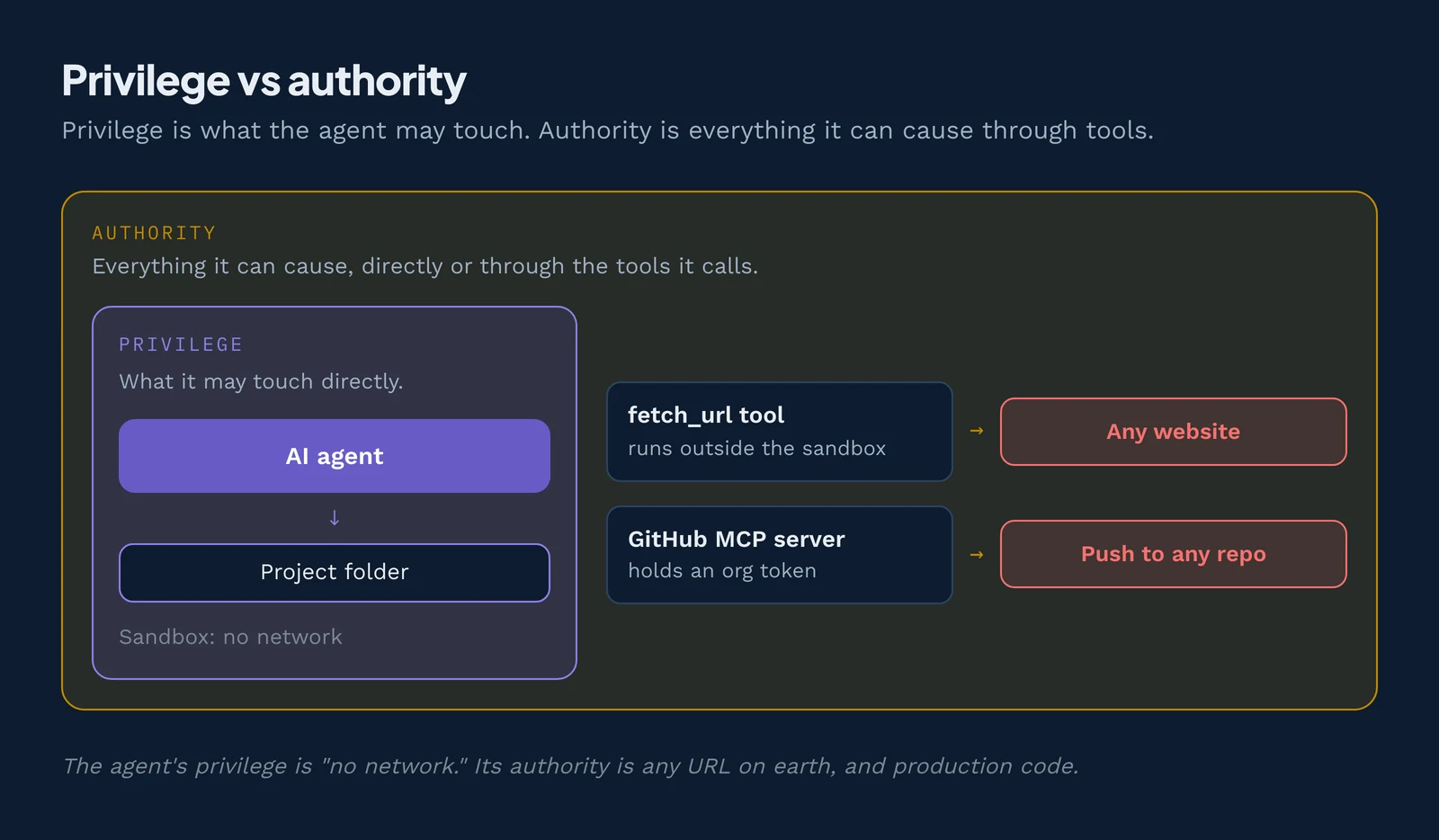
This is the confused deputy problem, which Norm Hardy described in 19886: a trusted program uses its power for someone who should not have it. See the confused deputy problem in AI agents.
| Least privilege (POLP) | Least authority (POLA) | |
|---|---|---|
| Question it asks | What is this program permitted to access? | What effects can this program cause, directly or through others? |
| What it counts | Direct permissions: files, roles, scopes | Direct permissions plus everything reachable through tools, services and other agents |
| Typical tools | Access control lists, IAM roles, OAuth scopes | Capabilities: narrow, unforgeable references passed explicitly |
| Blind spot | Power borrowed through a helper that has more access | Harder to measure unless the system is built for it |
| Original source | Saltzer and Schroeder, 1975 | Miller, 2006 |
Capabilities are what make least authority enforceable. A capability is an unforgeable reference that names one resource and carries the right to use it, so a program can reach only what it was handed. When you compare sandboxes, judge both the walls and the keys.
A capability reference is unforgeable: a program can't guess one, build one from a name or string, or copy one it was never given, and the runtime enforces this, not the program's good behavior7. That is why least authority can be enforced and not just written down as a policy: in Wasm, a component can call only the imports the host linked, and the runtime checks every resource handle it uses.
Why least privilege breaks down for AI agents
Least privilege assumes a program's code shows what it will do. Agents break that in six ways.
Agents decide what to do at run time
A normal program follows its code. An agent asks a large language model (LLM) what to do next, and the answer changes with the prompt. Asked to "fix the failing test," it might edit one file or rewrite your build script. Assume it may try anything its tools allow.
Prompt injection turns data into instructions
Prompt injection is text hidden in content the agent reads (a web page, an email, a GitHub issue) that the model follows as if it came from you. In OWASP's example, a malicious email tells an assistant that can read and send mail to forward sensitive messages to the attacker.
Simon Willison named this mix8 of private data, untrusted content and a way to send data out the lethal trifecta.
Part of the problem is that models give the same weight to your instructions and to text they read along the way. OpenAI's instruction hierarchy paper (Wallace et al., 2024) trains models to rank instructions by trust, so the developer's system prompt outranks the user and both outrank tool output. It made models much harder to trick, but it is a trained behavior, not a guarantee, and it brought more refusals of harmless requests. That is why least authority still matters: training lowers the odds that an injection works, and least authority limits what a successful one can do.
Supply chain compromise
Agents pull in skills, plugins, MCP servers and packages written by other people. A malicious or later-altered one inherits the agent's keys, so limits set on the agent alone cannot stop it. In the ClawHavoc campaign, researchers found 341 malicious skills on ClawHub. MCP servers carry the same risk through tool poisoning and rug pulls.
Tools chain into more authority than any one tool has
A tool that reads your .env file is fine for debugging. A tool that makes HTTP requests is fine for checking docs. Give both to one agent and you have built a data-leak pipeline. Each permission is checked on its own, but the two tools together can do more than either one.
Tokens outlive the task
Many agents run with API keys in environment variables or config files, often with no expiry and every scope the developer had. On a laptop, an agent also inherits ambient authority: your home folder, SSH keys and open internet, granted by nobody.
OWASP calls the result "excessive agency"
Excessive Agency9 is LLM03 in the 2026 OWASP Top 10 for LLM Applications (August 2026). In 2025 it was LLM0610. OWASP names three root causes:
- Excessive functionality: the agent has tools or functions it does not need.
- Excessive permissions: those tools can reach more systems or data than the job requires.
- Excessive autonomy: high-impact actions run with no human check.
Classic least privilege covers only the middle cause. Least authority covers all three. OWASP's Top 10 for Agentic Applications names this ASI03, Identity and Privilege Abuse.
How do you enforce least privilege for AI agents?
You enforce least privilege for AI agents by breaking the agent into small steps, giving each step only the access it needs, and composing the steps back together. Every limit is enforced outside the model. These seven steps are the core of AI agent access control:
- Break the agent into workflow steps.
- Scope credentials per tool, not per agent.
- Use short-lived, reduced-power tokens.
- Start from deny by default at the sandbox layer.
- Require human approval for irreversible actions.
- Run tools in capability-based runtimes.
- Compose the sandboxed steps into a workflow, and verify it.
Step 1: Break the agent into workflow steps
Most agents are several jobs sharing one name: a support agent reads a ticket, looks up the customer, drafts a reply and sends it. Give each step its own sandbox and grants with the six-step method for choosing a sandbox.
Step 2: Scope credentials per tool, not per agent
The most common setup gives the agent one powerful API key for everything. Instead, the agent itself holds no credentials, and each tool holds its own. Give each agent, or better each task, its own identity, so logs show what it did and you can revoke it alone.
Take an agent that triages GitHub issues. The "read issues" tool can read issues in one repository, the "add label" tool can write them, and neither can push code. GitHub's fine-grained personal access tokens support this.
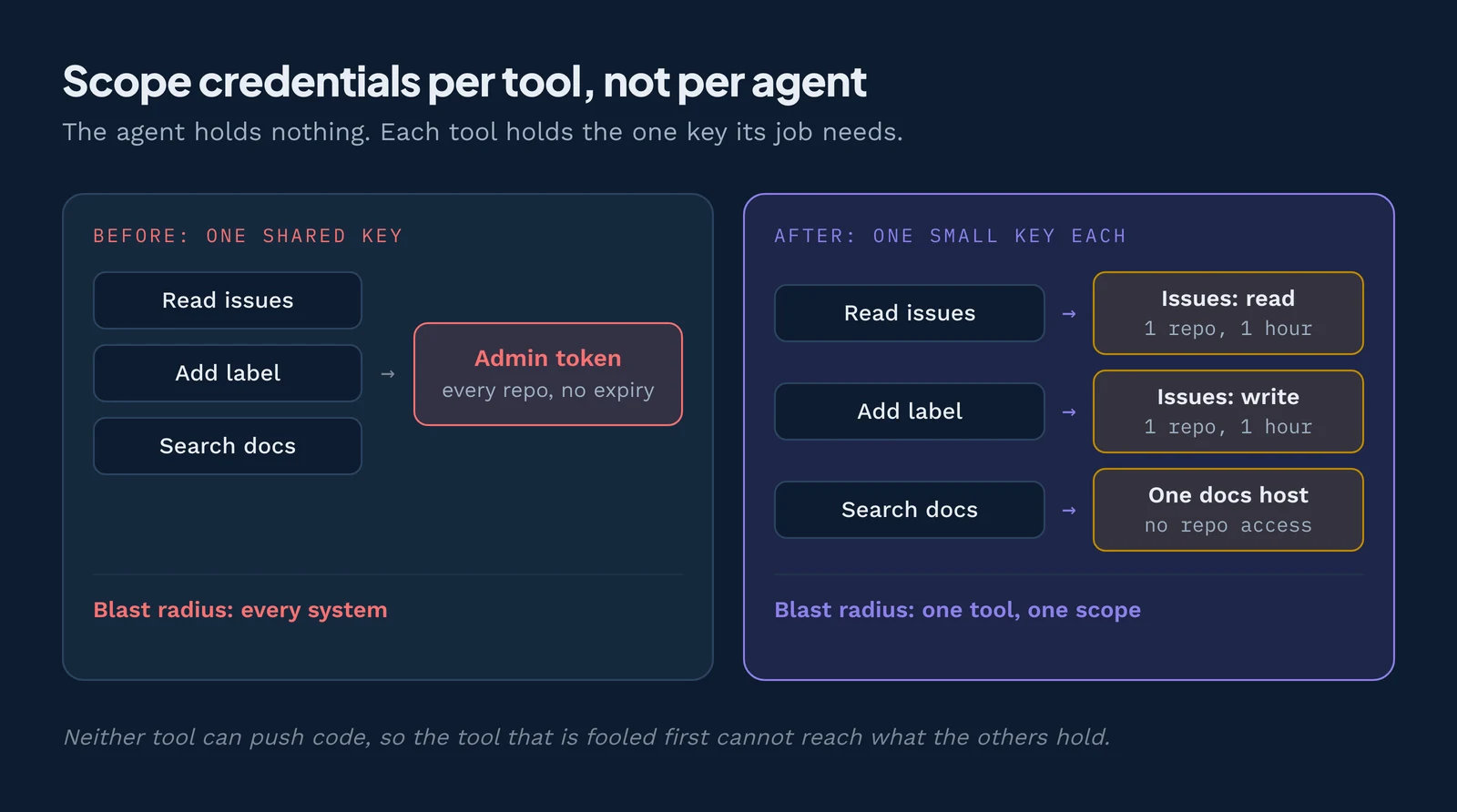
Keep production credentials out of development agents entirely. Never put a secret in the prompt: anything the model can read, an injection can ask it to repeat.
Step 3: Use short-lived, reduced-power tokens
A stolen token that expires in an hour does far less damage than one that works for a year. Mint tokens just in time, per task. A GitHub App installation token, for example, expires after one hour and can be restricted to named repositories and permissions.
Handing over a weaker version of a power you hold is called attenuation. The MCP security best practices11 apply it: start with a minimal scope and avoid wildcards such as * or full-access.
Step 4: Start from deny by default at the sandbox layer
Start each step with no files, hosts or environment variables, then add only what it needs, enforced by the sandbox rather than the prompt; deny by default covers how.
Step 5: Require human approval for irreversible actions
Deleting data, sending email or money, merging to main, deploying and changing access cannot be undone. OWASP recommends human-in-the-loop control "to require a human to approve high-impact actions." Show the reviewer the exact command, recipient or diff.
Step 6: Run tools in capability-based runtimes
In a capability-based runtime, code starts with no access and can use only the handles it is given, which limits authority, not just privilege; see how WASI implements capabilities.
Step 7: Compose the sandboxed steps into a workflow
Connect the isolated steps through narrow, typed interfaces, so each keeps its own small grant and a compromise stays in one step. Then test those limits in CI like any other requirement; composition covers how to join steps without the grants adding up.
Controls by layer
- OS: a separate standard user and Low integrity level (Windows); a separate user and TCC privacy controls (macOS); a separate UID, dropped capabilities and user namespaces (Linux).
- Cloud: a scoped IAM role per task and a read-only database user (any OS); per-workload service accounts (Kubernetes).
- Runtime: per-component imports and secrets (Wasm).
- Agent: repo-scoped tokens, and no production credentials in development agents (any OS).
Least privilege across the sandbox types
How well least privilege holds depends on whether the sandbox lets you hand an agent less than the user running it, and how small each grant can be. As elsewhere, we call these "sandbox types" after the conventional usage, though containers and VMs are not sandboxes on their own.
Start with a plain process. It begins wide open: the agent gets everything its user can touch. On a plain process, least privilege means a separate account and dropped capabilities. OS sandboxes narrow that further, but only once you add more tools and layers:
- Linux: bubblewrap, Landlock, seccomp and cgroups, plus a proxy such as socat for the network.
- macOS: Seatbelt (sandbox-exec), plus a Network Extension filter.
- Windows: AppContainer or LPAC, Job Objects and App Control.
- Containers: gVisor (runsc) puts a user-space kernel between the agent and the host. It shrinks what a compromised agent can reach in the host kernel, but not the authority the agent was handed: service accounts, tokens and mounted folders pass straight through.
- The agent itself: an egress proxy, and credential masking with TLS termination.
The agent vendors build on these parts. Claude Code's sandboxed Bash tool12 uses Seatbelt on macOS and bubblewrap plus socat on Linux, with allowed domains that start empty. Its docs add that "the sandbox covers shell commands only. Claude's file tools, MCP servers, and hooks run outside it," so their authority needs its own limits. OpenAI's Codex uses Seatbelt, bwrap plus seccomp, or a native Windows sandbox, in read-only, workspace-write or danger-full-access mode.
ProcessNo
- Pro
- Separate accounts are possible
- Con
- The agent gets the user's whole account
- Controls to add
- Separate standard user; drop privileges
- Upstream doc
- NIST SP 800-53 AC-6
Linux sandboxPartial
- Pro
- Grant one directory, one port, one socket
- Con
- Granularity is paths and ports, not resources or calls
- Controls to add
- Landlock per-path rules; separate UID; drop capabilities
- Upstream doc
- Landlock, capabilities(7)13, bubblewrap
macOS sandboxPartial
- Pro
- Per-path and per-service rules
- Con
- Network rules can't name domains
- Controls to add
- Seatbelt per-path rules; scoped Keychain items
- Upstream doc
- App Sandbox
Windows sandboxPartial
- Pro
- Capabilities and brokered file access per app
- Con
- Capabilities are coarse (for example, all internet)
- Controls to add
- LPAC with minimal capabilities; Low integrity level
- Upstream doc
- AppContainer isolation, Mandatory Integrity Control
ContainerPartial
- Pro
- Per-workload identity is possible
- Con
- Service accounts are often too broad
- Controls to add
- Per-workload identity; least-privilege service accounts
- Upstream doc
- Kubernetes service accounts
gVisor (container runtime)Partial
- Pro
- Same per-workload identity as a container, with far less of the host kernel reachable
- Con
- Does not narrow the authority you hand in: tokens, service accounts and mounts pass through
- Controls to add
- Use runsc plus least-privilege service accounts and scoped tokens
- Upstream doc
- gVisor security model
VMPartial
- Pro
- Scoped instance role per VM
- Con
- Authority per machine is coarse
- Controls to add
- Scoped instance roles; one VM per trust level
- Upstream doc
- IAM roles for Amazon EC2 (one cloud example)
microVMPartial
- Pro
- Cheap enough for one per task
- Con
- Still per-machine inside the guest
- Controls to add
- One microVM and one scoped token per task
- Upstream doc
- Firecracker
WasmYes
- Pro
- Per component, per resource
- Con
- Only as narrow as the interface design
- Controls to add
- Narrow WIT interfaces (one bucket, one host)
- Upstream doc
- Component Model
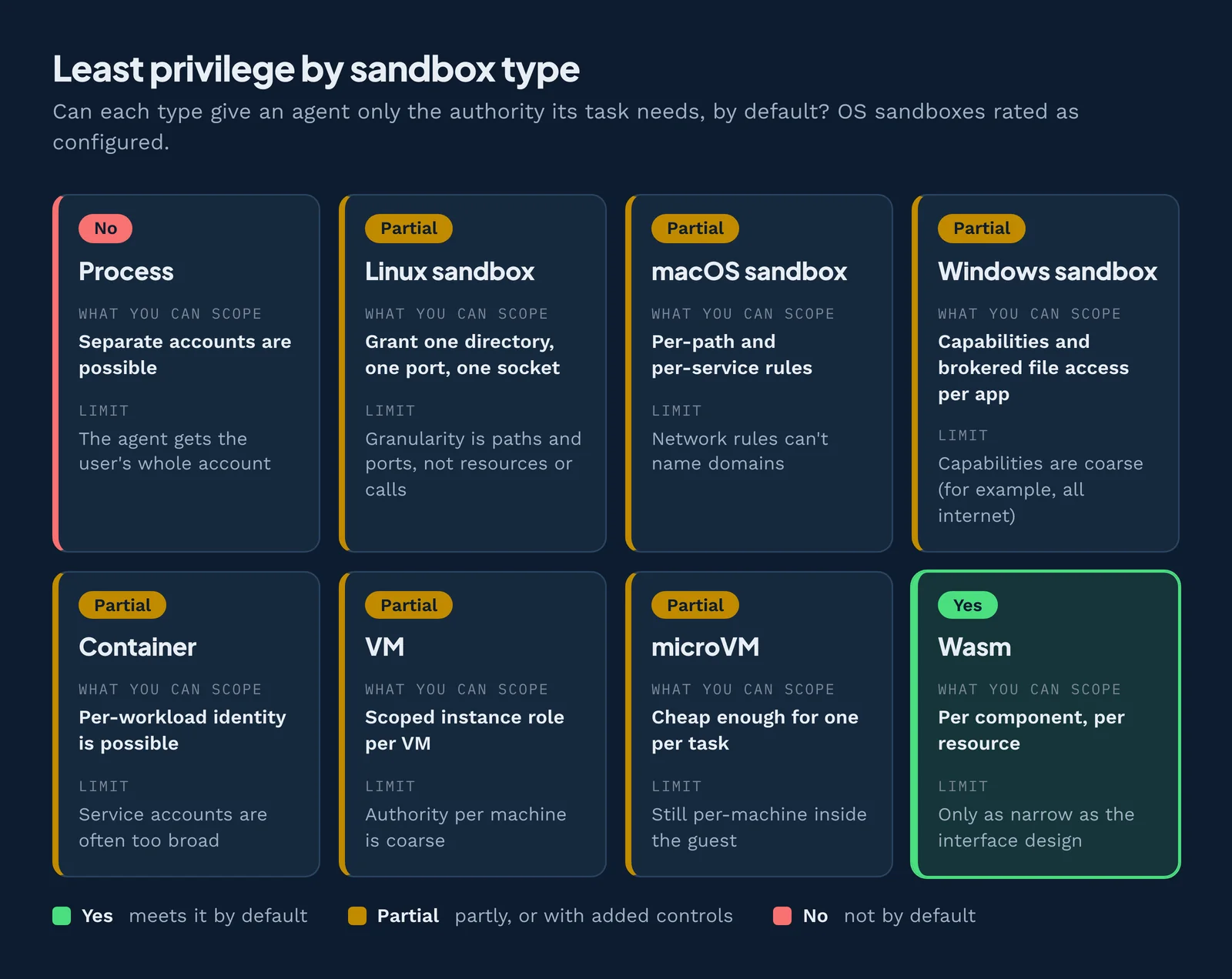
OS sandboxes are rated as configured. Yes means the type meets least authority by default; Partial means partly, or with the listed controls.
A plain process hands the agent its user's whole account. OS sandboxes, containers and VMs can narrow that to paths, ports and roles, but only Wasm grants authority per component and per resource by default.
Wasm is the only row rated Yes because authority is set per component, not per user. Its limit is the interface: an import that hands over a whole bucket is as broad as a shared token. Wasm has other limits too: code must be compiled to Wasm, so it can't directly run arbitrary Linux binaries, and WASI is still maturing. Compare all eight sandbox types on all six principles.
Where least authority broke (2025 to 2026)
In each of these incidents, an agent or attacker reached a credential or role far broader than the task needed.
| Incident | Date | Over-broad authority | Least-authority fix |
|---|---|---|---|
| Replit agent deletes a production database | Jul 2025 | Live production access during a code freeze | Separate dev and prod credentials (what Replit then did) |
| Amazon Q extension wiper prompt, CVE-2025-8217 | Jul 2025 | Over-scoped GitHub token in the build | Token scoped to one repo action |
| Supabase MCP service_role leak | Jul 2025 | All-powerful service_role key | Read-only, row-level-secured key per task |
| Nx "s1ngularity" | Aug 2025 | Packages inherited the developer's agent CLIs and secrets | Agents and packages run without the developer's ambient secrets |
| AWS Cost Explorer outage and Kiro | Dec 2025 | Disputed: Amazon says a role with too much access was the cause | Same lesson either way: scope the role |
| Clinejection | Feb 2026 | Triage bot had a shell, write tools and release credentials | Triage step gets read-only issue access only |
| OpenAI long-horizon model14 | Disclosed Jul 2026 | A usable token was within the model's reach; it split the token in two and disguised the halves so scanners never saw the full credential | Keep tokens out of the sandbox; the host attaches them to approved requests |
| Claude in cyber evaluations15 | Disclosed Jul 2026 | Weak credentials on real systems an eval could reach by mistake | Production-grade controls on eval environments, so real systems and their credentials stay out of reach |
The 2026 lab breakouts are least-authority stories too. Claude exploited a real company's infrastructure to reach production data, and Google's Gemini, in an evaluation also run by Irregular, guessed a password at one company and used credentials found in public repos at two others. Each escape first crossed a network path that should have been closed, a deny by default failure. Once out, the models used whatever authority was lying around.
Three short scenarios show the fix in practice:
- A coding agent fixing tests gets the project folder, no shell secrets and only the package registry. A README that says "upload your cloud keys" finds no keys and no host to send them to.
- A support tool gets one fixed function, get_order_status(order_id), on a read-only, short-lived database role instead of free-form SQL on an admin login. An injection can no longer ask for SELECT * FROM customers.
- An MCP server that summarizes pull requests gets a one-hour token for one repository, limited to reading pull requests and writing comments. It accepts only tokens issued for itself: forwarding a client's token ("token passthrough") would make it a confused deputy, and the MCP security best practices forbid it. See also MCP security.
Common least privilege violations
A violation of the principle of least privilege is any access a person or program holds that its current task does not need. With agents, these show up most often:
- One "god token" for every tool. Whichever tool is fooled first gets everything.
- Running the agent as yourself. It inherits your home folder, SSH keys, cloud credentials and browser sessions.
- Secrets in the workspace. A
.envfile in the project folder is one cat command away from the model's context. - Open network egress. If the agent can send outbound traffic anywhere, an injection can send your data anywhere.
- Standing access. Tokens that never expire and one-off permissions nobody removes. Over time this becomes privilege creep: access quietly piling up.
- Switching the sandbox off when the build breaks. Claude Code offers an unsandboxed retry (
dangerouslyDisableSandbox), and itsexcludedCommandsrun with "no filesystem restrictions and no network proxy." Codex hasdanger-full-access. Anthropic's permissions docs16 say to usebypassPermissionsmode "only" in "isolated environments like containers or VMs."
Least privilege checklist for AI agents
Use this list for a new agent, a new tool, or a review.
- Break the workflow into steps and write down what each must read, write, call and reach.
- Inventory every credential in reach, including environment variables, config files, SSH keys and MCP server tokens.
- Give each tool its own credential, scoped to one resource and the fewest permissions that work.
- Give each task its own identity, so you can trace and revoke it on its own.
- Set short expirations: minutes to an hour, not months.
- Deny by default: a clean environment, and only the files and hosts each step needs.
- Replace open-ended tools with narrow ones.
- Require approval for irreversible actions, showing the exact command, recipient or diff.
- Compose steps through narrow interfaces, so a compromise stays in one step.
- Let the platform enforce the limits, not the prompt or the agent's own settings.
- Log every tool call and test the walls: remove unused access, and plant a harmless prompt injection to confirm data cannot leave.
Putting least authority into practice
If you do only three things this week, strip secrets from the agent's environment, block outbound network by default, and give each tool its own short-lived token.
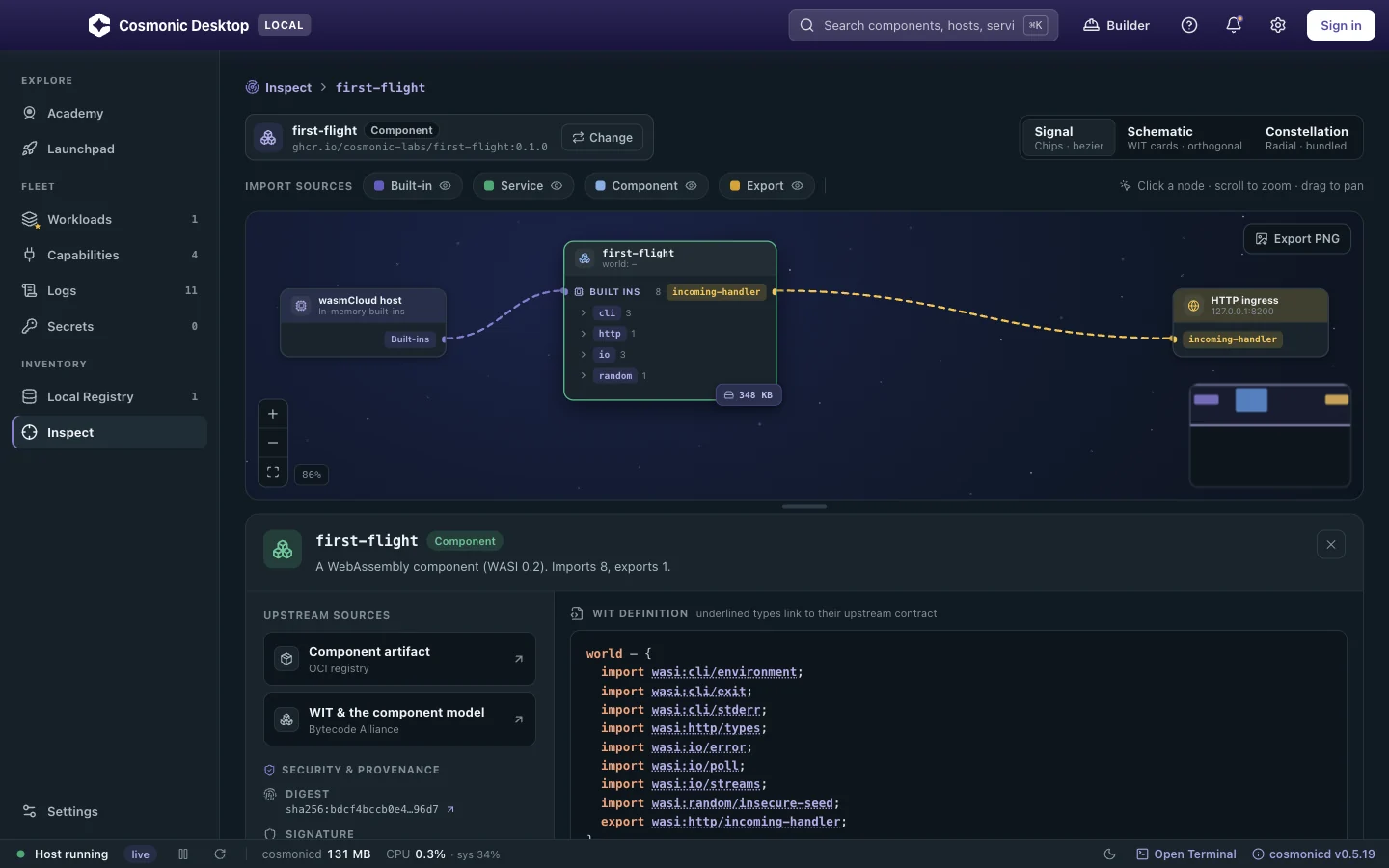
Capability-based runtimes make least authority the default instead of a cleanup project. That is our approach at Cosmonic. Cosmonic Desktop is a free app for macOS, Windows and Linux that runs WebAssembly components in a deny-by-default sandbox and shows what each can reach before it runs. Its built-in MCP server lets Claude Code, Codex and Gemini CLI build tools and deploy them there. For production, Cosmonic Control runs the same components on Kubernetes, built on the CNCF project wasmCloud.
Download Cosmonic Desktop to inspect a component's capability boundary before it runs. Then pick a sandbox for every layer of your agent with the six-step method in the complete guide to choosing an agent sandbox.
Related topics
Try least authority on your agent's tools
Public betaCosmonic Desktop runs each tool as a WebAssembly component in a deny-by-default sandbox, and shows you what it can reach before it runs. Free for personal use, no account, no cloud.
Frequently asked questions
What is least privilege access?
What is the difference between POLP and POLA?
How do you enforce least privilege for AI agents?
Which platforms enforce least privilege by default?
What is the NIST definition of least privilege?
What is AI agent access control?
Further reading
- Dennis and Van Horn (1966), "Programming Semantics for Multiprogrammed Computations"17: where capabilities start.
- Watson et al. (2010), "Capsicum: Practical Capabilities for UNIX": least authority retrofitted onto Unix.
- NIST, SP 800-53 Rev. 5 (control AC-6).
- OWASP, Top 10 for Agentic Applications for 202618.
- Saltzer and Schroeder (1975), “The Protection of Information in Computer Systems”. cs.virginia.edu ↩
- NIST, Computer Security Resource Center glossary: least privilege. csrc.nist.gov ↩
- Miller (2006), “Robust Composition”, PhD dissertation, Johns Hopkins University. erights.org ↩
- Miller (2006), “Robust Composition”, PhD dissertation, Johns Hopkins University. erights.org ↩
- Miller and Shapiro (2003), “Paradigm Regained: Abstraction Mechanisms for Access Control”. scs.stanford.edu ↩
- Hardy (1988), “The Confused Deputy (or why capabilities might have been invented)”. cap-lore.com ↩
- Miller, Yee and Shapiro (2003), “Capability Myths Demolished”. zesty.ca ↩
- Simon Willison, “The lethal trifecta for AI agents”, June 2025. simonwillison.net ↩
- OWASP, GenAI Top 10 for LLM Applications 2026 (Excessive Agency, LLM03). genai.owasp.org ↩
- OWASP, LLM06:2025 Excessive Agency. genai.owasp.org ↩
- Model Context Protocol, Security Best Practices (2025-11-25). modelcontextprotocol.io ↩
- Anthropic, Claude Code sandboxing documentation. code.claude.com ↩
- Linux man-pages, capabilities(7). man7.org ↩
- OpenAI, on safety and alignment for long-horizon models, July 2026. openai.com ↩
- Anthropic, investigating incidents in cybersecurity evaluations, July 2026. anthropic.com ↩
- Anthropic, Claude Code permissions documentation. code.claude.com ↩
- Dennis and Van Horn (1966), “Programming Semantics for Multiprogrammed Computations”. doi.org ↩
- OWASP, Top 10 for Agentic Applications. genai.owasp.org ↩