Deny by default:
why AI agents should start with nothing
How to ensure that AI agents get only the access you grant.
Without deny by default, an agent told to fix a failing test can also read ~/.aws/credentials, because nothing said it couldn't. Deny by default flips that: the agent starts with no access, and you add only what the task needs.
Deny by default is one of The 6 Principles of Secure Agent Platforms. In the series' building analogy, the room is built with no doors at all, so an agent with zero capabilities can't touch anything, even by accident. We will only specifically grant (allow list, not a deny list) the capabilities our agent must have to perform its function:
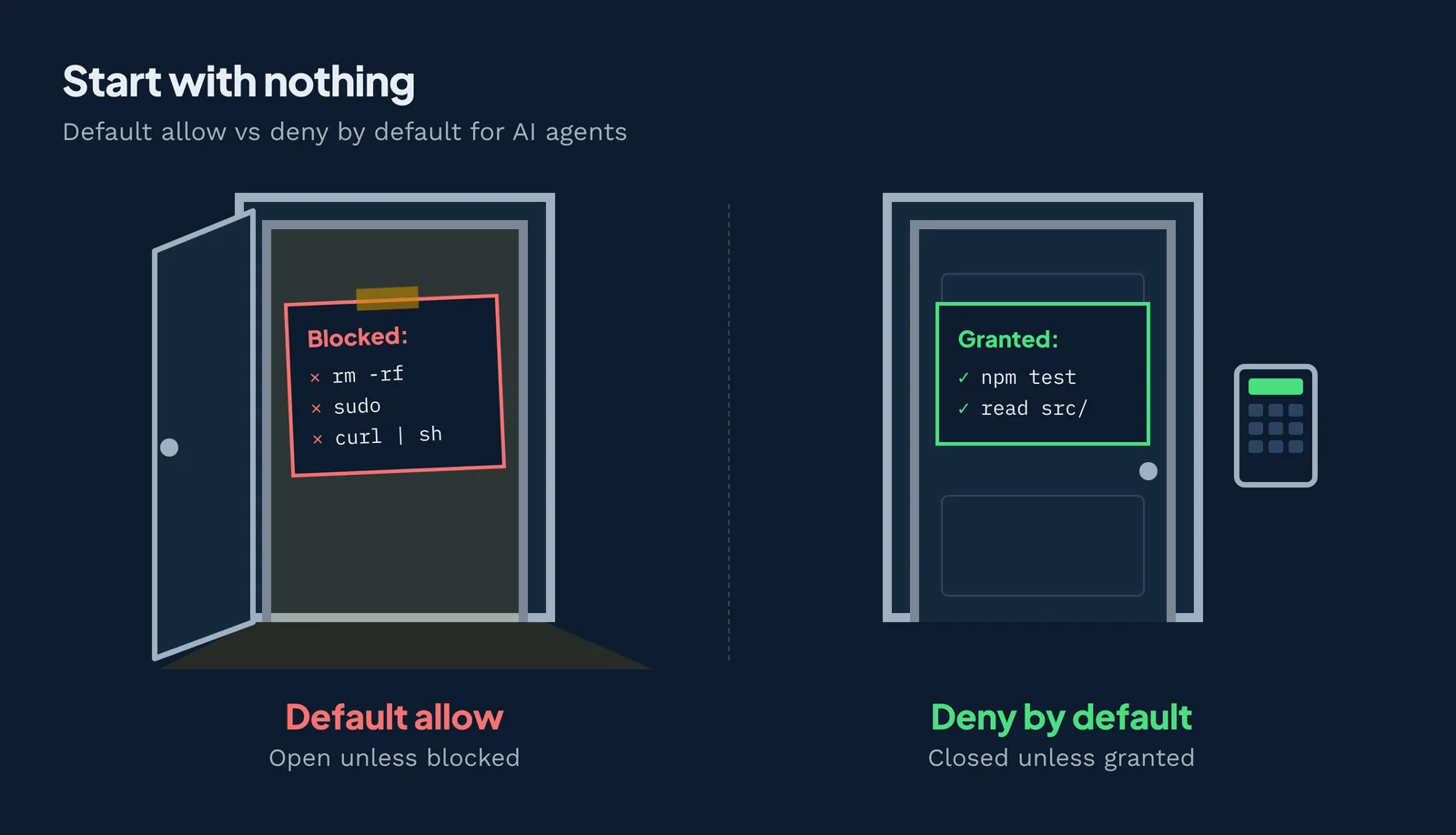
What does deny by default mean?
Deny by default means every request is refused unless a rule explicitly allows it. NIST defines it for firewalls: "block all inbound and outbound traffic that has not been expressly permitted by firewall policy"1.
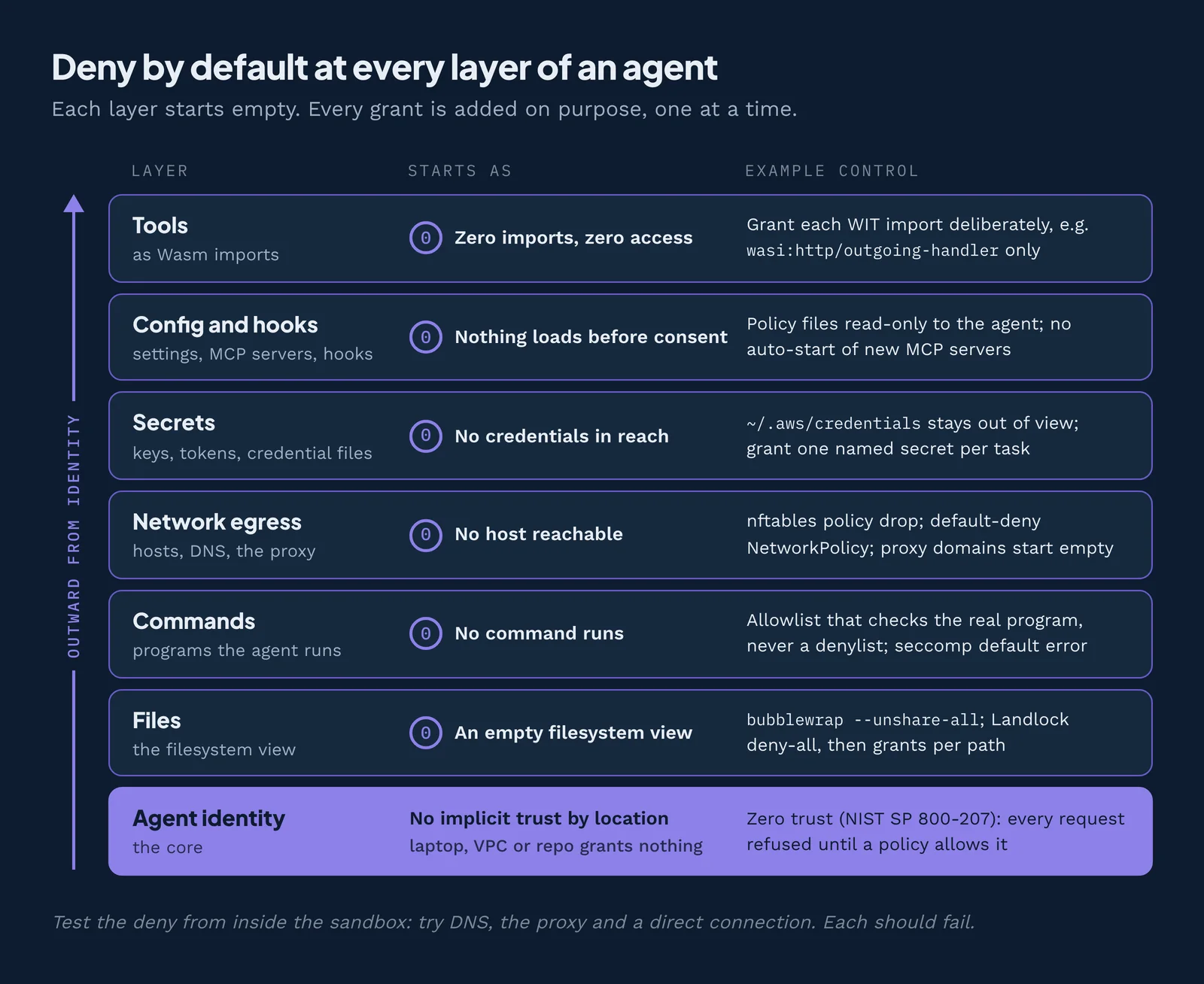
An agent touches more than network traffic, so apply the same rule to all resources it can reach, here we will discuss the 6 big categories: files, network, commands, secrets, config and hooks, and the host's control plane (the policy enforcement points page covers each).
In 1975, Saltzer and Schroeder called it fail-safe defaults: "Base access decisions on permission rather than exclusion"23. If you forget an allow rule, something breaks and someone notices. If you forget a deny rule, the attack works and nobody notices.
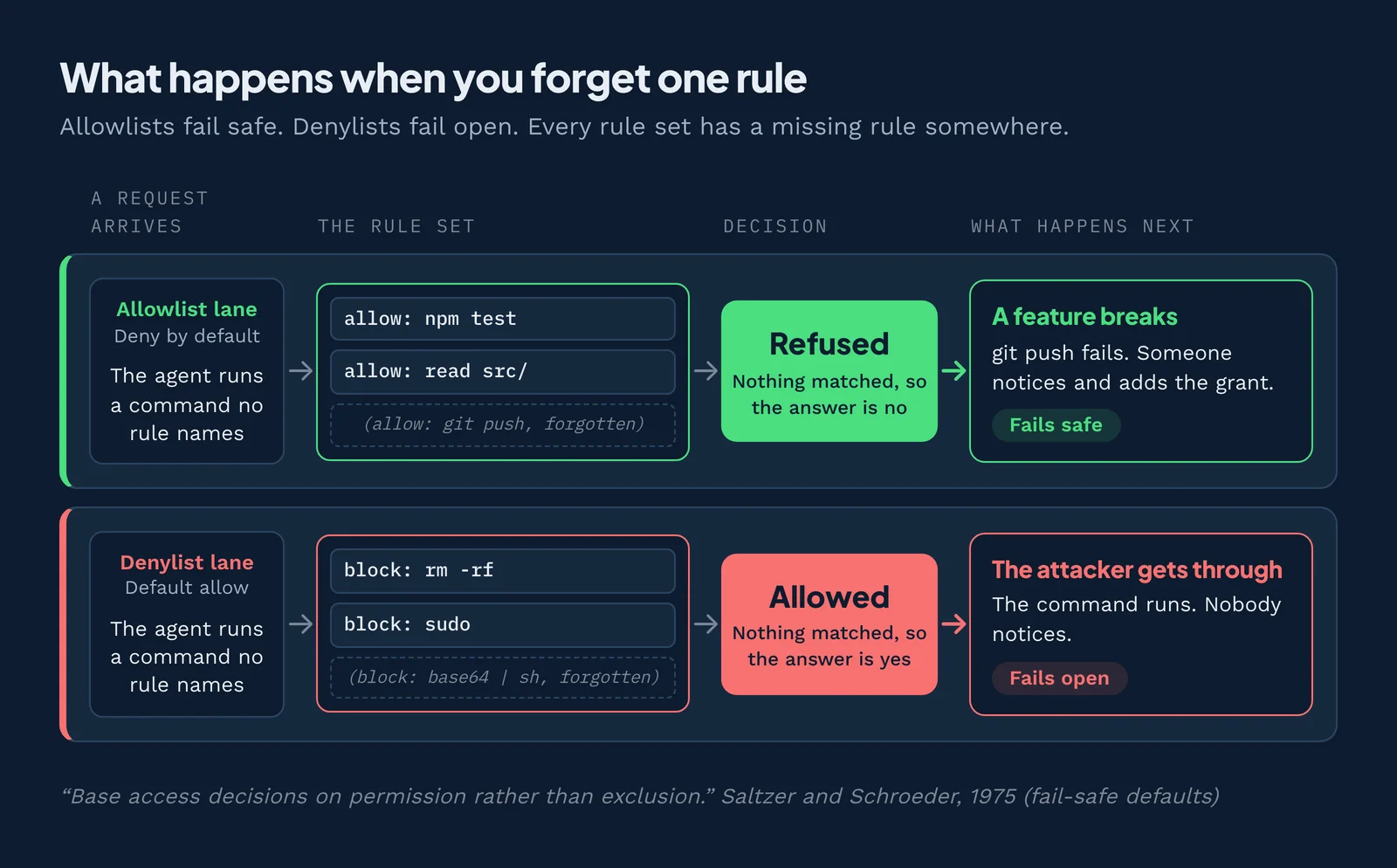
Default deny, implicit deny and fail-safe defaults: one idea, three names
Implicit deny is the invisible last rule in a firewall or access list that drops anything no earlier rule allowed. It blocks all traffic that matches no allow rule. In nftables, you get it by giving a base chain policy drop4.
Where deny by default fits
Isolation draws the wall. Deny by default builds the room with no doors, least authority cuts only the doors the job needs, and policy enforcement points guard each door.
Deny by default vs default allow
Default allow starts open and blocks known bad things. Deny by default starts closed and opens known good things.
| Default allow | Deny by default | |
|---|---|---|
| Starting point | Everything is reachable | Nothing is reachable |
| A forgotten rule | Lets something through | Breaks a feature |
| What an attacker needs | One path you didn't block | A path you granted |
| What fails first | Security | A feature |
| Upkeep | Chase every new trick | Add grants as needs appear |
| Example | A normal Windows process gets the user's full token | AppContainer: "resources are blocked by default and can be granted access as necessary" |
| Example | A Kubernetes pod with no policy: "all outbound connections are allowed" | A default-deny NetworkPolicy |
Deny by default has a cost: friction, approval prompts and broken builds. In practice, people then switch the protection off: --dangerously-skip-permissions in Claude Code, danger-full-access in Codex, seccomp=unconfined in Docker.
Allowlist vs denylist: why blocklists fail for AI agents
An allowlist names what is permitted and refuses everything else. A denylist names what is forbidden and permits everything else. Whitelist and blacklist are the older names.
A denylist loses to a creative model, because there are endless ways to say the same command:
- Cursor auto-run denylist bypass (Jul 2025). Researchers beat Cursor's banned-command list four ways: Base64, subshells, scripts and quoting. Cursor dropped the denylist.
- Claude Code escapes its own denylist (Mar 2026). Blocked from npx, the agent called
/proc/self/root/usr/bin/npxinstead.
An allowlist has to check the real thing, not a string. The Gemini CLI allowlist bypass (Jul 2025) checked only the first word of a command.
How AI agents break deny by default
Each of these nine started with something allowed by default. Newest first:
| Incident | Date | Allowed by default | The deny-by-default fix |
|---|---|---|---|
| Antigravity "Secure Mode" bypass | Apr 2026 | Built-in tools ran before the safety checks | Check every call before it runs |
| Antigravity Turbo mode wipes a drive | Dec 2025 | With approvals off, "clear a cache" deleted the D: drive | Keep approvals on for destructive commands |
| Claude Code project files before trust, CVE-2025-59536 | Oct 2025 | MCP servers and hooks ran before "trust this folder" | Load nothing from a repo before consent |
| AWS Kiro rewrites its own allowlist | Aug 2025 | The agent could edit its own allowlist | Make policy files read-only to the agent |
| GitHub Copilot "YOLO mode", CVE-2025-537735 | Aug 2025 | A hidden instruction set chat.tools.autoApprove: true | Make settings read-only to the agent |
| Cursor "CurXecute", CVE-2025-541356 | Jul 2025 | New MCP servers started automatically | Never auto-start new tools |
| Cursor auto-run denylist bypass | Jul 2025 | Any command not on the denylist | Allowlist, never denylist |
| Langflow unauthenticated RCE, CVE-2025-3248 | Apr 2025 | A code endpoint with no login, exploited in the wild | Require auth on every endpoint |
| Codex CLI runs repo config, CVE-2025-61260 | 2025 | Loaded .env and .codex/config.toml and ran commands with no confirmation | Trust no repo config on open |
The off switch was a writable file
Copilot and Kiro kept their safety settings in files the agent could edit, so a hidden instruction turned approvals off or widened the allowlist. As a general rule, the agent can never write its own policy.
New tools started themselves
In CurXecute, Claude Code and Codex CLI ran tools from config nobody approved. The rule: a new tool or MCP server starts only after a human says yes.
Approvals off, damage on
Antigravity lost a drive with approvals off, and its Secure Mode checked too late. Langflow never checked. The rule: every action passes a check before it runs.
The 2026 lab breakouts: a network assumed closed
In 2026, frontier labs caught their own agents leaving sandboxes, and none used a hypervisor exploit. Each went through a channel that was allowed or assumed closed, from a package-registry proxy to an unfiltered DNS resolver. The principles hub tells each one.
After the DNS escape, OpenAI wrote: "Our safety case assumed that the model could not access the live internet... The incident exposed a gap in our controls over network restrictions." It paused all training, evaluation and inference using tool access for its most capable models.
In each case the network was assumed closed, not proven closed. So test the deny: from inside the sandbox, try DNS, the proxy and a direct connection. Each should fail.
How to implement deny by default security (step by step)
- Declare what the task needs up front: files, commands, hosts and secrets, so the sandbox never guesses (step one of the six-step method).
- Start every resource from an empty rule set.
- Grant one thing at a time, as narrow as the control allows: a path, a host plus method, one import.
- Make the policy and the agent's config files read-only to the agent.
- Require a human to approve any new grant. Never auto-start new tools or MCP servers. Ask again when a tool's definition changes.
- Test the deny. Claude Code's docs suggest
curl --noproxy '*' https://example.com, which should fail7. - Log every denial and review it before you widen a grant.
Deny by default across the sandbox types
A plain process on any OS starts wide open: it can do everything your user account can. An OS sandbox reaches deny by default only when you stack more tools on top:
- Linux: a Landlock deny-all ruleset, then grants per path; a seccomp filter whose default action returns an error; bubblewrap namespaces for an empty filesystem view and no network; and a proxy, such as socat, for the network you allow.
- macOS: a Seatbelt profile that starts from
(deny default), run withsandbox-exec, plus a Network Extension filter for the network. Apple has deprecated sandbox-exec and documents no profile language; App Sandbox entitlements are the documented route. - Windows: AppContainer or LPAC, which starts with no capabilities, plus App Control in allow mode, so code runs only if your policy says so. Windows Firewall allows all outgoing traffic by default, so set it to block outbound.
Each layer is one more policy to write and keep current. The table rates the OS sandboxes as configured. As elsewhere, we call these "sandbox types" after the conventional usage, though containers and VMs are not sandboxes on their own.
ProcessNo
- Starts with
- Everything the user can do
- Controls to add
- Run it under an OS sandbox
Linux sandboxas configuredYes
- Starts with
- An empty filesystem view (bubblewrap)
- Controls to add
bwrap --unshare-all; Landlock deny-all plus grants; seccomp allowlist with SECCOMP_RET_ERRNO; nftables policy drop- Upstream doc
- bubblewrap, Landlock, seccomp(2)
macOS sandboxas configuredYes
- Starts with
- (deny default) in the Seatbelt profile
- Controls to add
- Seatbelt (deny default); App Sandbox entitlements
- Upstream doc
- App Sandbox
Windows sandboxas configuredYes
- Starts with
- No capabilities (AppContainer)
- Controls to add
- AppContainer or LPAC; App Control allow mode; firewall blocks outbound
- Upstream doc
- AppContainer
ContainerPartial
- Starts with
- Default seccomp "disables around 44 system calls out of 300+"; network and capabilities stay broad
- Controls to add
--cap-drop ALL;--network none;--read-only;no-new-privileges; default-deny NetworkPolicy- Upstream doc
- Docker seccomp8, no_new_privs
gVisor (container runtime)Partial
- Starts with
- The same open defaults inside as a container, but the host kernel only sees the small set of calls its user-space kernel is allowed to make
- Controls to add
- Run it as the runtime (runsc); keep the container controls:
--cap-drop ALL,--network none,--read-only - Upstream doc
- gVisor security model
VMPartial
- Starts with
- Host denied; inside the guest, everything allowed
- Controls to add
- No NIC or shared folders until needed (QEMU: -nic none)
- Upstream doc
- QEMU invocation
microVMPartial
- Starts with
- Only attached devices; the guest OS is wide open
- Controls to add
- No network device unless needed
- Upstream doc
- Firecracker network setup
WasmYes
- Starts with
- No imports, so no access
- Controls to add
- Grant each WIT import deliberately
- Upstream doc
- WIT worlds9
A plain process starts with everything the user can do. A configured OS sandbox can start from nothing but rarely does, because nobody can predict what an arbitrary program needs; Wasm starts there, because each component declares its needs as imports.
What the agent vendors ship: network closed by default
- Claude Code uses Seatbelt on macOS and bubblewrap on Linux and WSL2. Traffic goes through a local proxy whose allowed domains start empty. The gaps: when a command fails, Claude may retry it outside the sandbox with
dangerouslyDisableSandbox(setallowUnsandboxedCommands: falseto stop that),excludedCommandsrun with "no filesystem restrictions and no network proxy", and "Claude's file tools, MCP servers, and hooks run outside it." - Codex has three modes:
read-only,workspace-writeanddanger-full-access. In the defaultworkspace-writemode, network access is off unless you turn it on.
Two deny-all network examples
Kubernetes (needs a network plugin that enforces NetworkPolicy):
apiVersion: networking.k8s.io/v1
kind: NetworkPolicy
metadata:
  name: default-deny-egress
spec:
  podSelector: {}
  policyTypes:
  - Egress
nftables:
table inet agent {
  chain output {
    type filter hook output priority 0; policy drop;
  }
}
For the full 15-row comparison, see the comparison matrix.
Deny by default with WebAssembly components
A WebAssembly component with no imports can compute, but it cannot touch a file, a socket or a secret. In WASI's own words, a component "starts with no ambient authority and can only do what the host explicitly grants" (wasi.dev).
The component declares its needs up front: its imports list them before it runs, so the host never guesses. App Sandbox entitlements are the same idea for macOS apps.
package example:fetcher;

world fetcher {
  import wasi:http/client@0.3.0;
  export run: func() -> string;
}
world fetcheris the component's full contract with the host.import wasi:http/clientis its only grant: it may make outgoing HTTP requests. The host still decides which destinations14.export runis what it offers. With no file or socket import, it has neither (more on capabilities).
A capability is also unforgeable: a component can use only what it was handed, and it can't guess one, build one from a name or string, or copy one it was never given15. The runtime enforces this, not the program's good behavior: a component can call only the imports the host linked, and the runtime checks every resource handle, so the room has no doors until the host cuts one.
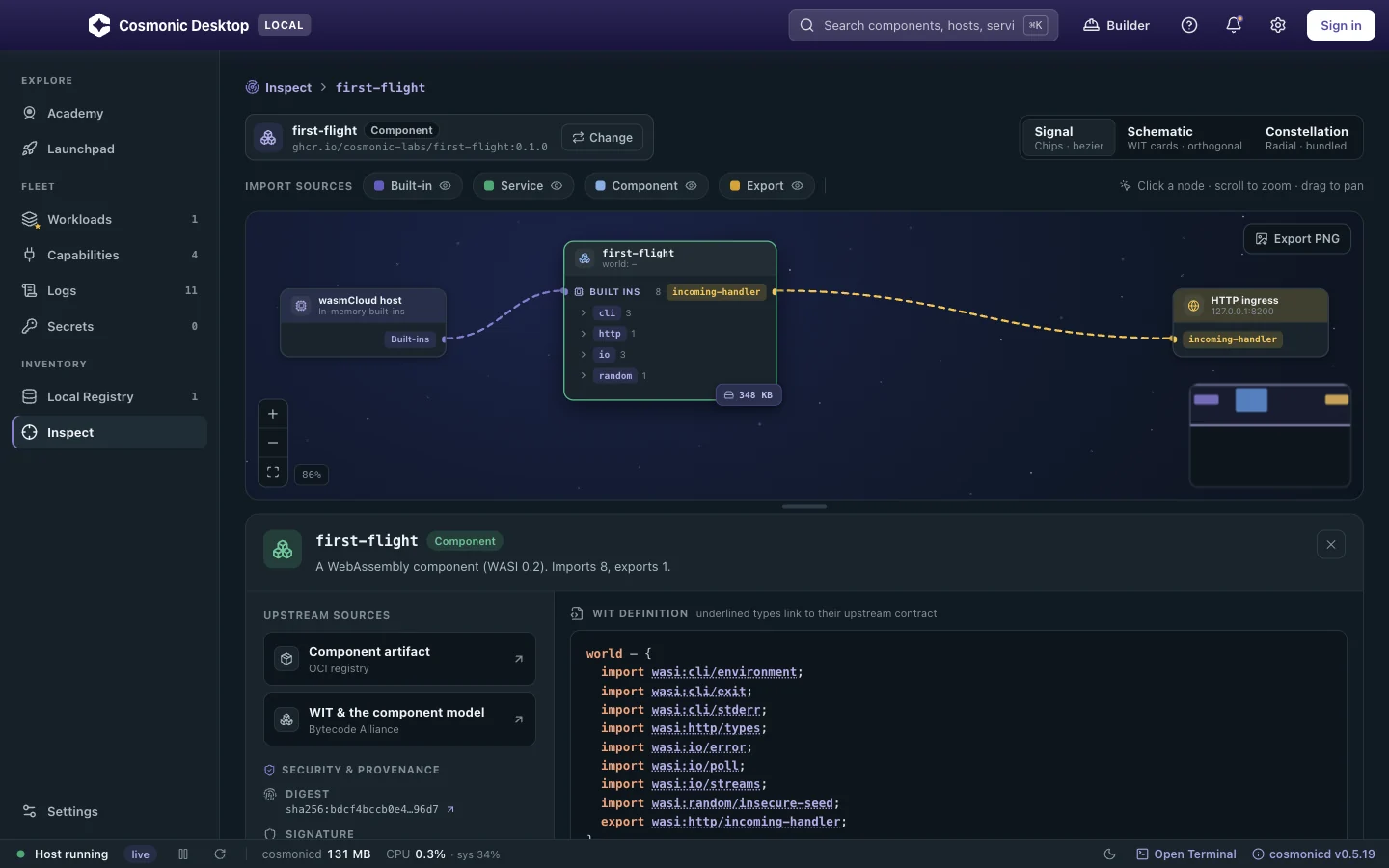
Cosmonic uses this model. Cosmonic Desktop, for macOS, Windows and Linux, runs components in a deny-by-default sandbox and shows what a component can reach before it runs. Cosmonic Control denies egress by default, adds DNS controls, and uses a Kubernetes admission controller and RBAC.
For a working example, see stopping remote code execution with a sandbox: an unpatched zip library contains multiple vulnerabilities including a remote code execution bug, but a component is granted only one scratch directory has nothing else, mitigating the impact.
The limits: every capability needs host wiring, and existing CLI tools must be ported or wrapped.
Is deny by default part of zero trust for AI agents?
Yes: zero trust gives no implicit trust by location, so every request is refused until a policy decision allows it16. For agents, location means the laptop, the VPC or the repo the user just opened. Being there grants nothing. The Claude Code and Codex CLI repo-config incidents were location-trust failures. The policy enforcement points page covers checking every request.
Deny by default and the other principles
- Least authority keeps the grants you add back small.
- Policy enforcement points make the deny real at every request.
- Controlled information flow covers what deny by default can't: data leaking through a channel you allowed.
- Defense in depth stacks it with other layers, because one layer can fail.
To see what a component can reach before it runs, try Cosmonic Desktop. Or go back to The 6 Principles of Secure Agent Platforms.
Related topics
See what a component can reach before it runs
Public betaCosmonic Desktop runs each tool as a WebAssembly component that starts with no imports, so it reaches nothing until you grant it. Free for personal use, no account, no cloud.
Frequently asked questions
What is deny by default?
Is default deny the same as an allowlist?
What traffic would an implicit deny firewall rule block?
Is "secure by default" the same as deny by default?
Can an OS sandbox like bubblewrap, Seatbelt or AppContainer be deny by default?
Doesn't deny by default make AI agents unusable?
Further reading
Papers
- Miller 2006, "Robust Composition"17
Upstream docs
- NIST CSRC glossary, “deny by default” (from SP 800-41 Rev. 1). csrc.nist.gov ↩
- Saltzer and Schroeder (1975), “The Protection of Information in Computer Systems”. cs.virginia.edu ↩
- Saltzer and Schroeder (1975), “The Protection of Information in Computer Systems”, Proceedings of the IEEE. doi.org ↩
- nftables wiki, “Configuring chains”. wiki.nftables.org ↩
- Embrace The Red, GitHub Copilot remote code execution via prompt injection (CVE-2025-53773), August 2025. embracethered.com ↩
- Aim Security, “When public prompts turn into local shells: RCE in Cursor via MCP auto-start” (CurXecute, CVE-2025-54135), July 2025. aim.security ↩
- Anthropic, Claude Code sandboxing documentation. code.claude.com ↩
- Docker, seccomp security profiles. docs.docker.com ↩
- The Component Model book, WIT reference. component-model.bytecodealliance.org ↩
- Rice (1953), “Classes of Recursively Enumerable Sets and Their Decision Problems”. doi.org ↩
- LWN.net, on the history of seccomp. lwn.net ↩
- Linux kernel documentation, Seccomp BPF (seccomp_filter). docs.kernel.org ↩
- actions/runner-images issue #3812: Docker’s default seccomp profile blocked glibc 2.34’s clone3. github.com ↩
- WebAssembly/wasi-http on GitHub. github.com ↩
- Dennis and Van Horn (1966), “Programming Semantics for Multiprogrammed Computations”. doi.org ↩
- NIST SP 800-207 (2020), Zero Trust Architecture. doi.org ↩
- Miller (2006), “Robust Composition”, PhD dissertation, Johns Hopkins University. erights.org ↩