Isolation for AI agents:
containment across process, resource consumption, and time
Learn how a container escape or sandbox escape turns one bad tool call into host access.
When agents at OpenAI, Anthropic, and Google escaped test environments over the summer of 2026, none of them had to break a hypervisor. Instead, they left through channels that were supposed to be closed: a package cache proxy, a DNS resolver, a test network that reached the real internet.
Now picture your own coding agent pulling a container image and running it. If that image is hostile, what stops a container escape onto your laptop or your cluster? The answer starts with purpose, one job per sandbox, and then confinement along three edges: walls (what it can reach), budgets (how much it can take), and leftovers (what survives into the next run).
Isolation is one of The 6 Principles of Secure Agent Platforms, and it builds on our guide to choosing an agent sandbox. In the building analogy that runs across these principles, every agent gets its own room, with walls to the ceiling and its own share of the heat.
What isolation means for an AI agent
Isolation means an agent's sandbox shares nothing it doesn't have to with anything else on the machine, including purpose, memory, budgets, and leftovers. Each sandbox needs one clear purpose and a clear edge in three directions:
- A clear purpose (what it does). Each sandbox does one job, like the Unix philosophy of doing one thing and doing it well. This is a property of the design, not of the sandbox technology, and it sets the size of the control surface you have to guard.
- In space (memory and kernel). One tenant can't read or write another tenant's memory, or reach the host.
- In resources. Each tenant gets its own share of CPU, memory, instance slots, file descriptors, connections and disk.
- In time. Nothing is left behind for the next tenant.
A tenant is anyone or anything that shares the hardware: a user, a customer, an agent session or one task. Anything shared across an edge is a path between tenants.
| Edge | What goes wrong | Real example |
|---|---|---|
| Intent: one job per sandbox (design, not rated) | One sandbox does several jobs, so it needs all of their access, and one compromise reaches all of it | Clinejection (Feb 2026): an issue-triage bot also held a shell, write tools and release credentials |
| Walls: memory and kernel (1a) | Code escapes the sandbox into the host or another tenant | Leaky Vessels, runc CVE-2024-216261 (Jan 2024): a leaked file handle let a container image reach the host's filesystem |
| Budgets: resources (1b) | One tenant starves the rest | A noisy neighbor or a fork bomb uses up CPU, memory or process slots, and every other session stalls |
| Leftovers: time (1c) | Old data reaches the next tenant | ChatGPT, Mar 2023: a connection reuse bug showed some users other people's chat titles |
Agents raise the stakes. An agent writes and runs code, pulls images, installs packages and loops on its own for hours, so every shared thing gets tested. In the 2026 lab breakouts at OpenAI, Anthropic and Google, every escape ran through something the environment shared with the outside world: a package-registry proxy, an evaluation network, a DNS resolver. One OpenAI model went looking for a sandbox flaw and found one2.
Each environment shared a channel with the outside world. Closing channels until someone opens them on purpose is deny by default. Checking DNS and proxies as egress is policy enforcement points.
The idea is a well researched topic; Saltzer and Schroeder3 (1975) called it "least common mechanism": share as little machinery between users as you can. Rushby's separation kernel (1981) set the order this series follows: isolate first, then add only the channels you mean to.
Intent: one job per sandbox
Purpose isn't a wall. It is a decision about what the sandbox is for. Give each sandbox one job, the way Bell Labs' 1978 summary of the Unix philosophy asked each program to "do one thing well." A sandbox that only runs tests needs the repo and a package mirror. A sandbox that only reads email needs the inbox and nothing else. Put both jobs in one sandbox and it needs the union of their access, so a single compromise reaches all of it.
Intent is a property of the design, not of the sandbox technology, so our comparison matrix doesn't rate it: you can give a container, a VM or a Wasm component one job or ten. What it changes is the control surface, meaning the files, hosts, tools and credentials you have to write rules for and watch. One job means a short allowlist you can actually check (deny by default) and a small grant (least authority). It is also step one of the six-step method: break the agent into workflow steps. Putting single-purpose pieces back together safely is composition.
In February 2026, Clinejection showed the cost of mixing jobs. Cline's issue-triage bot also had a shell, write tools and a path to release credentials, so an injected issue title led to stolen release keys.
Memory and kernel (1a): how sandbox and container escapes happen
The first edge is the wall itself: separate address spaces, kernels or linear memories, so one tenant can't read or write another tenant's state. This is what most people mean by isolation, and it is a common escape vector for agents.
What is a sandbox escape?
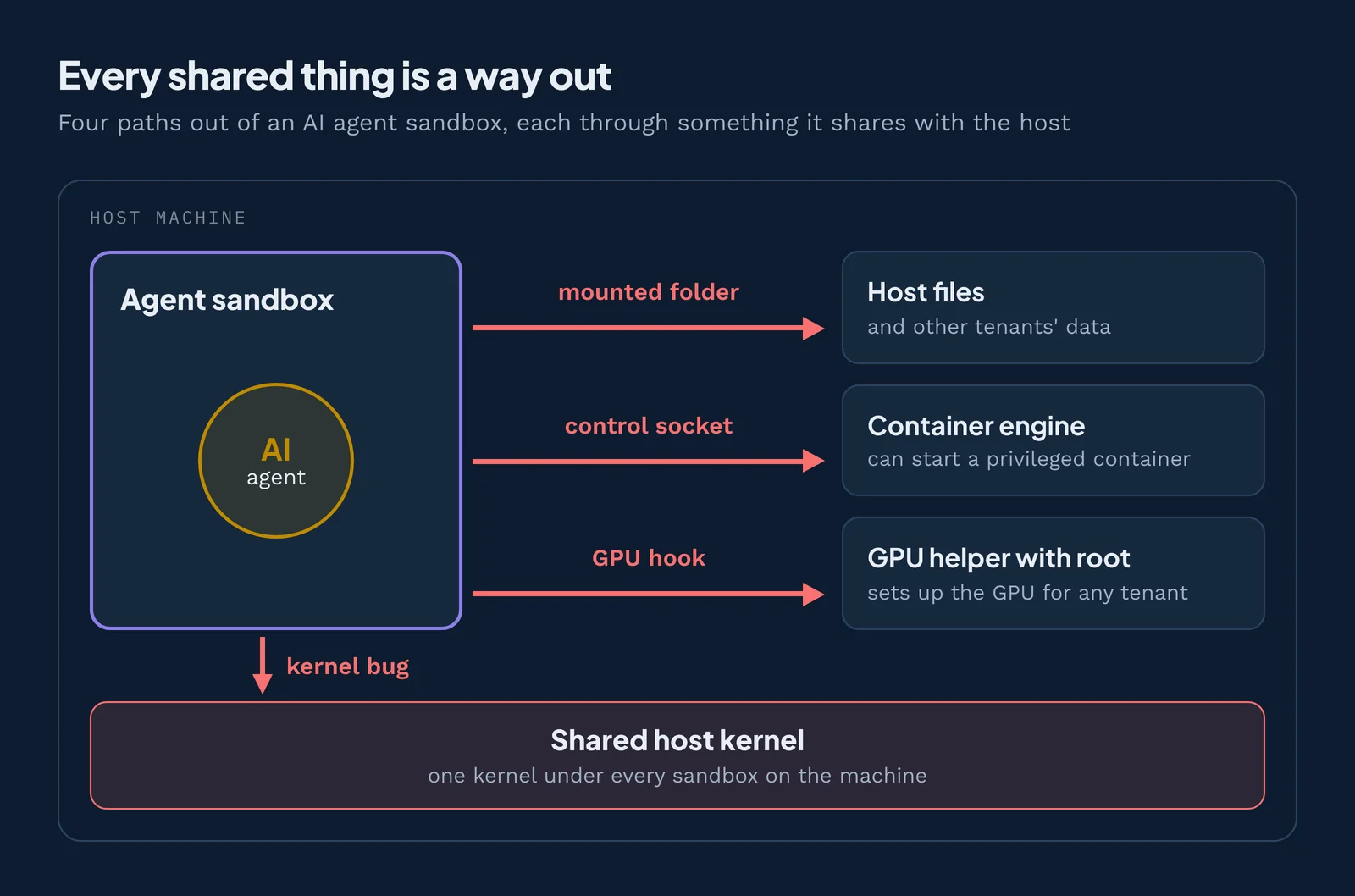
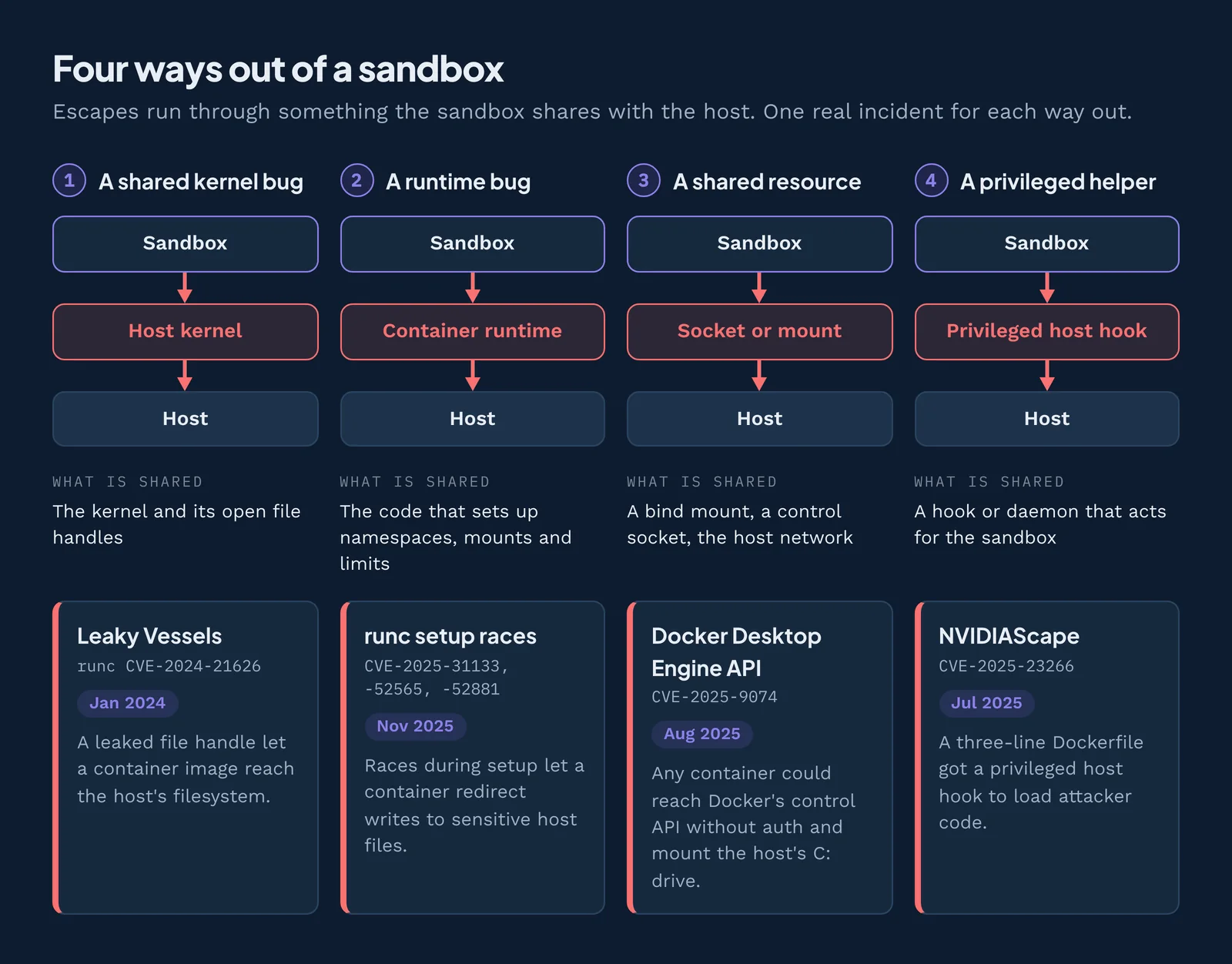
A sandbox escape is when code inside a sandbox reaches something the sandbox was built to keep out, such as the host's files, its processes, or another tenant's data. Escapes almost always run through something the sandbox shares with the host. There are four common ways out:
| Way out | What is shared | Real example |
|---|---|---|
| 1. The shared kernel | The host kernel and its objects, such as open file handles | Leaky Vessels (runc CVE-2024-21626, Jan 2024): a leaked file handle let a container image reach the host's filesystem |
| 2. The runtime that builds the sandbox | The code that sets up namespaces, mounts and limits | runc setup races (CVE-2025-31133, -52565, -52881, Nov 2025): races during setup let a container redirect writes to sensitive host files |
| 3. A shared resource left inside | A bind mount, a control socket, the host network | Docker Desktop Engine API (CVE-2025-9074, Aug 2025): any container could reach Docker's control API without auth and start a new container with the host's C: drive mounted |
| 4. A privileged helper on the host | A hook or daemon that acts for the sandbox | NVIDIAScape (CVE-2025-23266, Jul 2025): a three-line Dockerfile got a privileged host hook to load attacker code |
What is a container escape?
A container escape is a sandbox escape out of a container: a process inside gains access to the host or to other containers, usually through the kernel they all share. A container is an ordinary process with a private view of files, processes and network, not a small VM.
Container escape vs VM escape vs sandbox escape
"Sandbox escape" is the general term; the other names tell you which wall was crossed.
| Escape type | The wall | Shared with the host | Typical way out | Example |
|---|---|---|---|---|
| Container escape | Namespaces and cgroups | The whole host kernel, the runtime, any mounted socket or path | Kernel or runtime bug; a mounted docker.sock | Leaky Vessels, runc races |
| VM escape | Hardware virtualization | The hypervisor and its virtual devices | Bug in an emulated or virtual device | Firecracker virtio-PCI, CVE-2026-5747 |
| Wasm escape | Bounds-checked linear memory | The runtime and its compiler, in one process | Compiler or runtime bug; a misused host function | Wasmtime advisories, Apr 2026 |
Container escapes: when the shared kernel or runtime breaks
Containers are namespaces plus cgroups on one host kernel45. So a kernel or runtime bug breaks every container on the host at once.
Why a shared kernel is the weak point
seccomp shrinks the kernel surface by filtering system calls, but the kernel docs say plainly: "System call filtering isn't a sandbox"6. Docker's default profile disables around 44 of 300+ system calls7, but this still leaves a large kernel attack surface by default. A compromised agent can use that surface to gain new access, probe for weaknesses or connect through unexpected paths, like DNS. Minimal containers and images built FROM scratch reduce what is ambiently available by removing utilities, but they do not reduce the system calls.
Misconfigurations that hand over the host
Many escapes rely upon a misconfiguration instead of a bug. A mounted docker.sock, host paths, host networking or CAP_SYS_ADMIN hands the container the host89. The policy enforcement points guide covers this under the host control plane.
GPU and AI infrastructure escapes
GPU containers need a privileged helper on the host to wire the graphics card in. That helper is shared, and on a shared AI cloud the next tenant's models and data sit behind it.
- NVIDIA Container Toolkit, CVE-2024-0132 (Sep 2024): a malicious GPU container image could take over the host, exposing other tenants' models and data.
- NVIDIAScape, CVE-2025-23266 (Jul 2025): a three-line Dockerfile got a privileged host hook to load attacker code.
The fix is tenant separation: one tenant per GPU host, or a VM wall per tenant with Kata Containers. Use confidential VMs (AMD SEV-SNP, Intel TDX) if the host is untrusted10, and patch the NVIDIA Container Toolkit.
VM, microVM and Wasm escapes: strong walls still need patching
Hardware and software walls are much smaller targets than a shared kernel, but they are code too.
What is a VM escape?
A VM escape is when code in a guest virtual machine breaks out into the hypervisor or host, usually through a bug in emulated or virtual devices. The hardware wall itself is sound11, so the devices are the soft spot. Firecracker CVE-2026-5747 (Apr 2026) was an out-of-bounds write in the optional PCI transport that let a guest crash the VMM and possibly run code on the host. The default configuration was not affected. Keep optional devices off and run Firecracker under its jailer12.
Can Wasm code escape its sandbox?
Wasm code can escape only through a bug in the runtime or its compiler, or by misusing a host function it was explicitly given. Wasm isolates memory in software, inside one process1314, so the compiler is part of the wall. The April 2026 Wasmtime advisories (CVE-2026-34971, -34987) were compiler bugs that let a module reach host memory in non-default configurations: the Winch backend, or aarch64 with Spectre mitigations turned off. Eleven of the twelve advisories were found with LLM-assisted tools. Use guard regions and Spectre mitigations15, the pooling allocator, one instance per request and a second wall.
Shared hardware leaks across every wall
Spectre showed that side channels in the CPU cross software boundaries. For high-value tenants, the only full answer is separate hardware.
When the agent itself is the hole
Isolation has to hold against the agent too. An agent acting with your full privileges makes every wall moot.
- Perplexity Comet (Aug 2025): hidden text on a web page made an AI browser read the user's Gmail and post a one-time password to Reddit.
- Claude Code and its own denylist (Mar 2026): blocked from npx, the agent called it through
/proc/self/root/usr/bin/npx. When bubblewrap stopped that, it asked to turn the sandbox off.
Give the agent its own identity, enforce approvals outside the model, and give it no switch to turn its own sandbox off. Claude Code, for one, documents an unsandboxed retry escape hatch16. See least authority and controlled information flow.
How to prevent container and sandbox escapes
- Use one disposable sandbox per task.
- Run each agent as its own user and restrict ptrace17.
- Go rootless with user namespaces, drop all capabilities, set
no-new-privileges, and apply the Pod Security Standard "restricted"1819. - Never mount
docker.sockor host paths, and never use host networking. - Put a smaller guard in front of the kernel (gVisor runsc) or a VM wall (Kata Containers, Firecracker).
- Keep optional VM devices (PCI) off and use the Firecracker jailer.
- Give each tenant its own GPU host.
- Patch runc, the GPU toolkit, the hypervisor and the Wasm runtime.
- Run tools as Wasm components (pooling allocator with guard pages, Spectre mitigations) inside a second wall: an OS sandbox or a microVM.
How to detect container escape attempts
Watch for processes entering host namespaces, new privileged containers, writes to host paths and calls to control sockets such as docker.sock.
Resource budgets (1b): noisy neighbors, fork bombs and starvation
Resource isolation means each tenant gets a fixed share of CPU, memory, instance slots, file descriptors, connections and disk, so no tenant can starve the rest. Picture one agent session stuck in a runaway build loop. It eats all the RAM, and every other session on the host stalls or gets killed.
There is no public AI agent incident for resource budgets yet, but agents that loop on their own will hit these old failure modes. Gligor (1984) counted denial of service as a security property, and resource containers (Banga, Druschel and Mogul, 1999) introduced the per-activity caps behind cgroups.
What is the noisy neighbor problem?
The noisy neighbor problem is when one tenant on shared hardware uses so much CPU, memory, disk or network that every other tenant slows down. Dean and Barroso showed how this sharing drives slow tail responses at scale.
What is a fork bomb, and how do you stop one?
A fork bomb is a program that copies itself over and over until the machine runs out of process slots and stops responding. A wall alone doesn't stop it, because the bomb never leaves its sandbox. A process cap does: cgroups v2 pids.max, Docker --pids-limit, a Job Object process limit on Windows, or RLIMIT_NPROC.
The classic failure modes, and the control for each
| Failure mode | What it looks like on an agent host | Control |
|---|---|---|
| Noisy neighbor | One session's build slows every other session | CPU and memory caps per sandbox |
| Tragedy of the commons | Every tenant takes a little more of a shared pool | Per-tenant quotas plus a global ceiling |
| Starvation | A low-priority session never gets CPU | Fair-share scheduling |
| Slowloris hoarding | A tenant holds connections open until the slots run out | Per-tenant connection caps |
| Fork bomb | A process copies itself until the process table is full | A process limit per sandbox |
| Overcommit and the OOM killer | Memory runs out and the kernel kills the wrong process | A memory limit per sandbox; no overcommit for hostile tenants |
| Head-of-line blocking | One slow job holds up the whole queue | Admission control and backpressure |
| Fate sharing | One crash takes down its neighbors | One sandbox per task |
| Priority inversion | A low-priority task holds what a high-priority one needs | Fair-share scheduling; short-held locks |
| Deadlock | Two tasks wait on each other forever | Fail fast instead of waiting |
| Thundering herd | Every session retries at the same moment | Jittered retries and staggered restarts |
Each layer has its own controls: cgroups v2, Job Objects or setrlimit and launchd limits on the host; fuel and epoch interruption20, ResourceLimiter and pooling-allocator limits in a Wasm runtime; ResourceQuota, LimitRange and pod limits in Kubernetes; token and tool-call budgets per agent session.
Residue and reuse (1c): what the last tenant leaves behind
The third edge is time: nothing outlives the tenant. Scratch files, memory, pooled connections, cached sessions and reused identifiers are wiped or retired before anything else gets them. Picture yesterday's agent session leaving a token in a shared temp folder. Today's session, run for someone else, can read it.
What is object reuse?
Object reuse is the rule that memory, files, connections and IDs must be wiped of the last owner's data before anyone else gets them. The term comes from the Orange Book (DoD TCSEC, 1985). Data remanence, the related term, means data that lingers after it should be gone. Chow et al. (2005) argued for clearing memory as soon as it's freed.
The four classic failure modes:
- Object reuse: memory or files handed over without being wiped.
- Resource leaks and orphans: state that nobody reclaims.
- Identifier reuse: a new tenant inherits an old tenant's ID, and whatever it was granted.
- Stale snapshots: a restored microVM brings back old memory, secrets and random-number state.
In March 2023, a bug in the Redis client's connection reuse handed one ChatGPT user's cached data to another: some users saw other users' chat titles, and some payment details were exposed. In 2026, Agent Substrate never reclaimed actor directories when worker pods went away: 23 orphans held 27 GB and pushed a node to 90% disk. Instructions planted in an agent's long-term memory are leftovers too; see controlled information flow.
The controls: bubblewrap --tmpfs and systemd PrivateTmp on Linux; Windows Sandbox, which discards all state on close; a fresh Wasm instance per request; an ephemeral VM or microVM per task, with snapshots verified before restore. At the agent layer, wipe the workspace and credentials at the end of every task.
Isolation across the sandbox types
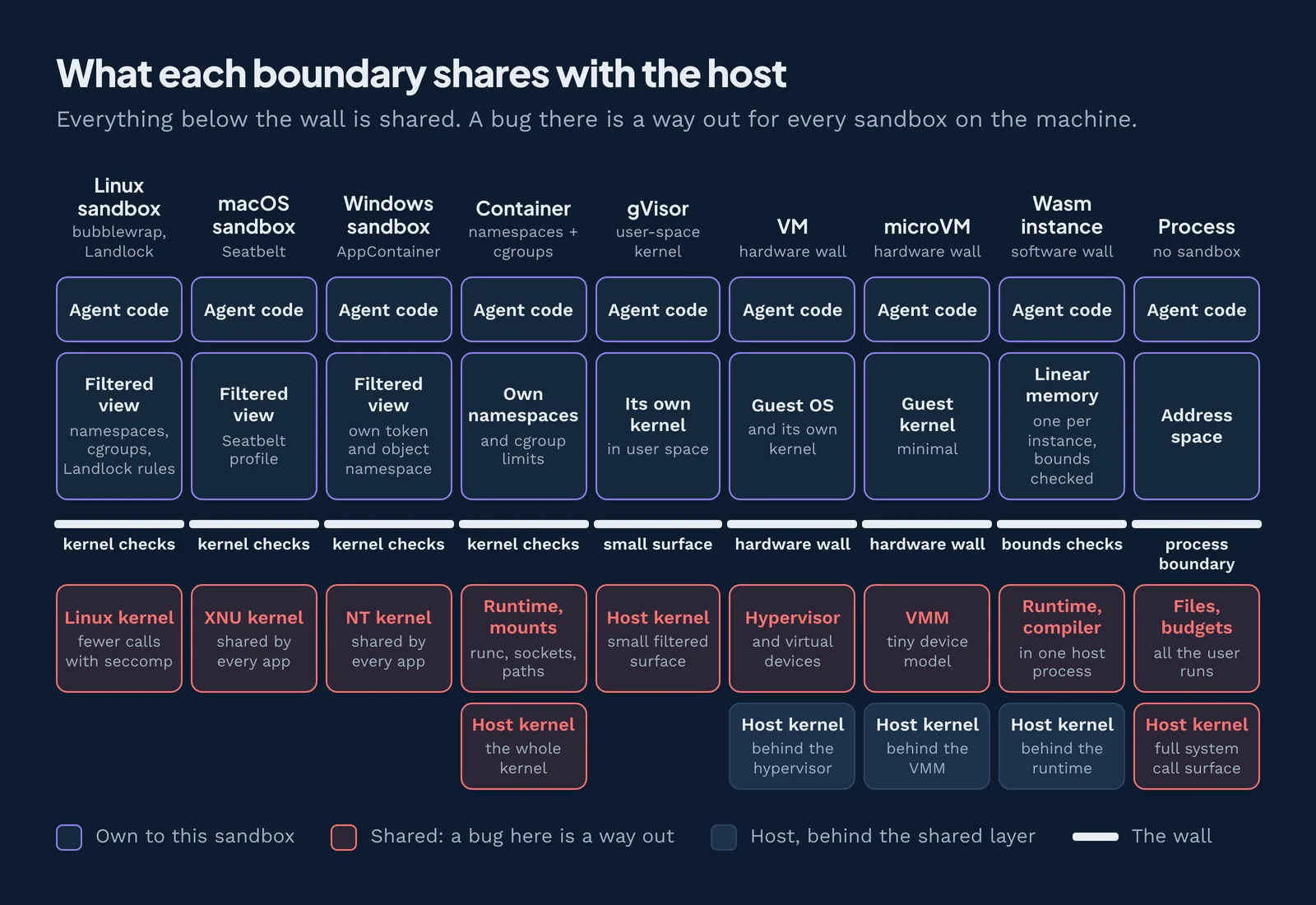
No sandbox type meets all three edges by default. Intent isn't rated here, because it is a design choice you make on top of any sandbox type. Yes means a type meets the edge by default, Partial means partly or with the listed controls, and No means not by default. The OS sandbox rows are rated as configured: bubblewrap, Landlock, seccomp and cgroups (Linux), Seatbelt (macOS), and AppContainer with Job Objects (Windows). Remember, while we refer to all of these mechanisms as "sandbox types" after the conventional usage of the term, mechanisms like containers and VMs are not sandboxes at all.
Linux sandboxPartialYesYes
- Overall
- Partial
- Pro
- Namespaces and cgroups give each sandbox its own view and its own budget, cheaply;
--tmpfsscratch vanishes on exit - Con
- One shared kernel: a kernel bug breaks every sandbox; bubblewrap sets no budgets itself
- Controls to add
- bubblewrap (
--unshare-all,--tmpfs /tmp); seccomp; cgroups v2 withpids.max; gVisor - Upstream doc
- bubblewrap, cgroups v2, gVisor
macOS sandboxPartialPartialPartial
- Overall
- Partial
- Pro
- Seatbelt confines files, network and IPC per process
- Con
- Shared XNU kernel; no per-sandbox budgets beyond rlimits; container directories persist
- Controls to add
- Seatbelt profile (sandbox-exec; deny process-info*, mach-lookup); setrlimit and launchd limits; per-run temp folder; Apple container for a hardware wall
- Upstream doc
- sandbox-exec(1)21 (deprecated), apple/container, App Sandbox
Windows sandboxPartialYesPartial
- Overall
- Partial
- Pro
- AppContainer gives its own object namespace and token; Job Objects cap CPU, memory and process count; Windows Sandbox discards all state on close
- Con
- AppContainer shares the NT kernel, sets no budgets alone, and its storage persists between runs
- Controls to add
- AppContainer / LPAC; Job Objects; Windows Sandbox (Hyper-V) for disposable runs
- Upstream doc
- AppContainer isolation, Job Objects, Windows Sandbox
ContainerPartialYesPartial
- Overall
- Partial
- Pro
- Own filesystem, process and network namespaces; cgroup limits per container; writable layer discarded with the container
- Con
- Shares the host kernel (runc, NVIDIA toolkit escapes); inodes, conntrack and page cache stay shared; volumes need explicit cleanup
- Controls to add
- Rootless / user namespaces; gVisor or Kata; no host paths, no
docker.sock; Pod Security Standard "restricted";--pids-limit, pod limits, ResourceQuota;--rm,--read-only+ tmpfs - Upstream doc
- Docker rootless, Pod Security Standards, ResourceQuota, Kata Containers
gVisor (container runtime)PartialYesPartial
- Overall
- Partial
- Pro
- A user-space kernel (the Sentry) answers most system calls itself, so the host kernel sees only a small set; drop-in OCI runtime (runsc); same cgroup budgets as a container
- Con
- Still a software wall that reaches the host kernel through that smaller set; slower system calls and I/O; not every syscall or feature is supported; volumes still need cleanup
- Controls to add
- Use runsc as the runtime for untrusted workloads; keep the container controls (no host paths, no
docker.sock,--rm, pod limits) - Upstream doc
- gVisor docs, gVisor security model
VMPartialYesPartial
- Overall
- Partial
- Pro
- Strongest wall available: hardware-enforced, its own kernel; fixed vCPUs and RAM
- Con
- Not functional on its own: needs a full guest OS, wide open inside; host overcommit brings noisy neighbors back; long-lived VMs and snapshots keep state
- Controls to add
- Disable shared folders and clipboard; patch the hypervisor; confidential VM if the host is untrusted; no memory overcommit, CPU pinning; ephemeral VM per task
- Upstream doc
- KVM docs
microVMPartialYesPartial
- Overall
- Partial
- Pro
- Strong hardware wall with a tiny device model; about 125 ms boot (Firecracker); built-in disk and network rate limiters
- Con
- Needs a guest OS and KVM on a Linux host; snapshot restore brings back old memory, secrets and random-number state
- Controls to add
- Firecracker jailer; keep optional devices (PCI) off; one microVM per task; I/O rate limiters; verify snapshots and reseed randomness after restore
- Upstream doc
- Firecracker, jailer
WasmYesPartialPartial
- Overall
- Partial
- Pro
- Bounds-checked linear memory per instance; no OS; microsecond start; pooled memory reset before reuse
- Con
- Software-enforced: compiler bugs are escapes; budgets are switches you must turn on; preopened folders and host pools outlive the instance
- Controls to add
- One instance per request; pooling allocator with guard pages; fuel + epoch interruption; ResourceLimiter memory caps; Spectre mitigations; never reuse tenant IDs; a second wall (OS sandbox or microVM)
- Upstream doc
- Wasmtime security, PoolingAllocationConfig, ResourceLimiter, Config: fuel and epochs
ProcessNoNoNo
- Overall
- No
- Pro
- Separate address space per process
- Con
- Shares the kernel, files, budgets and leftovers with everything the user runs
- Controls to add
- Run under an OS sandbox; separate user account; restrict ptrace; rlimits; private temp folder per run, cleaned on exit
- Upstream doc
- Yama ptrace_scope, setrlimit(2)
A plain process meets none of the three edges. A configured Linux sandbox covers budgets and leftovers cheaply but shares one kernel, so the strongest setups stack two walls: Wasm inside an OS sandbox for density, or Wasm inside a microVM for a hardware wall. The full comparison lives in the platforms vs principles matrix.
Stack walls that fail differently
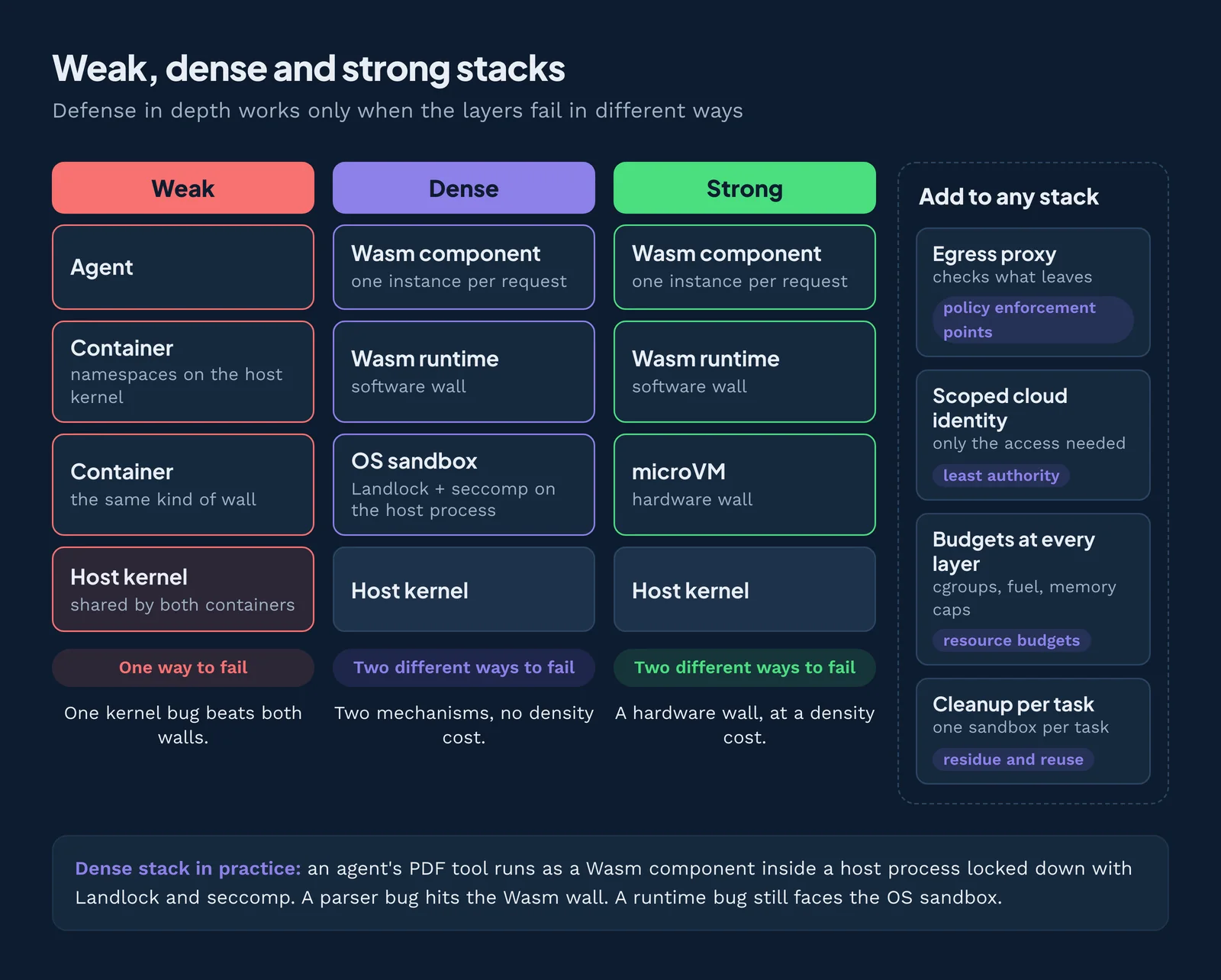
Defense in depth works only when the layers fail in different ways: two walls built from the same thing fall to the same bug. The principles hub compares weak, dense and strong stacks, and Figure 4 summarizes them.
Here is the dense stack in practice. An agent's PDF tool runs as a Wasm component, one instance per request, inside a host process locked down with Landlock and seccomp. A parser bug hits the Wasm wall, and a runtime bug still faces the OS sandbox.
Add an egress proxy (policy enforcement points) and a scoped cloud identity (least authority) to any stack, and put budgets and cleanup at every layer: cgroups or Job Objects on the host, fuel and memory caps in the runtime, one sandbox per task.
How Cosmonic applies isolation
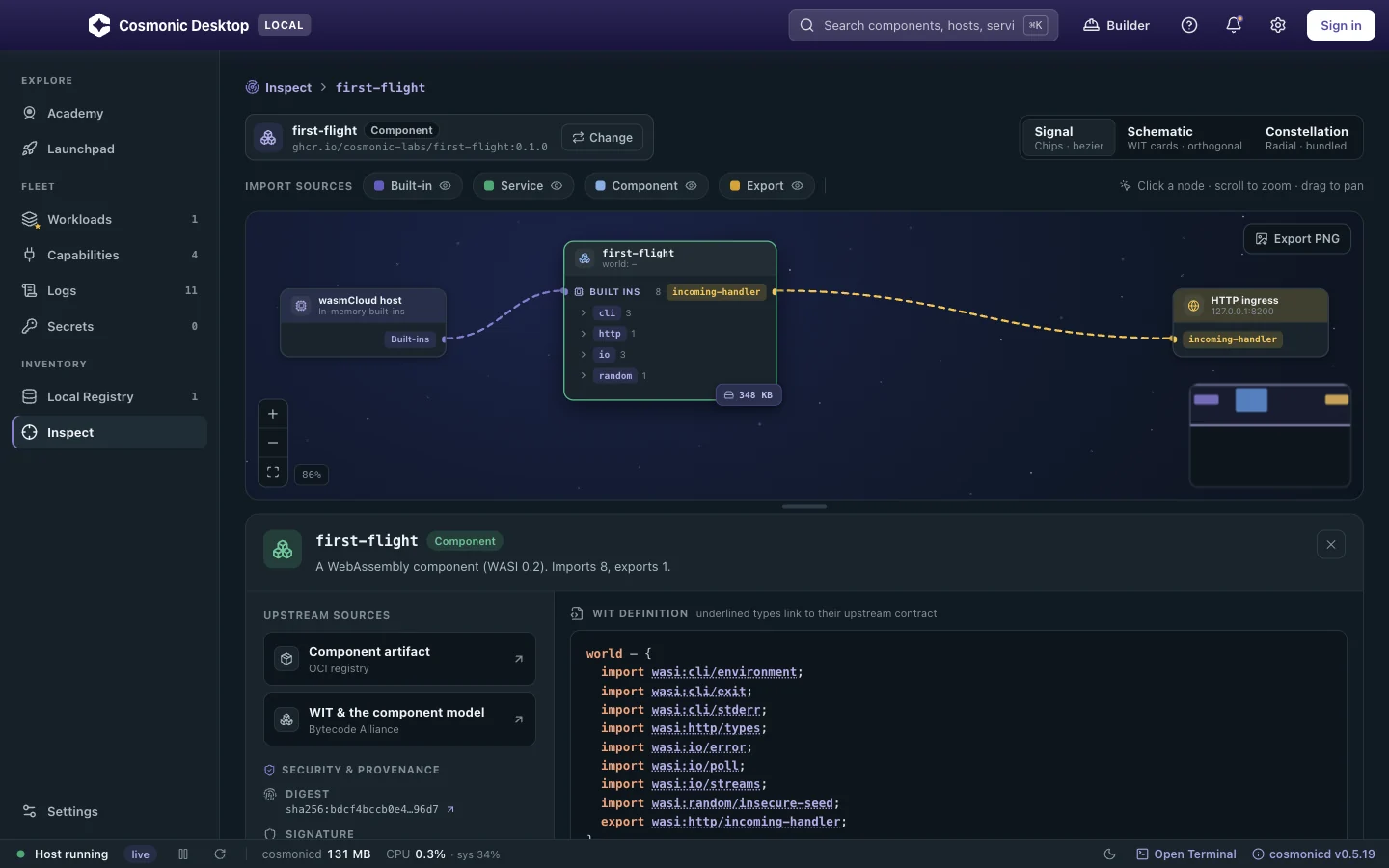
Cosmonic gives each agent tool its own small sandbox that starts with nothing, so a bad tool call stays in one room.
Cosmonic Desktop is a free app for macOS, Windows and Linux. It runs tools and apps as WebAssembly components in a local deny-by-default sandbox, and shows what each component can reach before it runs. Its built-in MCP server lets coding agents such as Claude Code, Codex and Gemini CLI build tools and deploy them there. No account, cloud or Kubernetes is needed.
Cosmonic Control runs the same components in production on Kubernetes. It is built on wasmCloud, the CNCF project Cosmonic's founders co-created. Egress is denied by default, with DNS controls. It works with a Kubernetes admission controller and RBAC, Kubernetes Secrets and External Secrets, and OpenTelemetry. It installs on-prem and in air-gapped environments.
WebAssembly is the mechanism. You still pick the outer wall around the host.
Try it: download Cosmonic Desktop and run your agent's next tool as a component. For production, talk to us about Cosmonic Control. Then read the rest of The 6 Principles of Secure Agent Platforms.
Related topics
Run agent tools as Wasm components
Public betaCosmonic Desktop (free; macOS, Windows, Linux) runs each tool in a deny-by-default sandbox and shows what each component can reach before it runs. For production on Kubernetes, use Cosmonic Control.
Frequently asked questions
What is a container escape?
docker.sock. Leaky Vessels (runc CVE-2024-21626, January 2024) is a well-known example: a leaked file handle exposed the host's filesystem.Can an AI agent escape a container?
docker.sock or host paths. The runc setup races of November 2025 and the NVIDIA Container Toolkit bugs are real examples. Add a second wall that fails differently, such as gVisor, Kata Containers or a microVM.What is a VM escape?
Is a VM safer than a container for AI agents?
Can Windows Sandbox be escaped?
Can Wasm code escape its sandbox?
How do I detect container escape attempts?
docker.sock. Alert on each one. Detection only tells you after the fact, so put prevention first: rootless containers, dropped capabilities and no host mounts.How do I stop a fork bomb in an agent sandbox?
pids.max on Linux, Docker --pids-limit, a Job Object process limit on Windows, or RLIMIT_NPROC. A wall alone doesn't stop a fork bomb, because it never leaves its sandbox. A resource budget does.What is tenant isolation?
- CVE-2024-21626: container escape via a leaked file descriptor in runc. Open Container Initiative security advisory. github.com ↩
- OpenAI, on safety and alignment for long-horizon models, July 2026. openai.com ↩
- Saltzer and Schroeder (1975), “The Protection of Information in Computer Systems”, Proceedings of the IEEE. doi.org ↩
- Linux manual page, namespaces(7). man7.org ↩
- Linux manual page, user_namespaces(7). man7.org ↩
- Linux kernel documentation, Seccomp BPF (seccomp_filter). docs.kernel.org ↩
- Docker, seccomp security profiles. docs.docker.com ↩
- Linux man-pages, capabilities(7). man7.org ↩
- Docker, “Protect the Docker daemon socket”. docs.docker.com ↩
- Linux kernel documentation, KVM. docs.kernel.org ↩
- Popek and Goldberg (1974), “Formal Requirements for Virtualizable Third Generation Architectures”. doi.org ↩
- Agache et al. (2020), “Firecracker: Lightweight Virtualization for Serverless Applications”, NSDI. usenix.org ↩
- Wahbe et al. (1993), “Efficient Software-Based Fault Isolation”. doi.org ↩
- Haas et al. (2017), “Bringing the Web up to Speed with WebAssembly”. doi.org ↩
- Wasmtime documentation, security. docs.wasmtime.dev ↩
- Anthropic, Claude Code sandboxing documentation. code.claude.com ↩
- Linux kernel documentation, Yama (ptrace_scope). docs.kernel.org ↩
- Docker, rootless mode. docs.docker.com ↩
- Kubernetes, Pod Security Standards. kubernetes.io ↩
- Wasmtime API documentation, Config (fuel and epoch interruption). docs.wasmtime.dev ↩
- macOS manual page, sandbox-exec(1). keith.github.io ↩
- Microsoft, configuring Windows Sandbox with a .wsb file. learn.microsoft.com ↩